CAL: transmit DTMF code
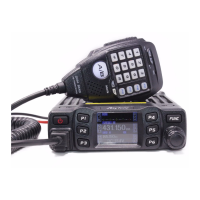
1、 short press【FUNC】key to choose programmed function group.
2、 short press【FPX】key which allocated as CAL function.
3、 short press it again or turn channel switch to choose code.
4、 Press【PUSH】key or 【FUNC】key to store setting and exit, or wait 10s to
automatically store setting and exit.
NB: NB function
1、 short press【FUNC】key to choose programmed function group.
2、 short press【FPX】key which allocated as NB function, LCD displays NB:XX.
3、 short press it again or turn channel switch to NB function between ON-OFF.
4、 Press【PUSH】key or 【FUNC】key to store setting and exit, or wait 10s to
automatically store setting and exit.
RB: RB function
1、 short press【FUNC】key to choose programmed function group.
2、 short press【FPX】key which allocated as RB function, LCD displays RB:XX.
3、 short press it again or turn channel switch to choose RB group
4、 Press【PUSH】key or 【FUNC】key to store setting and exit, or wait 10s to
automatically store setting and exit.
HIC: HI-CUT function
1、 short press【FUNC】key to choose programmed function group.
2、 short press【FPX】key which allocated as HIC function, LCD displays HIC:XX.
3、 short press it again or turn channel switch to switch between ON→OFF.
4、 Press【PUSH】key or 【FUNC】key to store setting and exit, or wait 10s to
automatically store setting and exit.
CDT: CTCSS/DCS encode (optional)
1、 short press【FUNC】key to choose programmed function group.
2、 Repeatedly short press【FPX】key which allocated as CDT function , LCD displays :
CDT:OFF Turn off CTCSS/DCS encode function.
CTC:XX 67.0Hz~250.3Hz, total 38 groups.
DCS:XX D023N~D754N, total 104 groups.
3、 After choose code mode, turn channel switch to choose code group.
4、 Press【PUSH】key or 【FUNC】key to store setting and exit, or wait 10s to
automatically store setting and exit.


 To Next Page
 Loading...