IV. Basic Functions and Buttons
State and Mode Adjustment
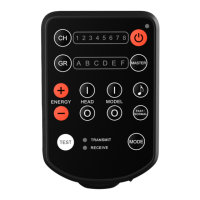
1. Press the Mode Adjustment Button
[15] to set the E2 to Transmit Mode or
Receive Mode.
Mode Indicator [7] indicates the
selected mode
2. Press and hold the Mode Adjustment
Button [15] for 5 seconds to enter into
the Relay State or to exit and return to
the Standard State.
Mode Indicator [7] blinks green in
Standard State.
Mode Indicator [7] blinks red in Relay
State.
Fast Mode is not available in Relay
State.
Channel Selection
1. Chanel selection is used to select one of
eight specic frequencies in the 2.4GHz
band.
• 14 •


 To Next Page