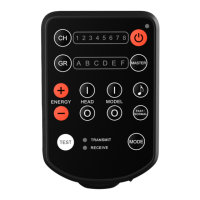
Remote Control – Head Control; Model
Control; Energy Adjustment
1. E2 can remotely radio control all ash
lights with built-in AODELAN radio
system functionality.
2. Both the Channel and Group settings on
the E2 unit must match the Channel and
Group settings of the ash lights.
3. Press the Head Control Button [5] to turn
on or off the ash lights.
<I> represents turn on.
<O> represents turn off.
When E2 is in Receive Mode,
pressing the Head Control Button [5]
<O> will let the Mode Indicator [7]
<RECEIVE> lights up all the time,
indicating the E2 has turned off its
receiving functionality.
4. Press the Model Control Button [12] to
turn on or off the modeling light.
<I> represents turn on.
<O> represents turn off.
• 16 •


 To Next Page