17
TC5-2V2SA.rev.05
TC5-2V2SA
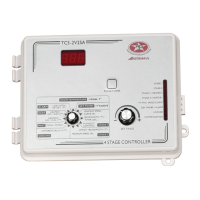
n Set selection knob to ROOM TEMPERATURE / PROBE T
o
. The av-
erage room temperature is displayed.
n Press the push-button. The temperature reading from probe 1 is
displayed, alternating with the letters "Pr 1" and the on/off state of
probe 1.
n For each additional probe, press the push-button. The temperature
reading from probe x is displayed, alternating with the letters "Pr x"
and the on/off state of the probe, etc.
Note: The display returns to the average room temperature after one
minute.
3
Viewing Minimum / Maximum Temperatures
The minimum and maximum temperatures are the lowest and highest tem-
perature values recorded since the last reset. Maximum and minimum
temperature values are recorded for the average room temperature as well
as for individual probe temperatures.
n Set the selection knob to ROOM TEMPERATURE / PROBE TEMP.
The room temperature is displayed.
n Turn the adjustment knob clockwise by one notch. The minimum
temperature is displayed, alternating with the letters "Lo".
n Turn the adjustment knob clockwise one notch further. The maximum
temperature is displayed, alternating with the letters "Hi".
n Turn the adjustment knob clockwise a third notch. The room tempera-
ture is displayed again.
n For each individual probe, press the push-button. The temperature read-
ing from probe x is displayed, alternating with the letters "Pr x" and the
on/off state of the probe.


 To Next Page