39
TC5-2V2SA.rev.05
TC5-2V2SA
de-icing time to zero.
1
Adjusting De-icing Cycle Time
The de-icing cycle time is the time lapse in minutes between de-icing
operations. The value ranges from 1 to 720 minutes.
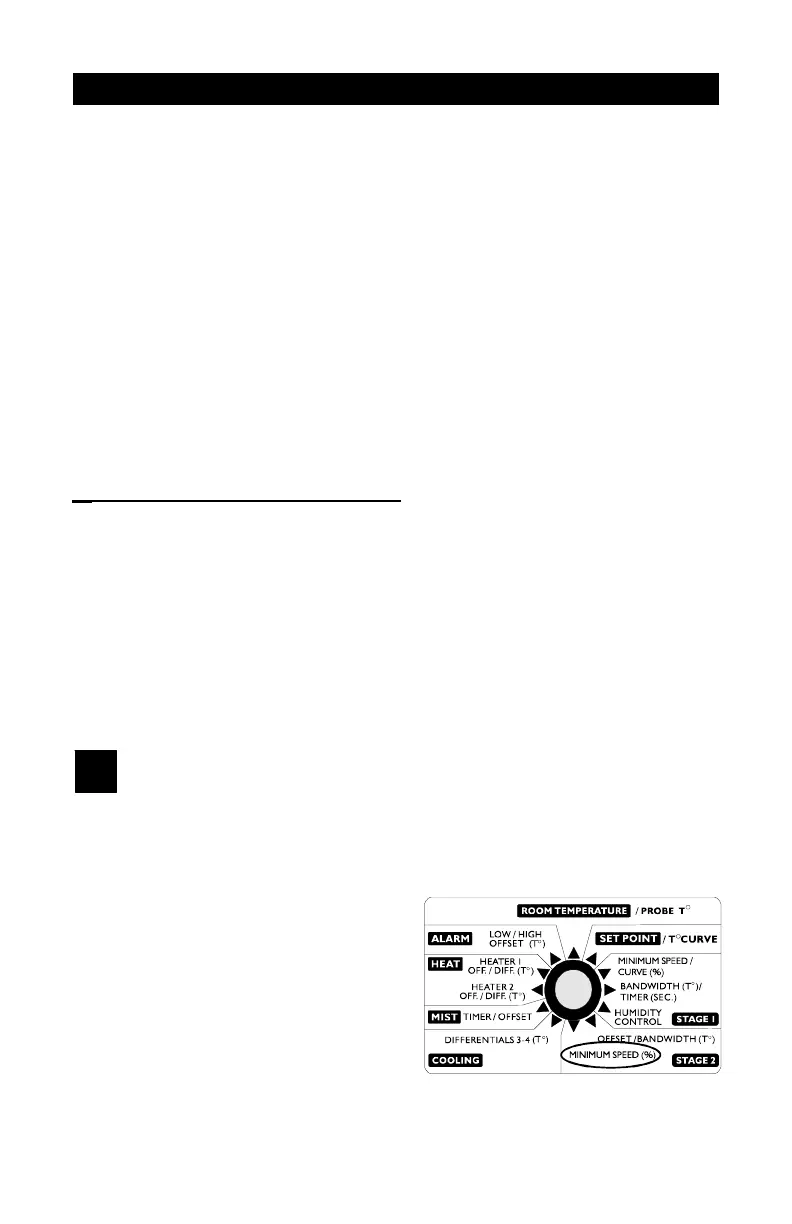
n Set the selection knob to STAGE
2 — MINIMUM SPEED. The
current minimum speed for
Stage 2 flashes on the display.
n Press the push-button. The
current de-icing cycle time is
displayed, alternating with the
letters "CyC".
DE-ICING OF STAGE 2 FANS
A de-icing cycle is provided for de-icing of Stage 2 fans in cold weather
conditions. When the de-icing cycle time has elapsed, the Stage 1 fans
are stopped. The Stage 2 fans are started at full speed for 2 seconds and
then operated at the Stage 2 minimum speed during a user-defined de-
icing time. Then, the Stage 2 fans are turned off and operation of Stage
1 fans is resumed at the appropriate speed. To deactivate de-icing, set
n Set the selection knob to COOLING — DIFFERENTIALS 3-4. The
current differential for Stage 3 flashes on the display, alternating with the
letters "St 3".
n Use the adjustment knob to adjust the differential to the desired value.
n Press the push-button. The current differential for Stage 4 flashes on
the display, alternating with the letters "St 4".
n Use the adjustment knob to adjust the differential to the desired value.


 To Next Page