49
TC5-2V2SA.rev.05
ALARM SETTINGS
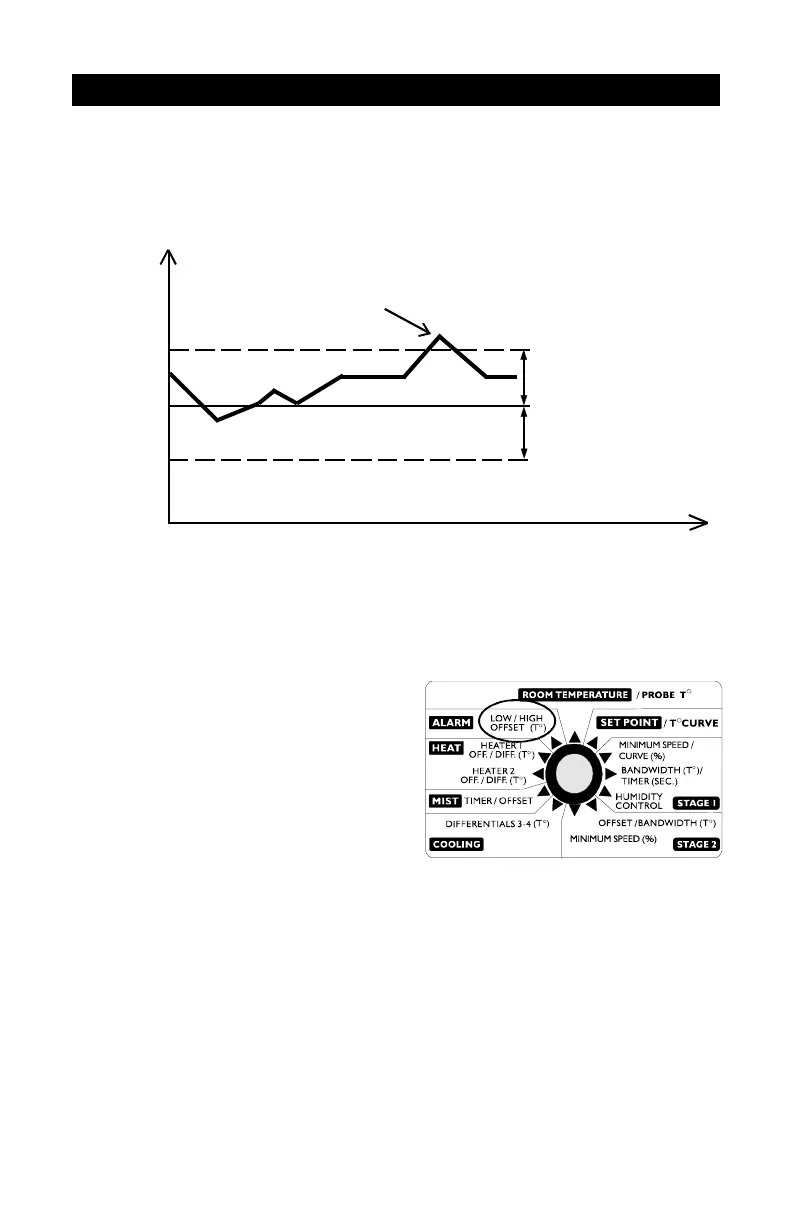
The controller sets off an alarm in the case of a power failure, a fault in the
supply circuit or a high or low temperature. Temperature alarms are de-
fined according to the set point as shown in the diagram below.
Adjusting the Alarm Settings
The high and low alarm offsets range from 0.5
o
F to 40
o
F.
n Set the selection knob to ALARM
— LOW / HIGH OFFSET. The
current low alarm offset flashes on
the display, alternating with the
word "LO".
n Use the adjustment knob to set the
low alarm offset to the desired
value.
n Press the push-button. The current high alarm offset flashes on the
display, alternating with the word "HI".
n Use the adjustment knob to set the high alarm offset to the desired
value.
Room
Temperature
Set Point
High Alarm Offset
Time
High Temperature Alarm
Low Alarm Offset


 To Next Page