27
TC5-2V2SA.rev.05
TC5-2V2SA
1
Adjusting Stage 1 Minimum Speed
The minimum speed can be adjusted between 10 and 100% of the full speed
of the fans.
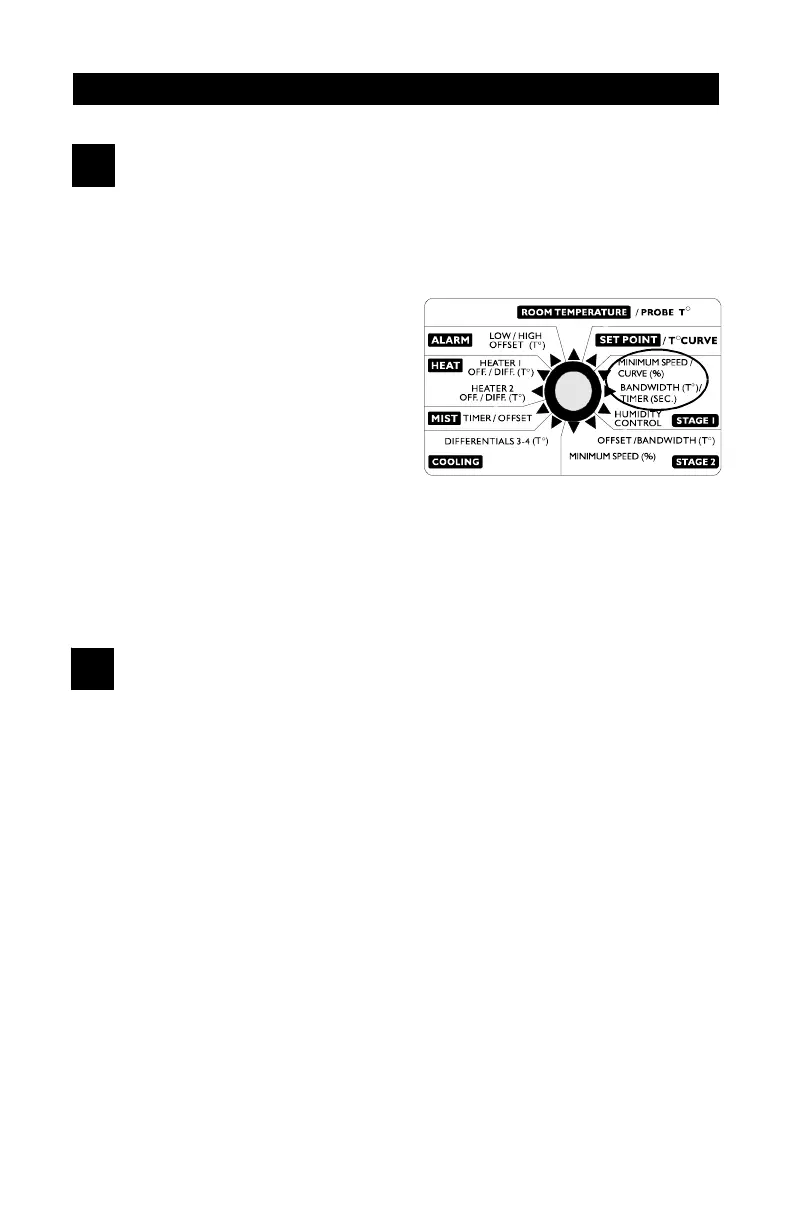
n Set the selection knob to
STAGE 1 — MIN. SPEED/
CURVE. The current minimum
speed for Stage 1 flashes on
the display.
n Use the adjustment knob to ad-
just the minimum speed to the
desired value.
NOTE: The minimum speed can be adjusted only if the minimum speed
curve is deactivated or if the minimum speed curve is activated but not
currently operating (see below).
2
Adjusting Stage 1 Time On and Time Off
Time on and Time Off can be adjusted between 0 and 900 seconds, in
increments of 15 seconds.
n Set the selection knob to STAGE 1 — BANDWIDTH/TIMER. The
current bandwidth for Stage 1 flashes on the display.
n Press the push-button. The current time on for Stage 1 flashes on the
display, alternating with the letters "On".
n Use the adjustment knob to adjust time on to the desired value.
n Press the push-button. The current time off for Stage 1 flashes on the
display, alternating with the letters "Off".
n Use the adjustment knob to adjust time off to the desired value.


 To Next Page