23
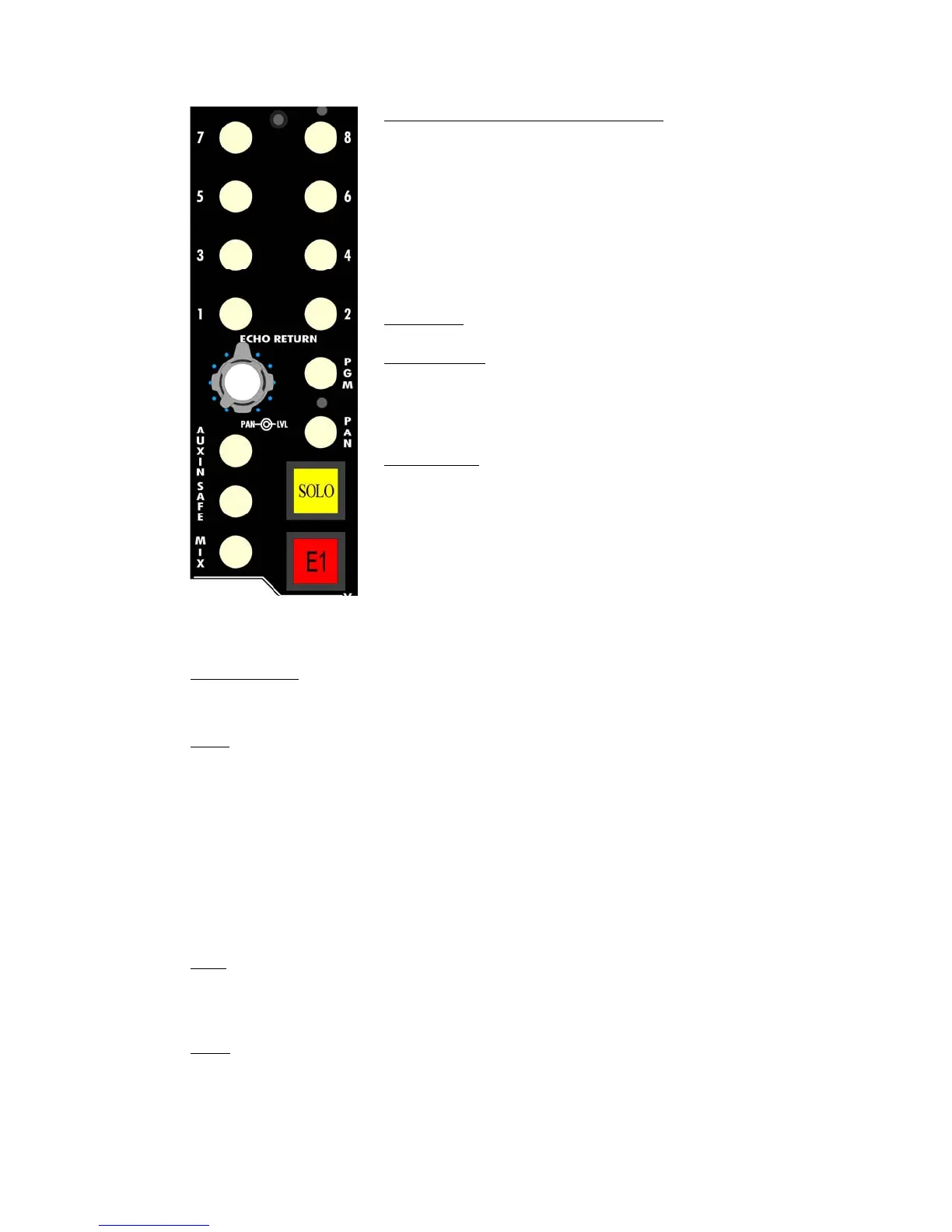
The controls for the E1608 Echo Return output section function as follows:
Important Note: Unlike the pan-pot in the 548B Channel module, the PAN button must be
engaged to enable Left/Right Program Bus panning.
PGM (Program): Assigns the Echo Return output to the Program Bus
• The Program Bus is fed post the Echo Return pan-pot
• Illuminates when engaged
SOLO: Activates the selected solo function for that Echo Return
• The following solo functions may be selected via the 845B Central Facilities Module:
o Solo(PFL): Non-destructive, mono, pre-fader listen (PFL). This is the default
solo mode.
o After Fader Listen (AFL): Non-destructive, mono, after-fader listen
o Solo-In-Place (SIP): Destructive, panned, after-fader listen
• Illuminates in yellow when engaged
NOTE: PFL is the default solo mode.
NOTE: Channels and Echo Returns must be assigned to the Program Bus for Solo-In-Place
for their mutes to activate when other channels or Echo Returns are soloed.
SAFE: Activates the Solo Safe mode for that Echo Return
• The SAFE button protects that Echo Return from being muted when the Solo-In-Place
function is active and another channel or Echo Return is soloed.
• Illuminates when engaged
MUTE: Cuts the audio output from that Echo Return
• The MUTE button is the on/off switch for the Echo Return output and is located post
level control in the signal flow
• The MUTE button is the button with an “E” and a number (1-8) located in the Echo
Return section
• Illuminates in red when engaged
Summing Bus (ACA) Assignment 1-8: Assigns the Echo Return
output to one or more of the eight Summing Buses (Active
Combining Amplifiers)
• Assignments to the Summing Buses can be made on an
individual basis
• Summing Buses are fed post the Echo Return level control
or post the Echo Return pan-pot when it’s engaged
• Summing Bus assignments are only active when engaged
• Switchable Odd/Even Summing Bus panning
• The Summing Bus assignment buttons illuminate when
engaged
LVL (Level): Controls the output level of the Echo Return
PAN (pan-pot): Provides continuous panning control
• Stereo panning between the Left and Right Program Buses
(when engaged)
• Odd and Even panning between Summing Buses (when
engaged)
PAN (button): Activates Left/Right panning between the Program
Buses and Odd/Even panning between the assigned Summing
Buses
• The PAN button must be engaged to enable Summing and
Program Bus panning
• Illuminates when engaged


 To Next Page