40
7.7 Peak Threshold
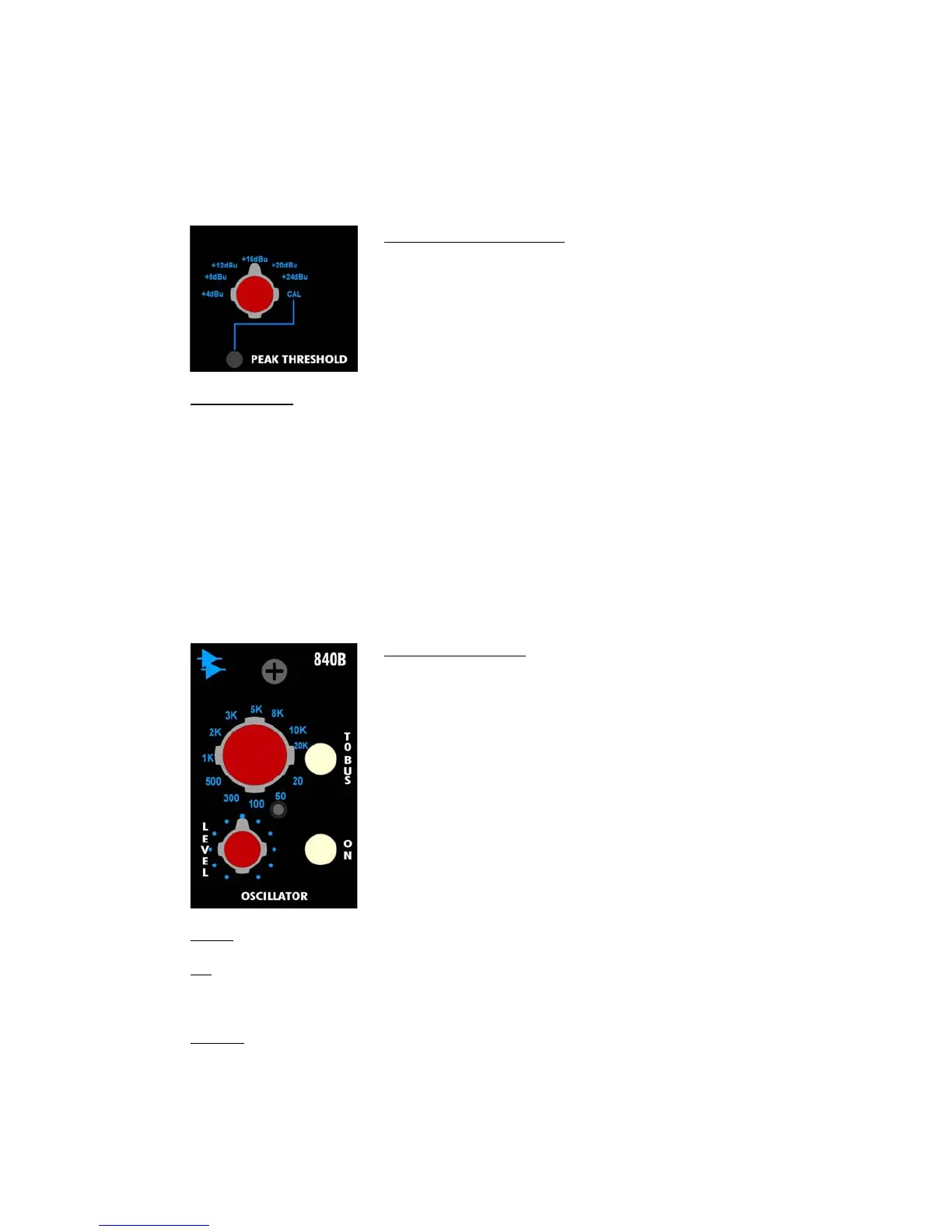
The 840B Peak Threshold section allows the selection of one of six Peak Thresholds. When the
signal in a channel crosses the selected threshold, the MIC button on that channel turns red,
indicating a peak has been reached. There is also a selector position and trim-pot for Peak
Indicator calibration.
The 840B Peak Threshold controls function as follows:
CAL (trim-pot): Calibrates the Peak Indicator
• CAL must be selected on the Peak Threshold selector
7.8 Oscillator
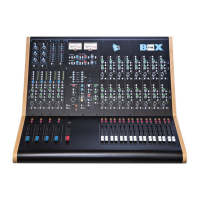
The 840B Oscillator section provides a full-range sine wave oscillator with the following
features:
• Twelve frequency selections from 20Hz to 20kHz
• On/off switch
• Level control
• Assignment to the Program and Summing Buses
• Balanced, line-level output
The 840B Oscillator controls function as follows:
LEVEL: Controls the output level of the Oscillator
ON: On/off switch for the Oscillator output
• The Oscillator output is fed to the OSCILLATOR output connector on the rear panel
• Illuminates in red when engaged
TO BUS: Routes Oscillator output to the Program and Summing Buses
• The Left and Right Program Bus Output Masters must be turned ON with the level up to
enable the Oscillator to feed the Program Buses
• The eight Summing Bus Sub-masters (SUB 1-8) must be turned ON with the level up to
enable Oscillator to feed the Summing Buses
• Automatically engages the CR DIM function when engaged
• Illuminates in red when engaged
Peak Threshold Selector: Selects the Peak Indicators threshold
from the following choices:
• +4dBU
• +8dBU
• +12dBU
• +16dBU
• +20dBU
• +24dBU
• CAL
Frequency Selector: Selects the Oscillator frequency from the
following choices:
• 20Hz
• 50Hz
• 100Hz
• 300Hz
• 500Hz
• 1kHz
• 2kHz
• 3kHz
• 5kHz
• 8kHz
• 10kHz
• 20 kHz


 To Next Page