37
7.1 Stereo Headphone Amplifier
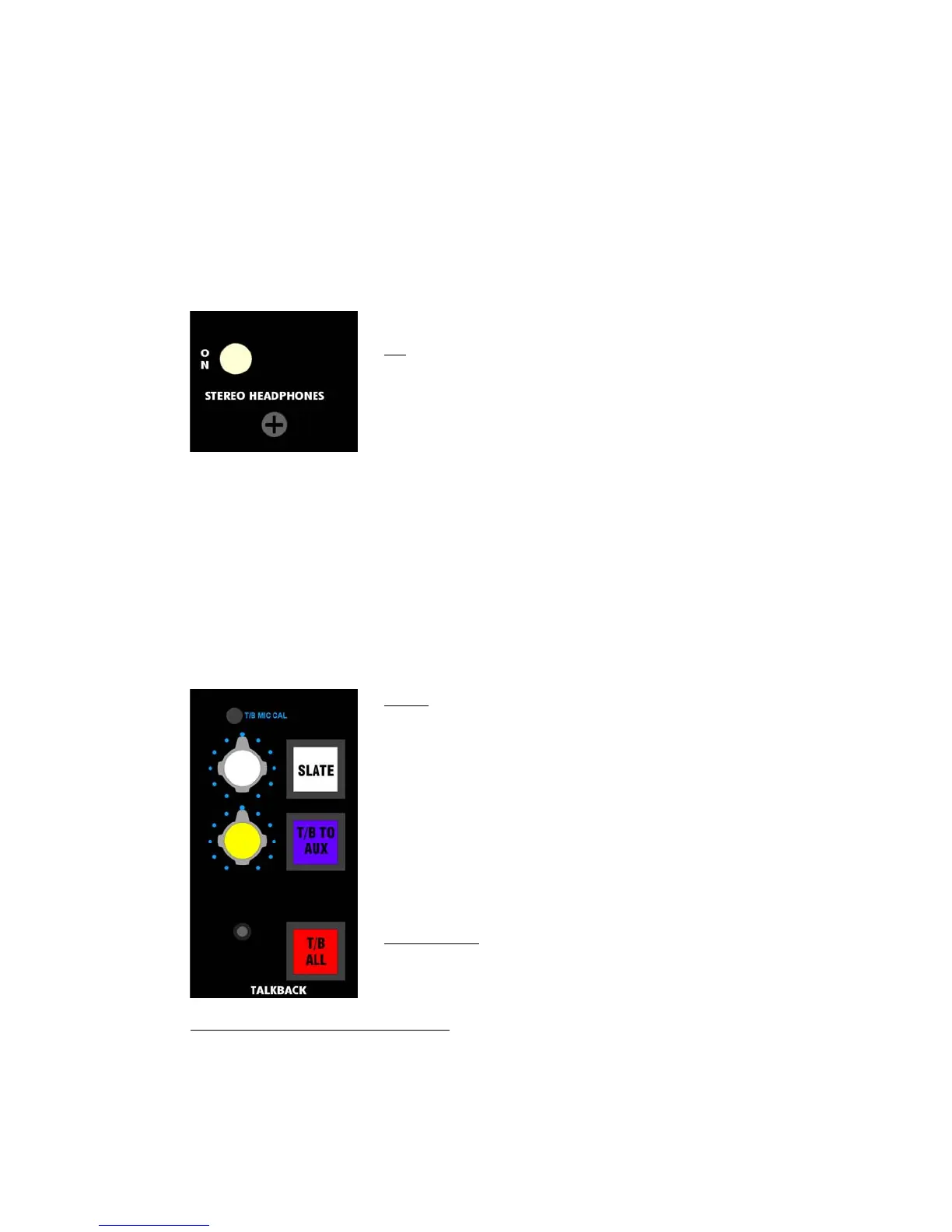
The 840B Stereo Headphone Amplifier is designed for use by the engineer or others in the
Control Room. It has the following features:
• On/off switch
• 1/4” stereo headphone jack (located under the armrest)
• Feeds the current Control Room Monitor source from Monitor Control section
o Volume follows the Monitor Control level
o Mono summing is available
o CR DIM is available
o Not affected by the MON CUT or Monitor System Selectors
The 840B Stereo Headphone Amplifier control functions as follows:
7.2 Talkback
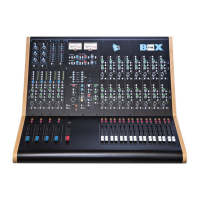
The 840B Talkback section provides a complete set of Talkback routing options and controls. It
has the following features:
• Talkback to all
• Talkback to auxes only
• Talkback microphone level
• Independent Slate function with level control
• Talkback Microphone in Meter Bridge
• Talkback remote control port
The 840B Talkback controls function as follows:
T/B TO AUX (Talkback to Auxiliaries): Routes Talkback to the enabled Auxiliary Buses
• The E1608 Echo Send T/B button must be engaged to enable Talkback to feed the
corresponding Auxiliary Bus
• The Echo Send must be turned ON with the level up to enable Talkback to feed the
corresponding Auxiliary Bus
• Momentary switch
• Independent level control
• Automatically engages the CR DIM function when pressed
• Illuminates in yellow when engaged
ON: On/off switch for the Stereo Headphone Amplifier
• Illuminates when engaged
SLATE: Routes Talkback to the Program and Summing Buses
• The Left and Right Program Bus Output Masters must be turned
ON with the level up to enable Talkback to feed the Program
Buses
• The eight Summing Bus masters (SUB 1-8) must be turned ON
with the level up to enable Talkback to feed the Summing
Buses
• Independent Level Control
• Momentary Switch
• Automatically engages the CR DIM function when pressed
• Illuminates in red when engaged
Note: The SLATE function does not include a tone or oscillator feed.
SLATE LEVEL: Volume control for the Talkback to the Program and
Summing Buses
• Located adjacent to the SLATE button


 To Next Page