Apogee Jam X User’s Guide
Configuring Neural Archetype:Tim Hensen - Standalone
The best way to get started quickly with Jam X is with the supplied Archetype: Tim Hensen guitar amp
plugin running in Standalone mode on your Mac or Windows computer.
1. No DAW needed - After installing the Archetype:Tim Hensen plugin, go to the Applications
folder (on Mac), find the Neural DSP folder, open it and click on the Archetype Tim Hensen
icon to launch the application in Standalone mode.
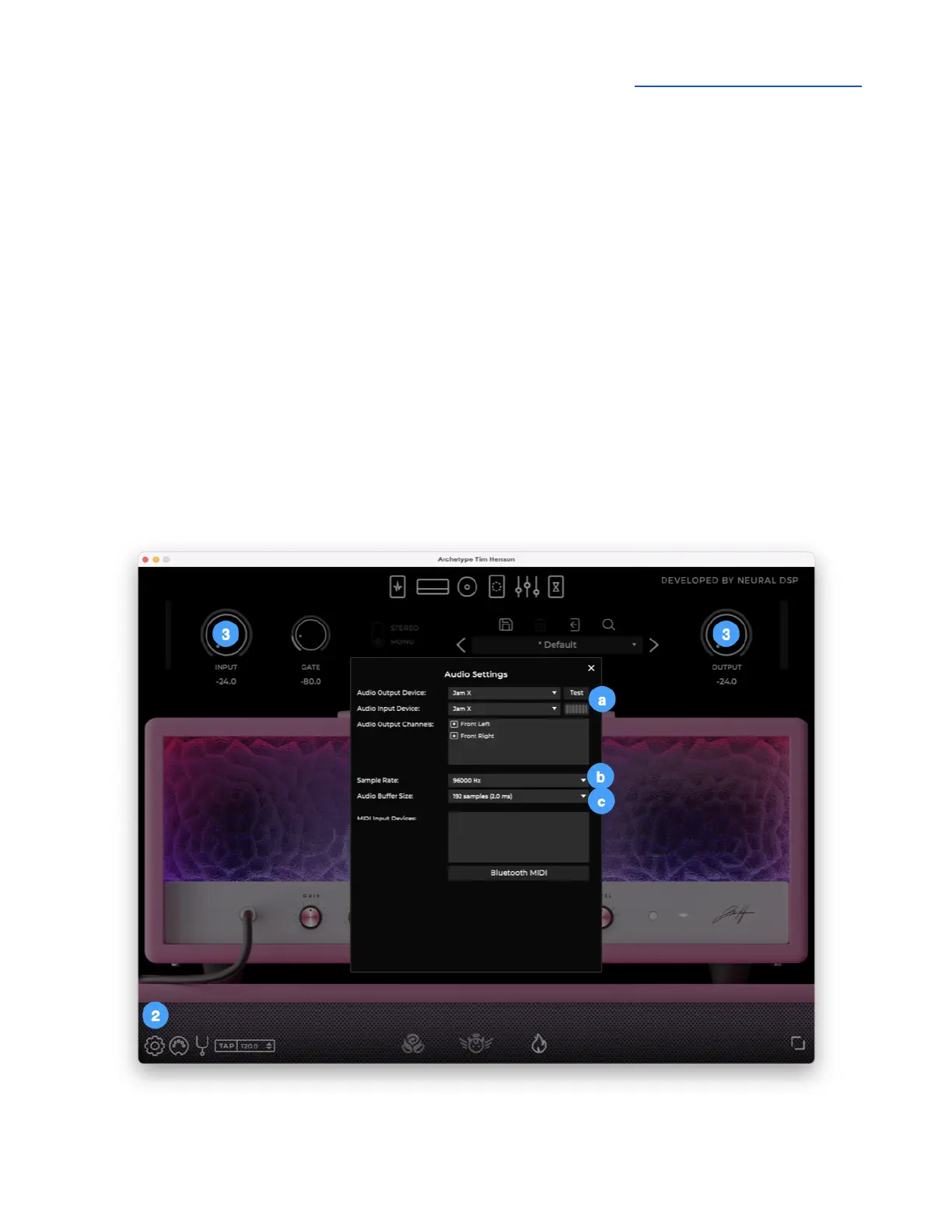
2. Click on the Setting gear in the lower left corner of the app window.
a. Set Audio Output Device and Audio Input Device to Jam X
b. Set Sample Rate to 96000 Hz
c. Set Audio Buffer Size to 192 samples, for a latency of 2.0ms
3. Start with the Input and Output knobs set to 0.0.
4. Adjust Jam’s headphone/speaker output level with your computer or iOS device’s output level
control.


 To Next Page