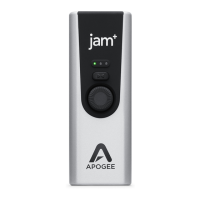
Apogee Jam X User’s Guide
Troubleshooting
Q: The LED light stays blue and I can’t turn it green
A1: Check if Jam X is recognized by the computer or iOS device. If it isn’t, Your USB cable may be
faulty and should be swapped out.
A2: The LED will not turn green until an audio application plays through the Jam X (such as playing
Apple Music or Spotify), or attempts to record from Jam X’s ¼” instrument input (like Garageband or
Ableton Live). Some apps will not do this until you actually start recording so make sure you check for
this.
Q: Low sound through headphone/speakers, even though the input signal is peaking red.
A: The output volume may be turned down. This is a separate control from the input adjustment knob.
To adjust output level, use the volume buttons on the side of your iPhone or iPad, or the volume
controls on your Mac or PC computer.
Q: The input signal is noisy or has a hum or buzz
A1: This could be a bad cable. Try swapping out your instrument cable, output cable, or USB cable to
see if there’s improvement.
A2: Hi-Z (high impedance) input sources such as electric guitar pickups are notoriously noisy and
susceptible to picking up interference from lights, radio transmissions, and other electronic devices.
Turn your instrument to face another direction, or move to a different area away from electromagnetic
sources to reduce the interference being picked up.
Q: Will Jam X work with my Android device?
A: Jam X was designed to work with standard drivers that are part of Windows and Mac PC’s, and
Apple iOS devices. You may try using Jam X with your Android device, but we cannot guarantee that
it will work.
For more information
● Apogee KnowledgeBase and FAQs
● Informational Videos
● Apogee Product Registration
● How to contact Apogee Technical Support
Please visit:
www.apogeedigital.com/support


 To Next Page