MANAGEMENT
SYSTEMS
Assessed to ISO 9001:2008
Cert/LPCB ref. 010
Assessed to ISO 14001:2004
Cert/LPCB ref. 010 EMS
MANAGEMENT
SYSTEMS
Cert/LPCB ref. 010
PRODUCT
CERTIFICATION
Apollo Test Set - User Manual
22
Events
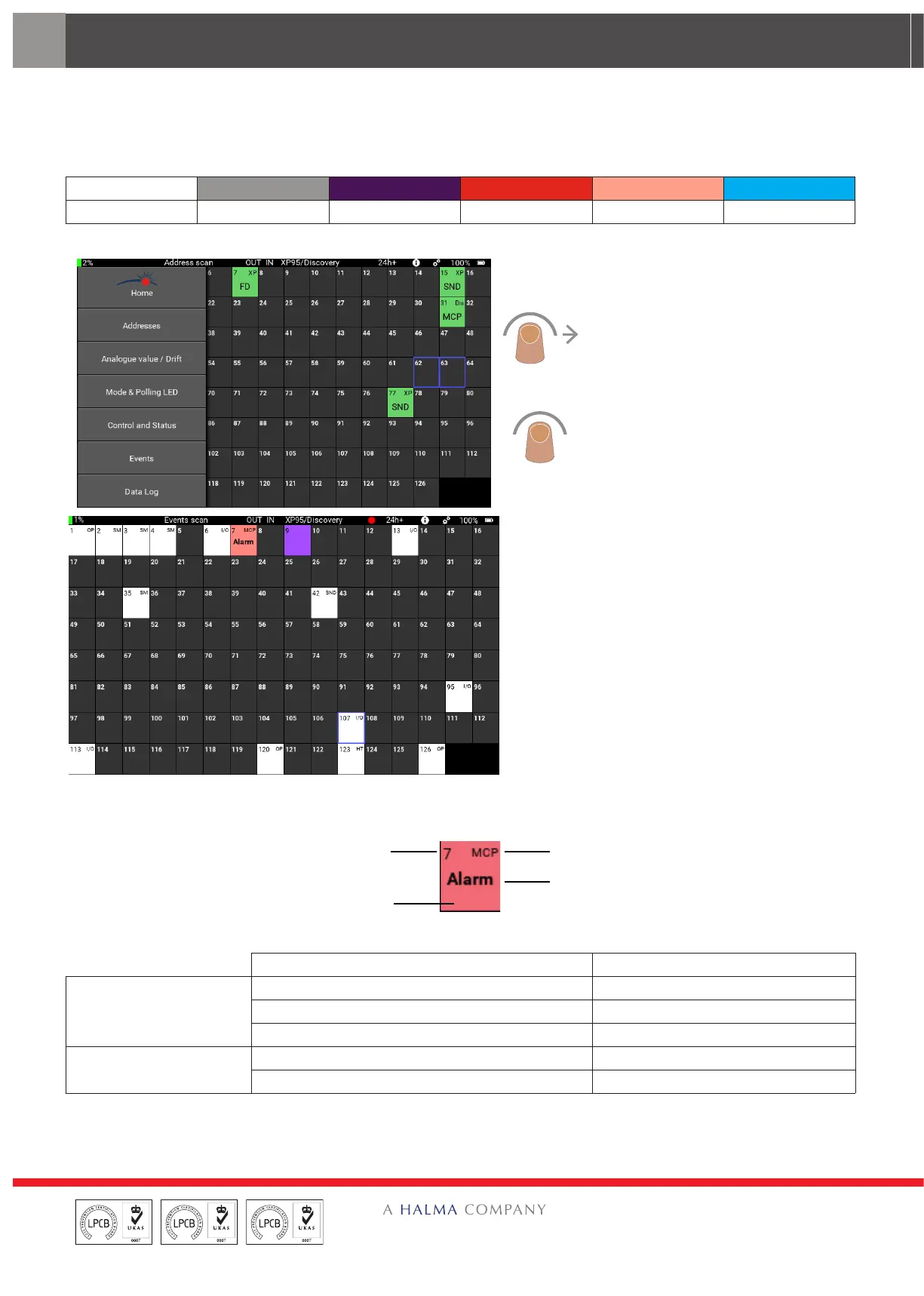
The Events menu shows event flags, event types and event addresses. When the Events menu is selected the unit starts
recording (indicated by a flashing red LED in the title bar) all events that occur. The type of event and the device status is
shown by dierent colours:
Occupied address Empty address Dual address Tamper* Alarm* Fault*
Note: * indicates the event on the device at the given address
Swipe right from the left side of the
screen. The menu selection bar appears.
Tap ‘Events. The menu selection bar
closes and the Events screen appears.
The event status of each device is
shown.
Each device shows the information that follows:
Device address
ent flag: Event address
Devic
Event type
Examples of the event types, event flag: event address are:
Description Text on screen
Event
Alarm, MCP alarm Alarm
Fault Fault
Tamper Tamper
Event flag: event address
The device at the address 10 placed an alarm bit A:10
The device at the address 1 placed an interrupt bit I:1


 To Next Page