MANAGEMENT
SYSTEMS
Assessed to ISO 9001:2008
Cert/LPCB ref. 010
Assessed to ISO 14001:2004
Cert/LPCB ref. 010 EMS
MANAGEMENT
SYSTEMS
Cert/LPCB ref. 010
PRODUCT
CERTIFICATION
Apollo Test Set - User Manual
5
How do I control the touchscreen?
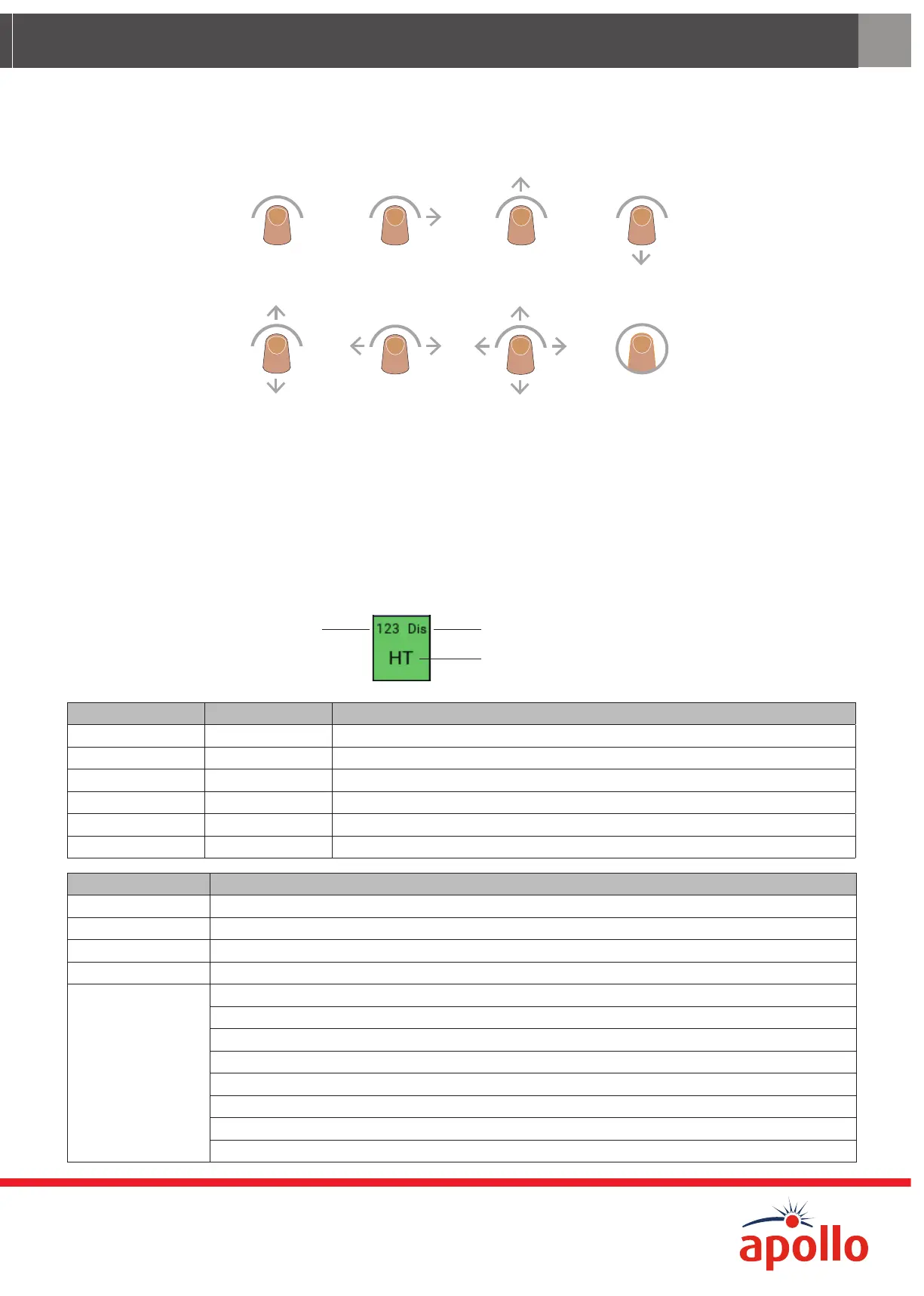
The touchscreen is controlled using a finger and swiping in dierent directions to select things on the screen. In this User
Manual the icons that follow are used to show how to move around the touchscreen.
TapSwipe rightSwipe up Swipe down
ertical swipe
Horizontal slide
(press and drag)
Omnidirectional
slide
T
What are Device range and Device type test set IDs?
Before using the Test Set it is important that you understand the abbreviations that are used on the various screens for
dierent device ranges and types that are used on the test set. The table that follows defines these abbreviations. It may
be long but it is necessary for you to be able to understand the information being given on the screen. Each screen is
divided in sections, one section for each device. Each section contains:
e
ess
Device Range ID
Devic
Device range ID Range Description
Dis Discovery covers all Discovery devices including Discovery UL
Sot Soteria all Soteria devices
XP XP95 covers XP95, XPlorer, XP95 I.S. and XPander devices
XPa XP95A used for XP95A devices with unique type codes
S90 Series 90 covers all Series 90 devices
U User covers all User type codes
Device type test set ID Description
SUM Shop Unit Monitor/User Defined
UD1 User Defined
UD2 User Defined
UD3 User Defined
SND
Sounder Controller, Sounders, Visual Indicators, VADs (Base and Open Area), Sounder Control Module
Sounders, Visual Indicators and VADs (Base and Open Area)
Sounder Control Module
Sounder Beacon Base and Open Area
Sounder Base
Voice Sounder Beacon
Voice Sounder
Reserved


 To Next Page