MANAGEMENT
SYSTEMS
Assessed to ISO 9001:2008
Cert/LPCB ref. 010
Assessed to ISO 14001:2004
Cert/LPCB ref. 010 EMS
MANAGEMENT
SYSTEMS
Cert/LPCB ref. 010
PRODUCT
CERTIFICATION
Apollo Test Set - User Manual
4
How do I switch the Test Set on?
To switch the Test Set on, press and hold the green power on button on the side of the unit. When the power LED lights up
you can release the power on button.
What do I see when the Test Set is switched on?
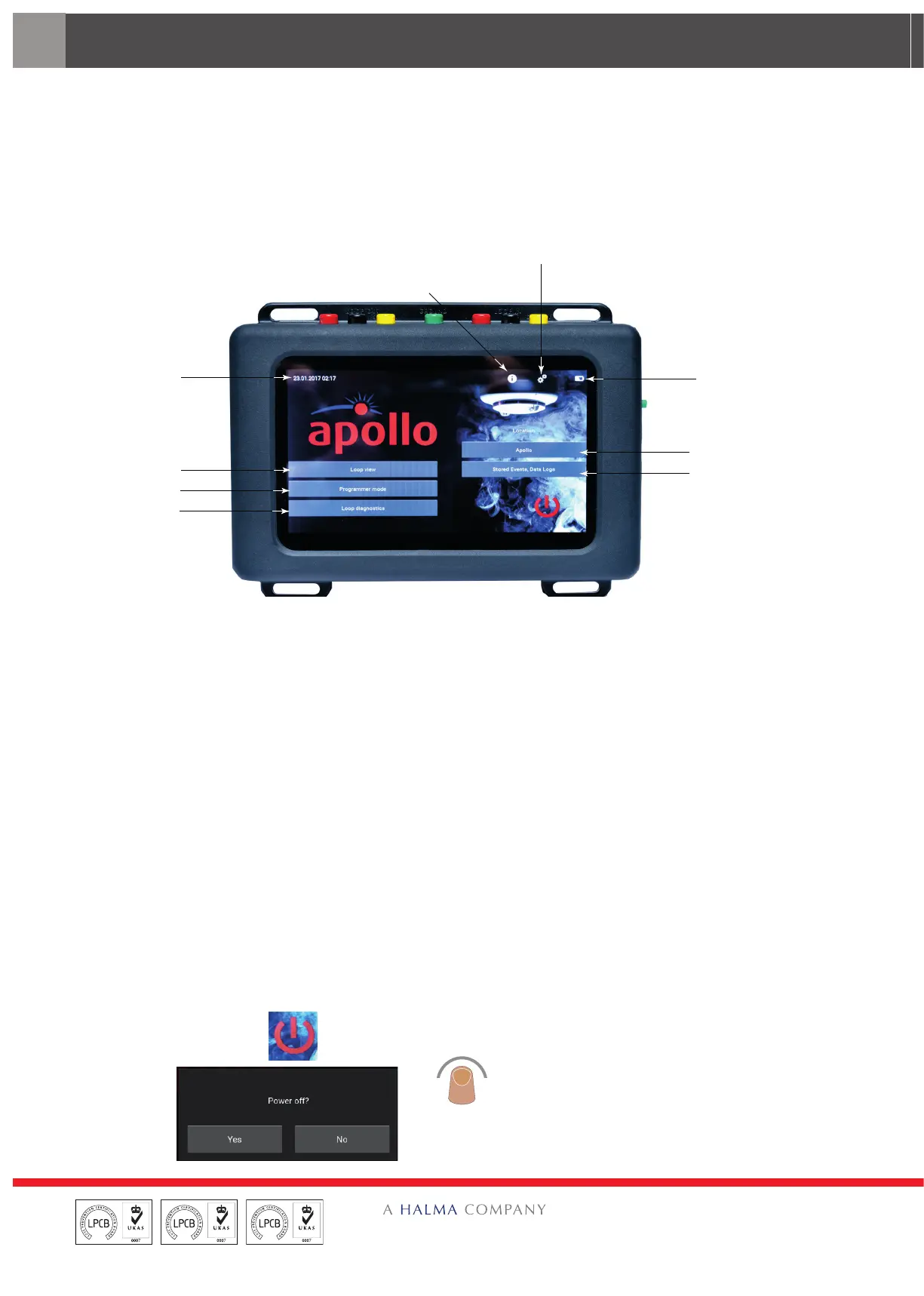
When the Test Set is first switched on the title screen appears with a segmented circle revolving in the centre indicating
that the software is being loaded. When the load is complete the Home Screen appears.
Date and Time
Loop View
ogrammer Mode
Loop Diagnostics
Help
Battery state
Location
Stored Events,
From the Home Screen you are able to access the six main menus:
• Settings
This menu enables you to change some of the settings of the Test Set such as the Screen settings, Location and cable
type. These are explained on page 7.
• Loop View
The Loop View menu enables you to access a further six sub-menus. These are explained on page 12.
• Programmer Mode
The programmer Mode menu enables you to do various tasks on the system. These are explained on page 25.
• Loop Diagnostics
The Loop Diagnostics menu enables you to troubleshoot the system. This is explained on page 31.
• Location
This enables you to enter the location. This is explained on page 37.
• Stored Events, Data logs
This menu enables you to view stored event and data logs. This is explained on page 38.
How do I switch the test set o?
On the Home Screen, tap the ‘Power
O’ icon.
The ‘Power-o’ splash screen
appears.
Tap ‘Yes’ to power-o the unit.


 To Next Page