MANAGEMENT
SYSTEMS
Assessed to ISO 9001:2008
Cert/LPCB ref. 010
Assessed to ISO 14001:2004
Cert/LPCB ref. 010 EMS
MANAGEMENT
SYSTEMS
Cert/LPCB ref. 010
PRODUCT
CERTIFICATION
Apollo Test Set - User Manual
9
Cable types
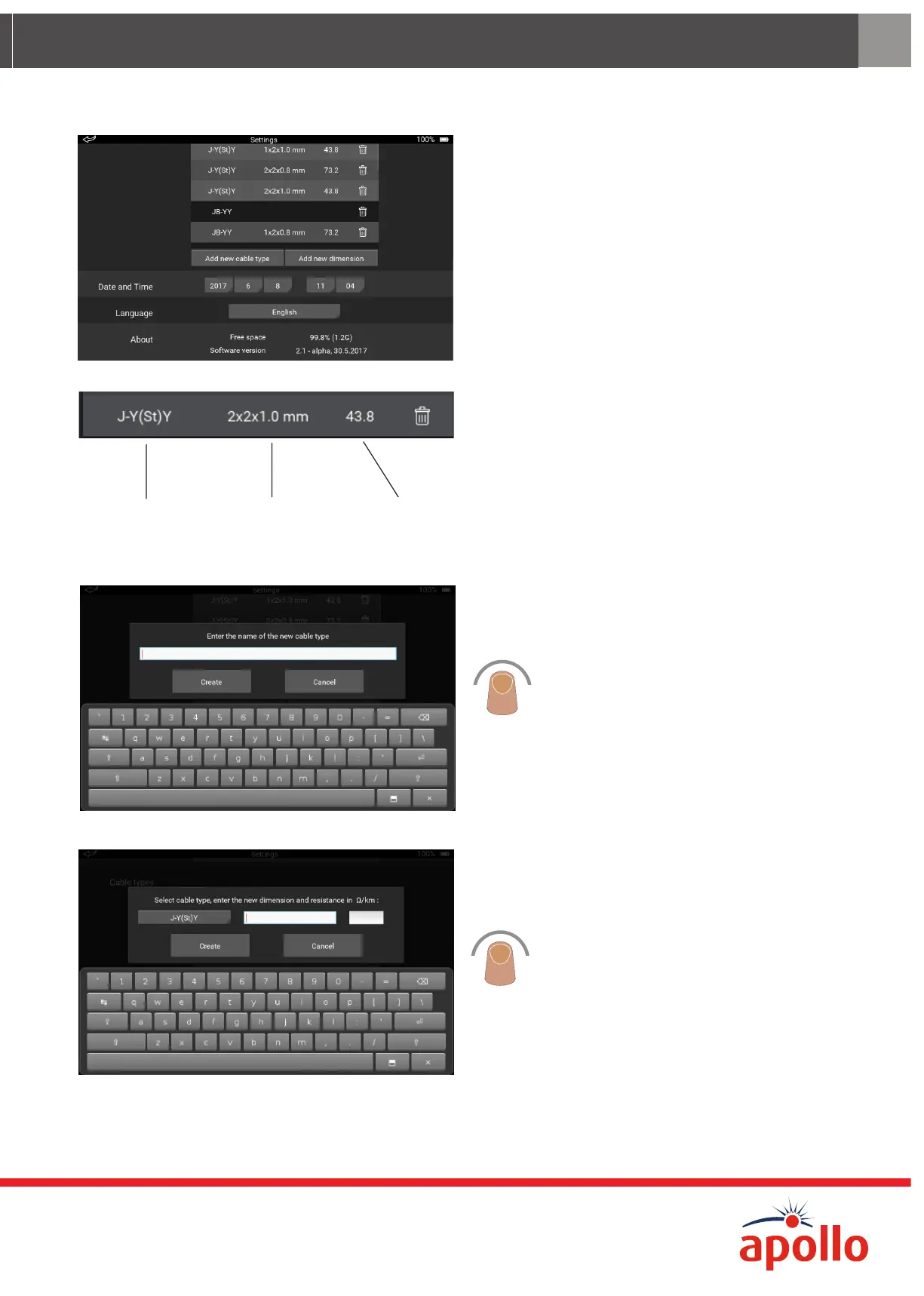
The Cable types section of the Settings screen
enables you to:
• Add a new cable type to the list
• Add new dimensions to a cable type
• Remove a cable type from the list
• Remove a dimension from the list
Cable type Cable dimension
number of pairs and
conductor diameter
Loop resistance
Ω/km
Each cable type gives additional information:
• Cable type
• Cable dimension
• Loop resistance
To add a new cable:
Tap ‘Add new cable type’. The on-screen
keyboard appears.
Enter the name for the new cable.
Tap ‘Create’, the new cable is added to the list.
To add dimensions:
Tap to select the cable type.
Tap ‘Add new dimension’. The on-screen
keyboard appears.
Enter the new dimension and loop resistance.
Tap ‘Create’ the new dimension is added.


 To Next Page