MANAGEMENT
SYSTEMS
Assessed to ISO 9001:2008
Cert/LPCB ref. 010
Assessed to ISO 14001:2004
Cert/LPCB ref. 010 EMS
MANAGEMENT
SYSTEMS
Cert/LPCB ref. 010
PRODUCT
CERTIFICATION
Apollo Test Set - User Manual
8
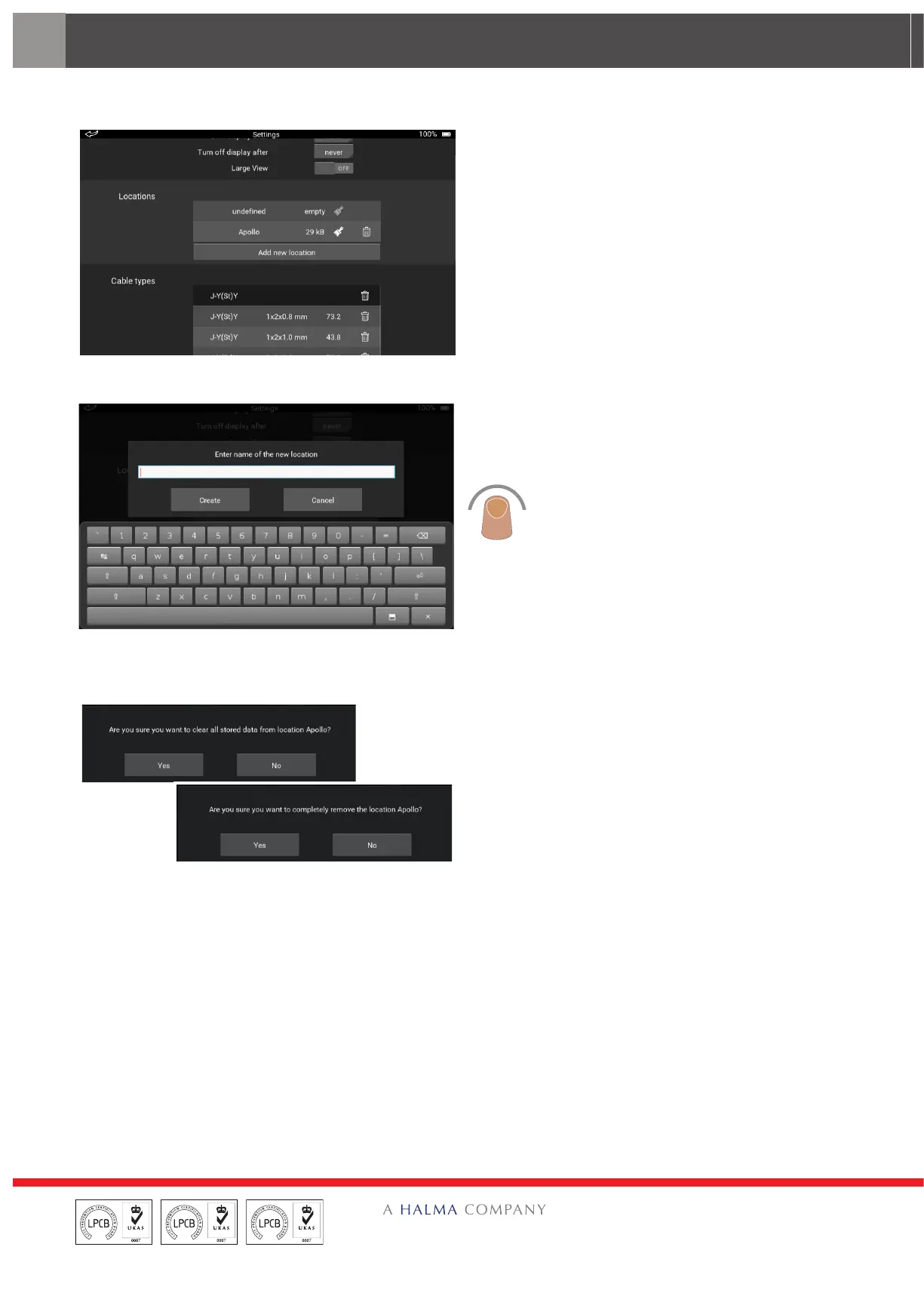
Locations
The Locations section of the Settings screen
enables you to:
• Add a new location
• Remove a location from the list
• Clear all data at the selected location
Alongside the location name you will find how
much memory the data is taking up and two
other icons; one that looks like a brush and one
that looks like a dustbin.
To add a new location, tap ‘Add new location’.
The on-screen keyboard appears. Use the
keyboard to enter the name of the new location.
Tap ‘OK’ to return to the Settings screen.
To clear stored data from a location, tap the
brush icon. A splash screen appears asking
you to confirm that you want to clear the data.
Tap ‘Yes’ to clear the data.
To delete the location, tap the dustbin icon. A
splash screen appears asking you to confirm
that you want to delete the location. Tap ‘Yes’ to
delete the location.


 To Next Page