MANAGEMENT
SYSTEMS
Assessed to ISO 9001:2008
Cert/LPCB ref. 010
Assessed to ISO 14001:2004
Cert/LPCB ref. 010 EMS
MANAGEMENT
SYSTEMS
Cert/LPCB ref. 010
PRODUCT
CERTIFICATION
Apollo Test Set - User Manual
40
How do I update firmware?
To make sure that the Test Set operates eciently, it may be necessary to update the firmware that operates it.
Firmware updates will be made available on www.apollo-fire.co.uk and will require loading onto a USB flash drive.
To install the firmware update:
1. Connect the power supply cable to the Test Set and a suitable power supply.
2. Plug the USB flash drive containing the firmware update into the USB socket of the Test Set.
3. Make a note of the firmware update version number.
The full Firmware Update flowchart can be found on page 47.
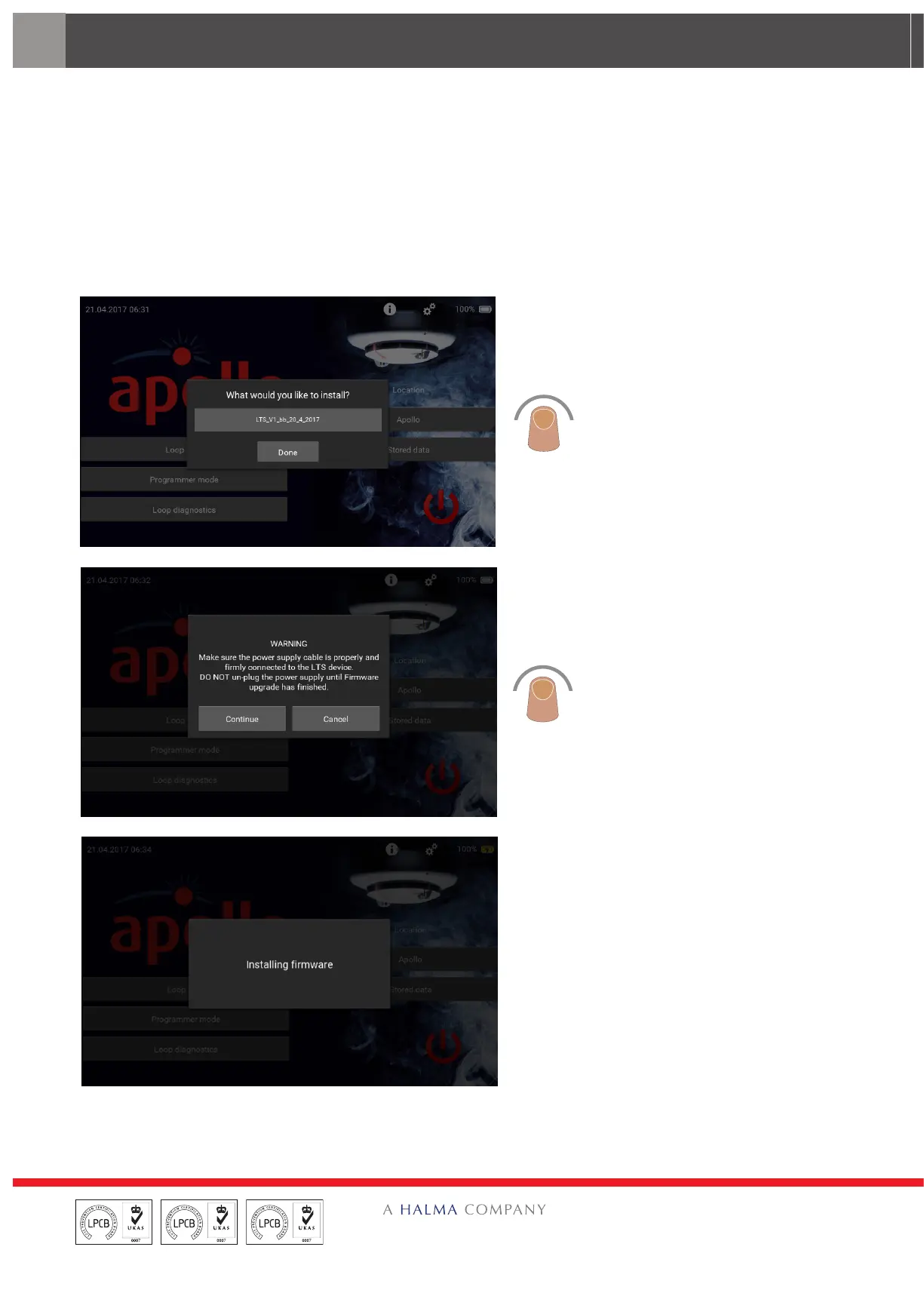
The firmware update screen appears.
Tap the update to be installed.
The Warning splash screen appears.
Check that the power supply cable is
correctly attached to the Test Set and
tap ‘Continue’.
The ‘Installing firmware’ screen
appears. DO NOT do anything with the
Test Set during the update process.


 To Next Page