Troubleshooting
Apollo SL40 Field Maintenance Manual
19
RECEIVER SENSITIVITY
The speaker audio level is measured using the HP8920.
Procedure
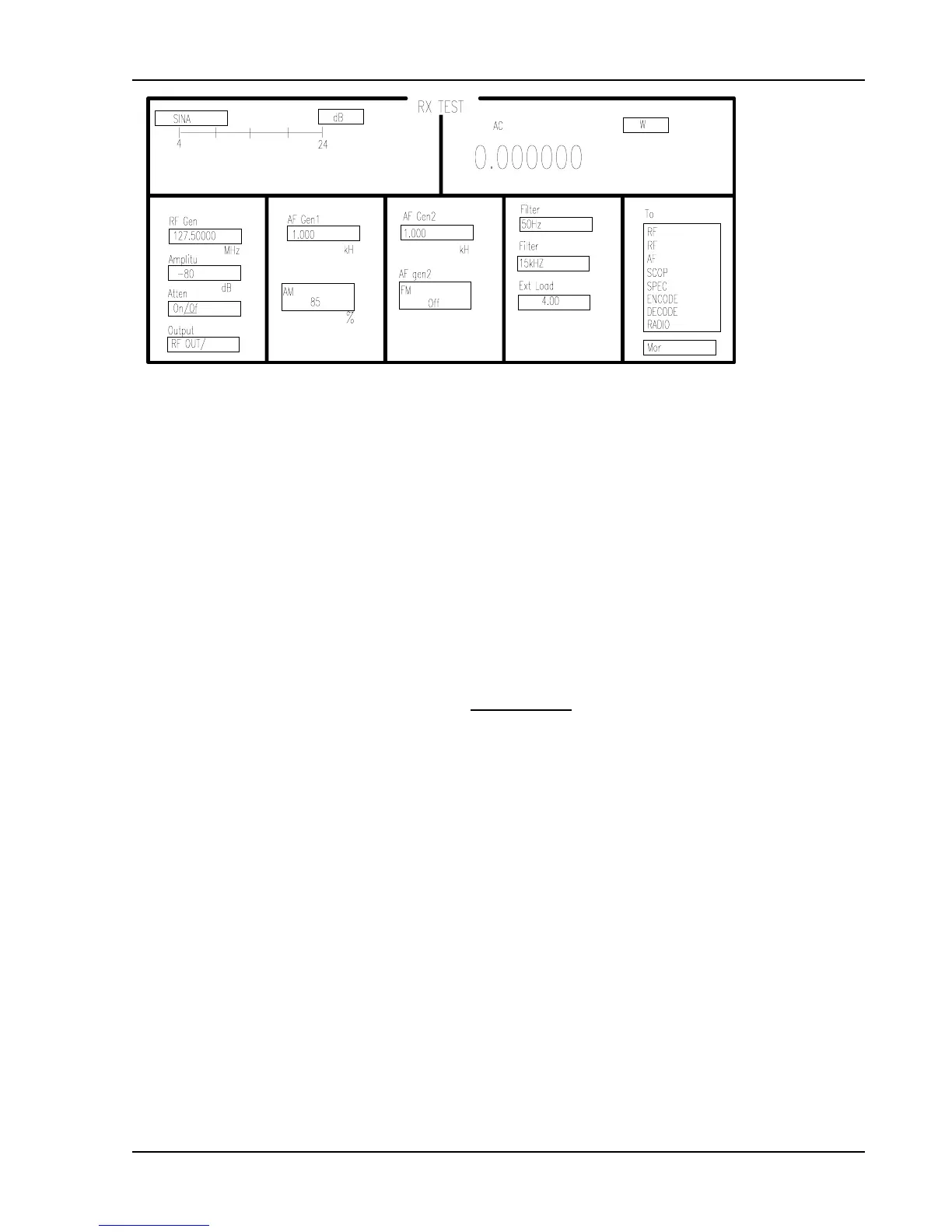
1. Set the HP 8920 as listed below. Use Figure 3 and Figure 5 as guides.
Press PRESET
Press RX: function
Using the CURSOR control knob or the USER keys set:
RF GEN Freq 118.00 MHz
Amplitude 1,000 µ volts
RF OUTPUT RF OUTPUT
AF Freq 1,000 / 85%
Ext Load 4 ohms
AC LEVEL W
2. Connect speaker load to the HP8920 audio in. Set SINAD low level to 4 dB (LO=4).
Turn SL40 volume control until AC LEVEL on HP8920 reads 12 watts.
3. The distortion level on the HP8920 should be < 5%.
4. Reduce the AF Freq. modulation level on the HP8920 to 30 The distortion level on the
HP8920 should be < 5% and the noise level should be ≥ 25 dB.
5. Disable the squelch by pulling out on the volume knob. Reduce the signal generator
amplitude until the HP8920 displays a 6 dB SINAD value (S+N/N). The amplitude level
should be <1 volt.
Figure 5. Receiver Test Setup


 To Next Page