SW Version 2.04 30-January-2009 Page 17 of 128
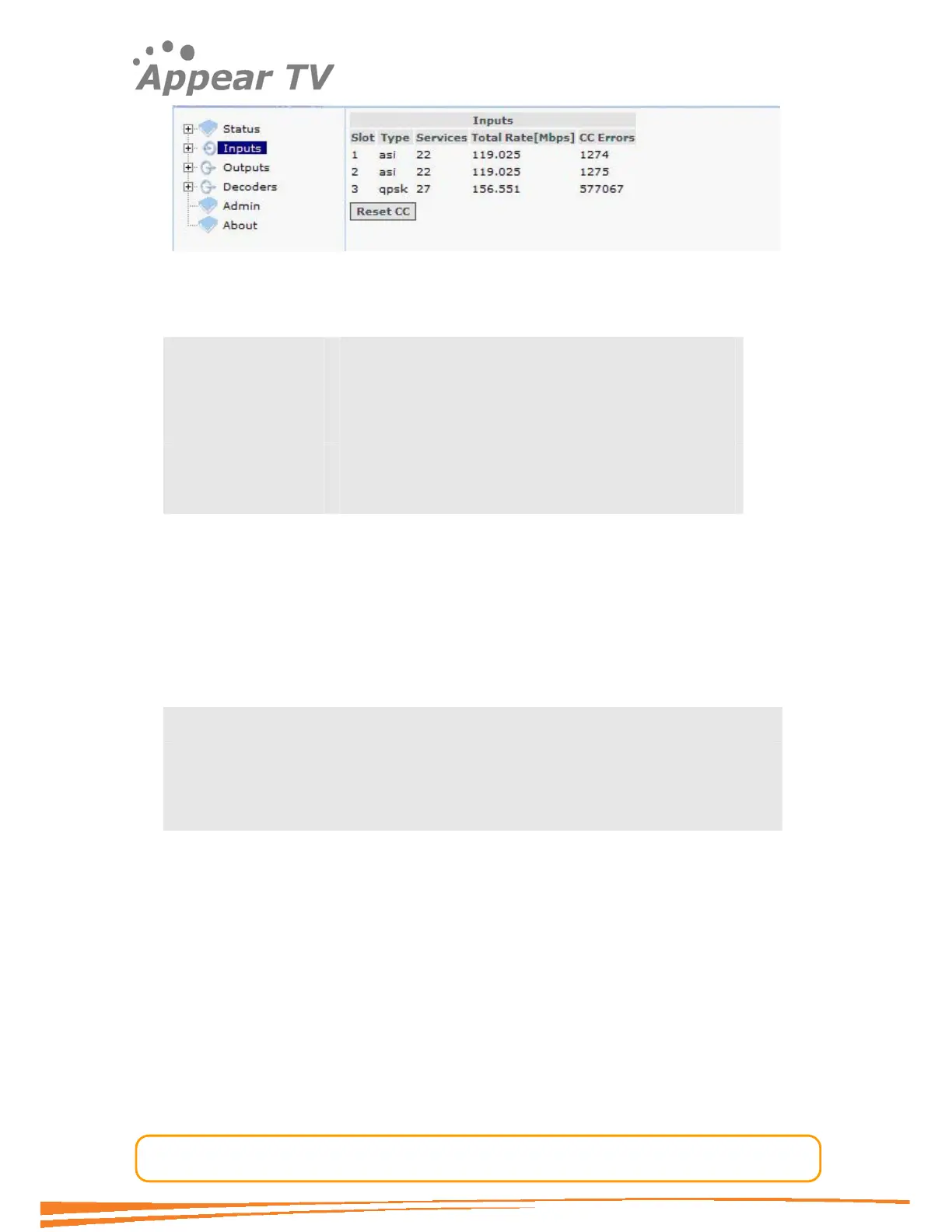
Figure 10 - Inputs view
The following information is displayed in the Inputs main display pane:
Slot Slot position in the chassis
Type Type of input module
Services The number of services present in the transport stream
Total Rate [Mbps] The total bandwidth of the incoming transport stream
CC Errors The number of CC errors detected on all input ports
For each input module available in the unit they all have some common analysis
features and they all support manual definition of input PSI. The next sections will first
describe these common features, before the configuration of each available input
module will be described.
4.3.1 Input Analysis
For each listed input module the unit provides detailed MPEG/DVB transport stream
analysis for all the available input streams. The following information is provided by
the input analysis engine.
Port specific status
PSI/SI analysis of all input services
PID display: listing all input PIDs for each input, with implicit highlighting of CC
errors, PCR flag and scrambling bits (odd/even)
This information is accessible by drilling down into the Inputs node in the navigation
tree. The following example is based on a QPSK input, but the same applies for all
input modules.



 To Next Page