SW Version 2.04 30-January-2009 Page 32 of 128
Front End Locked Current Tuner lock status: Yes or No
4.3.8 IP Input
4.3.8.1 General Configuration
The unit can be equipped with a number of different IP input modules. Each IP input
module is capable of receiving up to 250 individual input streams. The input streams
can be either SPTS or MPTS encoded.
In order to add new inputs, remove input or view info regarding existing inputs:
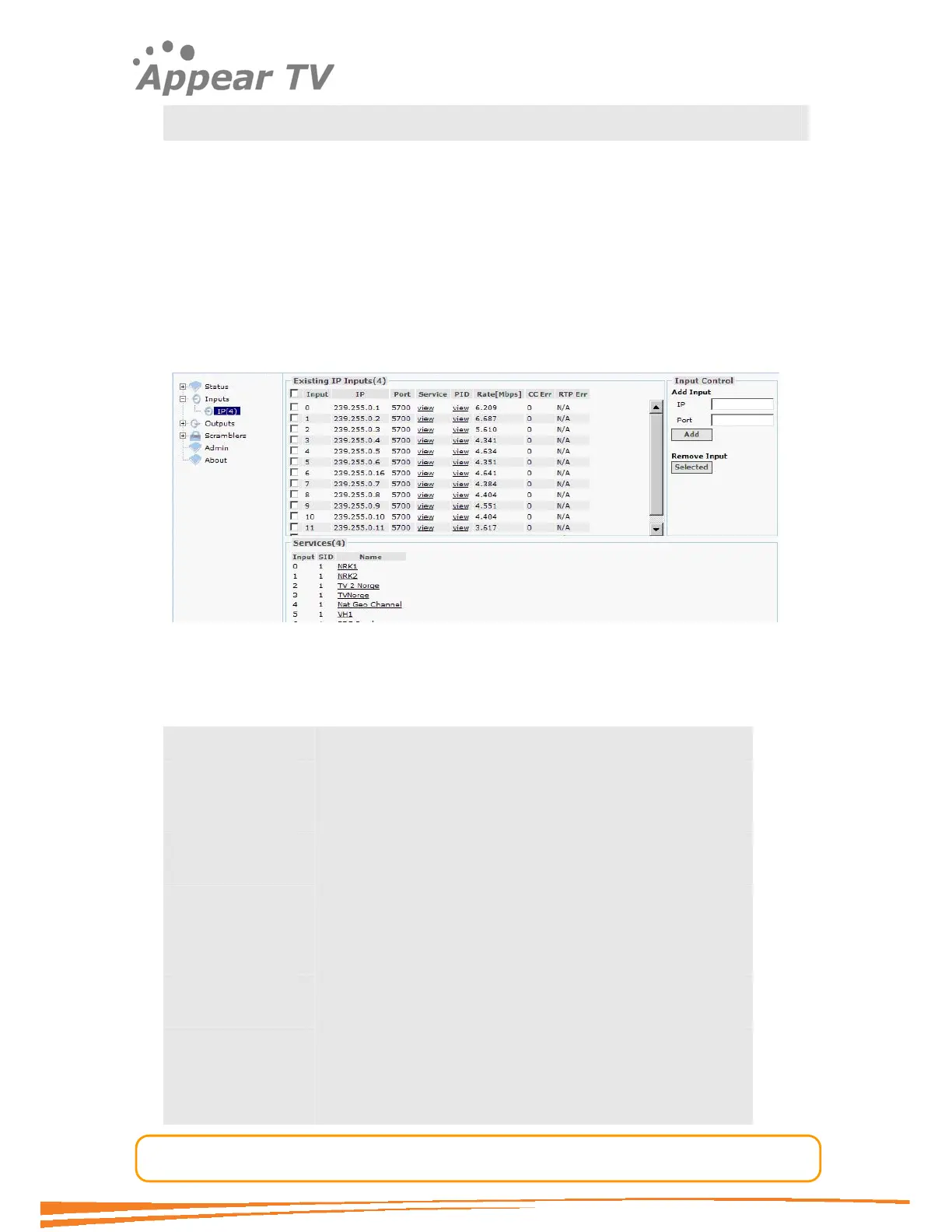
Open the Inputs page from the navigation pane and choose the IP input module you
wish to configure. See Figure 21. The services available on all inputs will be listed in
the same view by default (in the bottom half of the main display window).
Figure 21 - IP input page
The IP input window shows all configurable settings as well as the current bit rate and
service information. The following parameters are available:
Input Shows the input number
IP Shows the IP address of the multicast/unicast.
Port Shows the port.
Service Filtering of the displayed service information. Shows only the
services available from the selected input port
PID Packet Identifier. Shows all available PIDs from the
selected input port
Rate[Mbps] Shows the incoming data rate
CC Err Bit Error Rate gives quality indication of the input signal.
No input signal will display no sync.
RTP Err Real Time Protocol Error.
De-Jitter This check box activates the de-jitter algorithm on the input
port. Normally this should be enabled in order to achive the
best results. In some cases if the input quality is very poor a



 To Next Page