SW Version 2.04 30-January-2009 Page 64 of 128
4.6.2 Configuring Radio Services
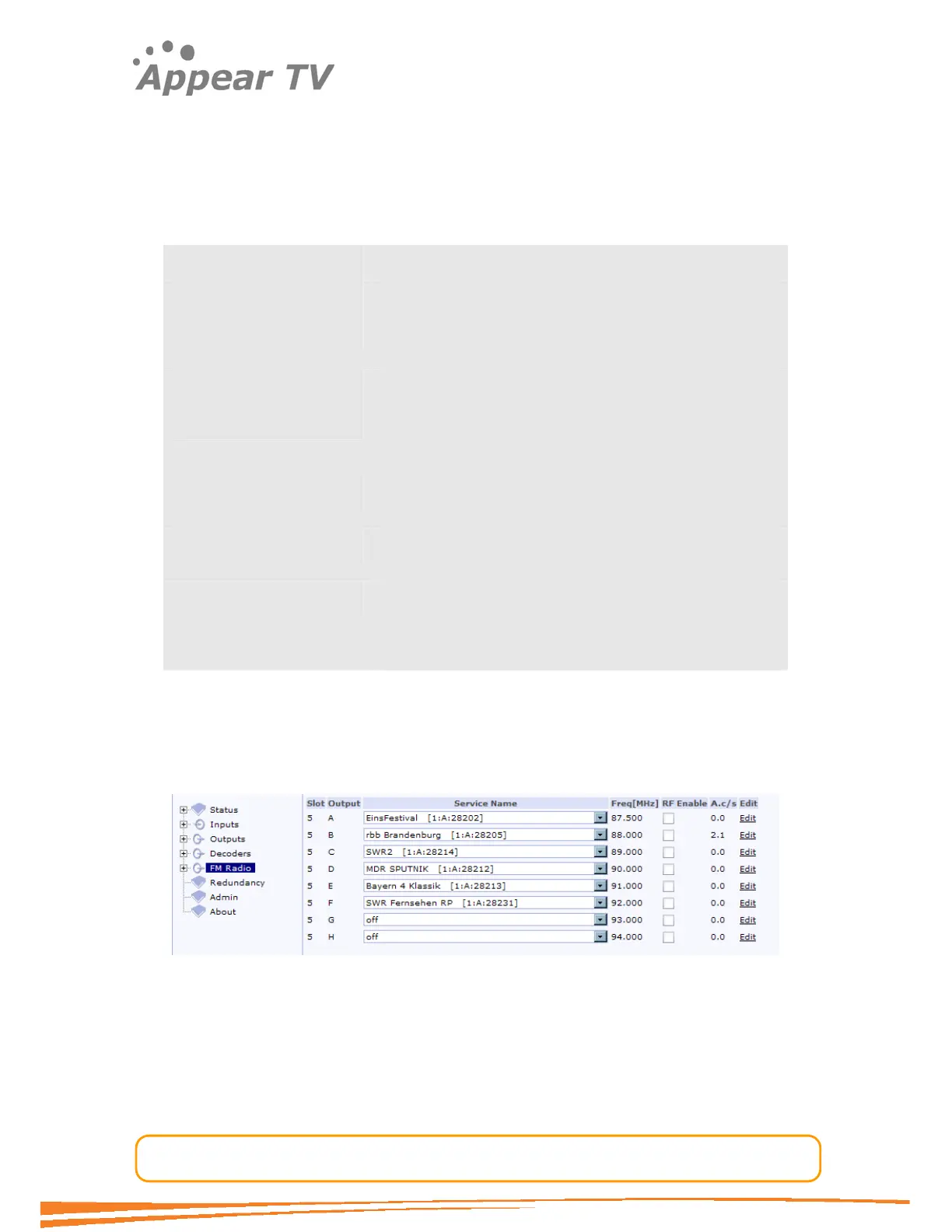
To configure services on the FM radio module, click FM radio in the navigation pane.
A list of all FM radio modules in that chassis is shown by slot number, with a list of
services with configurable fields for each service on each card.
The following variables are displayed:
Slot number The slot the module is in.
Output port The port the service is output on.
Service name This field enables the choice of services via a pull down
menu.
Frequency The output frequency of the service
RF Enable A check box for enabling RF up conversion of a chosen
service from a particular port on a module in a particular
slot.
Audio gain The relative audio output level in dB. The audio output
level can be adjusted in the Edit field.
Testtone This field indicates if a testtone has been enabled on this
service.
A.c/s Audio Clipping/second. This function reports audio
clipping. It is updated every 10 seconds. Clipping of
audio can be reduced by configuring the audio level
adjustment in the Edit field described further on.
To configure each service, select the service name from the pull-down menu. Ensure
the RF Enable check box is unchecked.
It should be noted that the number of services is determined in the global parameters
set up. A default of 8 is listed, (along with default frequencies) if the card setup has
not been configured.
Figure 50 - The FM radio display pane
Use the Edit button to configure individual outputs. Clicking it shows the resulting
user interface as displayed below. The page will show different options depending on
the choice of RDS mode.



 To Next Page