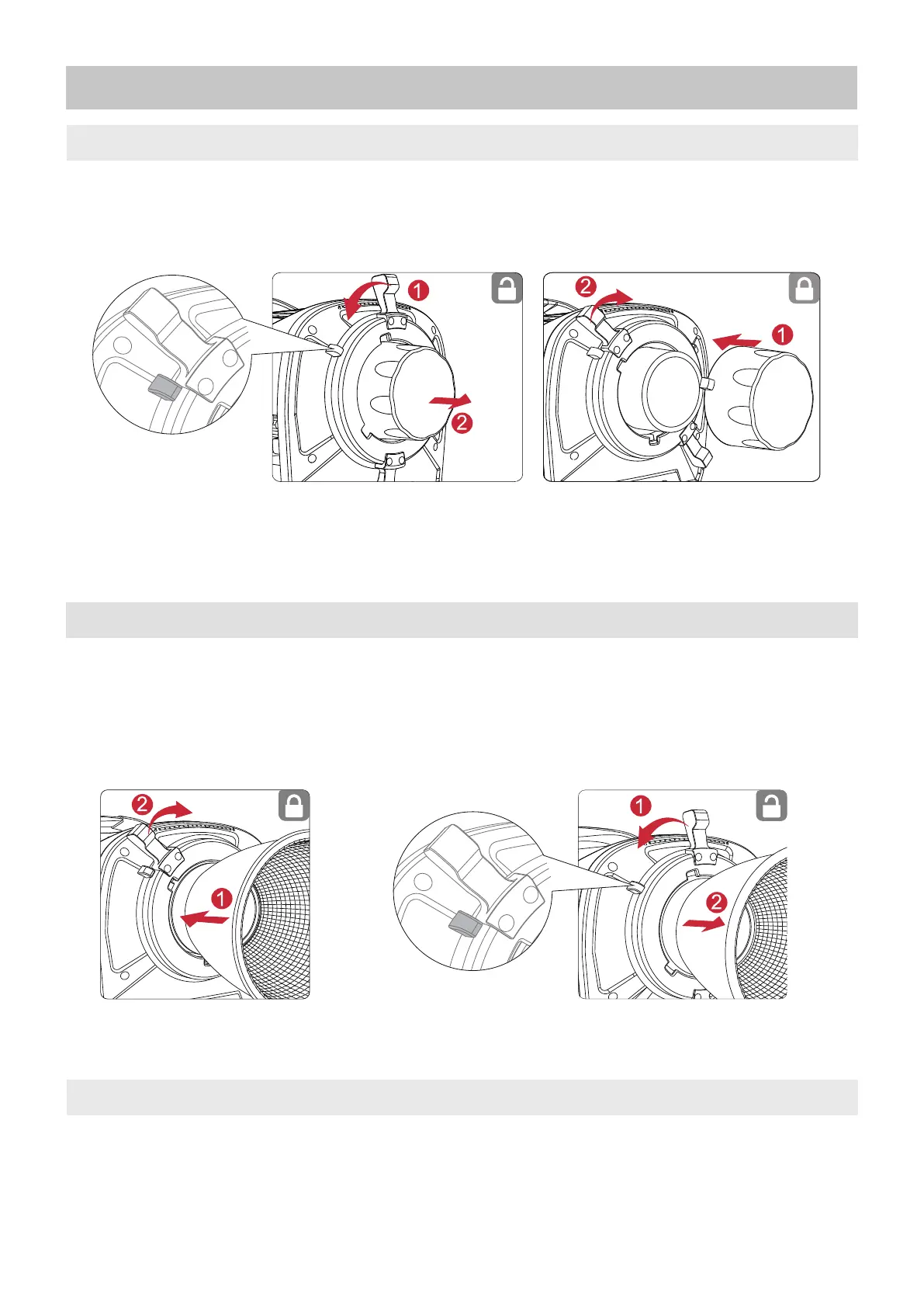
1. Attaching/Detaching the Protection Cover
07
To detach the cover, rotate the Pro-Lock Handle to the open position and remove it. To reat-
tach the cover, insert it into place and rotate the Pro-Lock Handle clockwise until locked.
* Before use, please make sure to remove the protective cover. During transportation and
storage, please attach the protective cover.
To attach the Reflector, insert it into the Bowen Bayonet Mount and rotate the Pro-Lock
Handle clockwise until locked. To detach the Reflector, rotate the Pro-Lock Handle to the
open position and remove it.
2. Attaching/Detaching the Reflector
Setup
Installation of a Reflector
Open Position
Reflector removal
Open Position
3. Setting Up the Lamp Head
Mount the Lamp Head into a Junior Receiver and tighten in place. Loosen or tighten the disc
brake handle on the yoke to adjust the fixture's angle of tilt.











 To Next Page