EasyManua.ls Logo

AquaLab 4TEV Series - User Manual

Default Icon
122 pages
Print Icon
To Next Page IconTo Next Page
Loading...
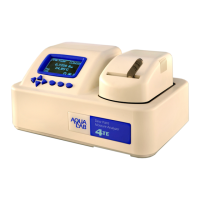
Water Activity Meter
Operator’s Manual
For Series 4, 4TE, 4TEV, DUO, and TEV DUO
Decagon Devices, Inc.
Version: August 2, 2016 09:05:15

Table of Contents

Questions and Answers

  • D
    Daniel JonesSep 9, 2025
    How to fix an AquaLab 4TEV that will not turn on?
    • B
      benjaminclarkSep 9, 2025
      First, check that the power cord is securely attached to the back of the instrument and plugged into the power outlet. If it still doesn't turn on, a power surge may have blown a fuse. To replace the fuse: 1. Unplug the power cord. 2. Locate the panel where the power cord plugs in. The fuse box is on the right side of that panel. Press in on the release tab and pull the fuse-holder out. Pull the broken fuse(s) out and replace with a 1.25 Amp 250V fuse. 3. Replace the fuse-holder and push it into the fuse-well until the release tab snaps in place. 4. Connect the power cord and turn your instrument on. If the fuse blows again, a failed component may be the cause.
  • D
    Darren NorrisSep 7, 2025
    What does message on screen mean on AquaLab 4TEV Measuring Instruments?
    • C
      Cynthia WiseSep 8, 2025
      If AquaLab Measuring Instruments displays a message on screen, it means the crystal that runs the firmware is having trouble starting. Occasionally, cycling the power solves the problem. If this message continues to appear, the instrument needs to be serviced.
  • M
    Molly HughesAug 22, 2025
    What to do if AquaLab 4TEV Measuring Instruments shows a warning that the sample is too hot?
    • J
      Jamie StevensonAug 22, 2025
      To avoid this problem with AquaLab Measuring Instruments, ensure that you only measure samples that are at the same temperature as the instrument.
  • M
    Michael GilbertSep 5, 2025
    Why does AquaLab 4TEV Measuring Instruments show no moisture content reading?
    • H
      Holly Martinez MDSep 5, 2025
      If the AquaLab Measuring Instruments displays the message no moisture content reading, make sure that the sample water activity and the instrument controlling temperature are within the scope of the selected moisture sorption isotherm model because the water activity or temperature for that reading is beyond the scope of the moisture sorption isotherm.
  • Z
    zachary64Sep 4, 2025
    What to do if AquaLab 4TEV displays error 'Firmware is corrupted'?
    • M
      Michael GriffinSep 4, 2025
      If the AquaLab Measuring Instruments displays the error “Firmware is corrupted,” it means the firmware on the instrument is corrupted and needs to be reloaded.
  • A
    Andrew ElliottSep 3, 2025
    Why are water activity readings too high or low on AquaLab 4TEV Measuring Instruments?
    • J
      Jill RosalesSep 3, 2025
      If your AquaLab Measuring Instruments displays water activity readings on verification standards that are too high/low and a linear offset adjustment cannot be made any higher/lower, it may be because the thermopile in your chamber or the chamber mirror may have become contaminated.
  • J
    Jesse JohnsonSep 1, 2025
    Why moisture content does not show up on AquaLab 4TEV Measuring Instruments screen?
    • R
      Ronald JonesSep 1, 2025
      If the moisture content does not show up on the screen of AquaLab Measuring Instruments, it means moisture content has not been activated. Toggle to menu tab, select moisture content, and select the appropriate model.
  • O
    oholdenAug 31, 2025
    What to do if verification is not correct on AquaLab 4TEV?
    • J
      Joseph SpenceAug 31, 2025
      If verification is not correct on AquaLab Measuring Instruments, it may be because the sample chamber and mirror need to be cleaned. Also, verify and adjust for linear offset.
  • W
    weaversamanthaAug 30, 2025
    Why are the readings slow or inconsistent on AquaLab Measuring Instruments?
    • A
      Anthony KaiserAug 30, 2025
      If you are getting slow or inconsistent readings from AquaLab Measuring Instruments, it could be because the temperature difference between the sample and the block chamber may be too great, the sample needs to equilibrate to instrument temperature before a fast, accurate reading can be made. The sample chamber may be dirty. Some products absorb or desorb moisture very slowly. Your sample may contain volatiles. A fan blade in the block chamber may be broken or bent.
  • E
    Elizabeth AriasAug 29, 2025
    What to do if I ran test with wrong model on AquaLab 4TEV Measuring Instruments?
    • J
      Jeremy BowenAug 29, 2025
      If you run a test with the wrong model on AquaLab Measuring Instruments, toggle to the correct model on the measurement screen using the up and down arrow keys. The correct model may not be loaded on the instrument. To determine which models are loaded on the instrument, cycle to the menu tab, select Moisture Content and then the loaded models appear.

Summary

Introduction to AquaLab Water Activity Meter

General Safety Information

Important guidelines and warnings for safe operation of the AquaLab instrument.

Getting Started with AquaLab

Preparing AquaLab for Operation

Steps to set up and prepare the AquaLab before first use.

AquaLab Menus and Navigation

Cleaning and Maintenance Procedures

Cleaning Procedure

Detailed step-by-step instructions for cleaning the AquaLab instrument.

Verification of Calibration

Procedures to check and ensure the accuracy of the AquaLab's calibration.

Verification and Calibration

Water Activity Verification

Daily checks to guarantee optimal performance and accuracy against standards.

Sample Preparation Guidelines

Taking a Water Activity Reading

DUO Operation (Optional)

Computer Interface and Software

Troubleshooting Common Issues

Instrument Power and Startup Issues

Solutions for problems related to powering on the AquaLab.

Slow or Inconsistent Readings

Troubleshooting steps for slow measurements or unstable results.

Sensor and Calibration Problems

Diagnosing and resolving issues with sensors or calibration accuracy.

Support and Repair Information

Appendix A: Preparing Salt Solutions

Appendix B: Temperature Correction of Verification Standards

Appendix C: AquaLab Verification Standards Application Note

AquaLab 4TEV Series Specifications

General IconGeneral
Accuracy±0.003 aw
Temperature Control15 - 40 °C
Temperature Accuracy±0.1 °C
Power Requirements110 - 220 VAC, 50/60 Hz
DisplayColor touch screen
Water Activity Range0.030 - 1.000 aw
Measurement TimeTypically 5 minutes
CommunicationUSB
Measurement Range0.030 - 1.000 aw
ConnectivityUSB
Operating Humidity0 - 90% RH non-condensing

Related product manuals