5.1. Troubleshooting
The following table offers you a guide for the most common causes of defects, which can occur on the labelling
machines verify on it if the detected defects are included in this table in order to nd the possible solutions.
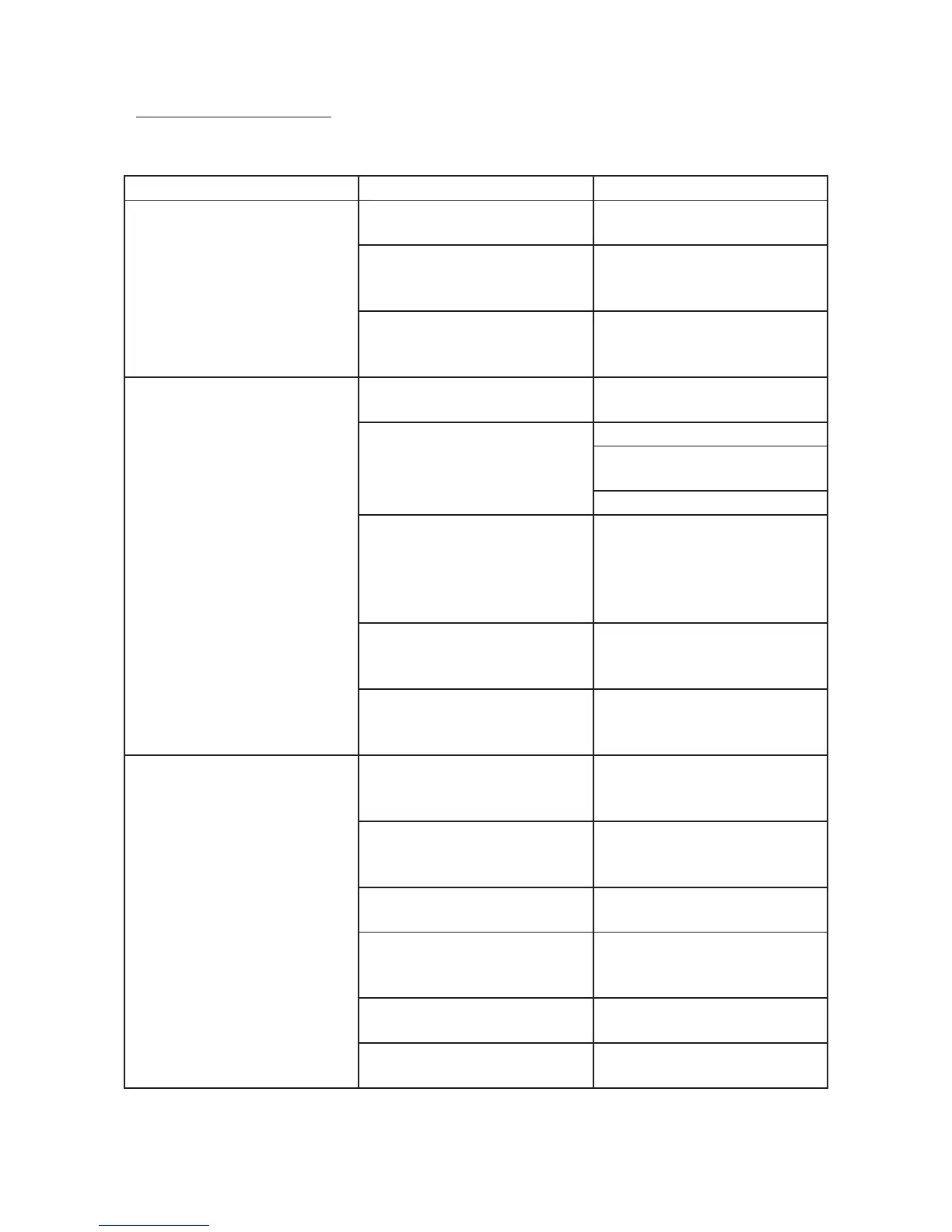
Problem Possible cause Solution
Slanted labelling
Machine not oriented compa-
red to the product
Verify the position of the ma-
chine
Alignment of the label in the
machine
Check the position of coil-hol-
der plate and paper guide rings
Wet product Place labels only on perfectly
dry products
Curling of the label or labelling
with air bubbles
Too high ejection speed Adjust the speed of the label-
ling machine
Uneven products’ surface
Mount optional adapters
Improve the product surface
quality whenever possible
Labelling machine speed lower
than the transport speed
Adjust the labelling machine
speed to the transport speed
or vice versa according to the
limit of the labelling machine
Too hot product Cool the products before label-
ling
Product surface excessively ir-
regular or made of material not
compatible with the used labels
Refer to the labels’ supplier
Application error
Dirty or wrongly adjusted
photocell
Adjust the reading sensor or
clean it if dirty
Label stop sensor wrongly
adjusted or dirty
Adjust the reading sensor or
clean it if dirty
Interspazio delle etichette
(GAP) irregolare
Check the labels
Badly oriented
Check that the orienter’s adju-
stment are t to the product to
be labelled
The surface of the product is
dirty
Just label clean product
Irregular speed
Check that the feeding speed of
the transports band is even


 To Next Page