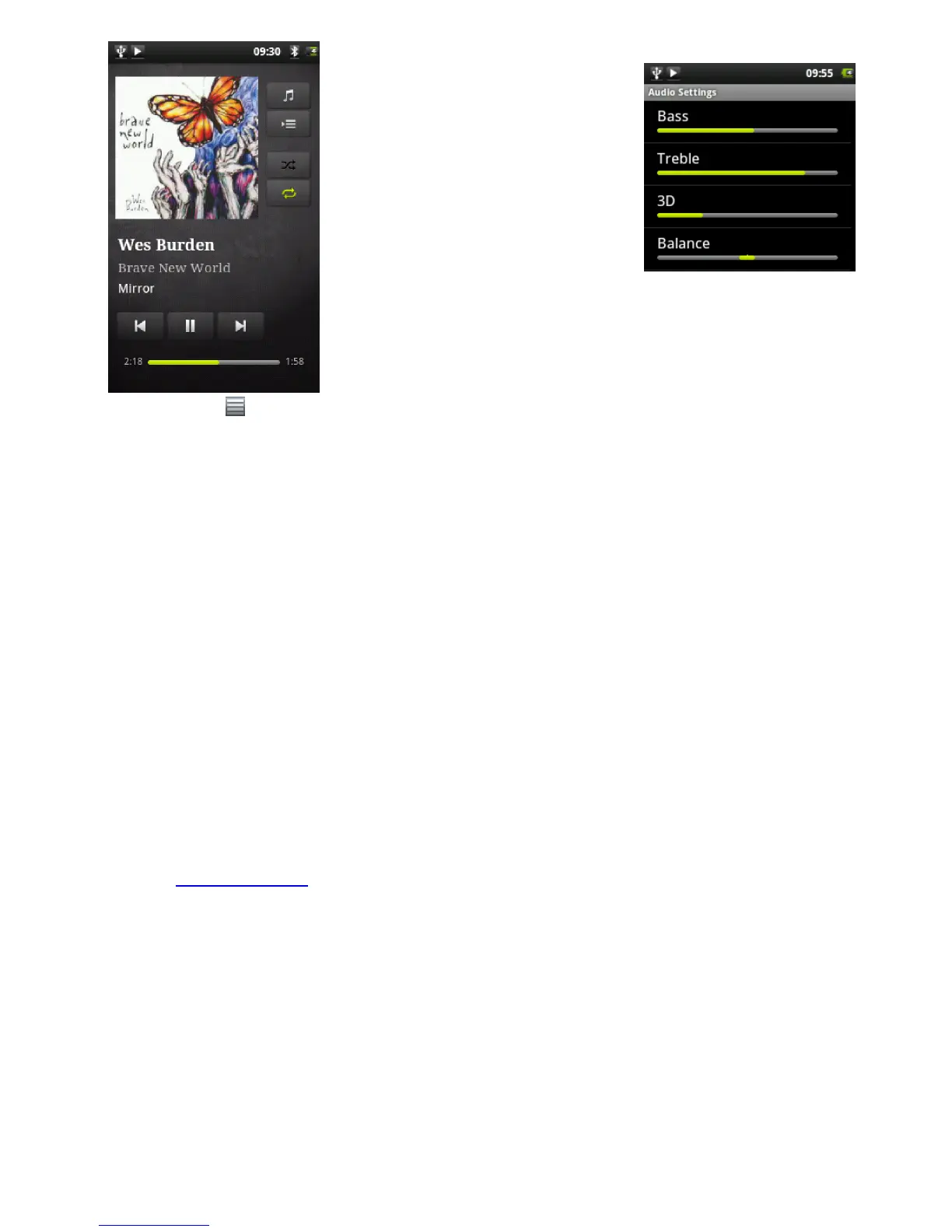
The music playback screen includes the standard playback controls.
You can tap on the progression bar to go
directly to a different location in the
song. The previous and next buttons can
be tapped once to jump to the beginning
of the current song or jump to the next
song, or held down to reverse or
advance rapidly through the current
song. The icons to the right of the album
cover do the following:
- Switch to the music selection screen
- View the current play list*
- Choose between repeating all songs in the current list, just one, and
not repeating.
Using the menu , you can choose additional items such as the Audio Settings (shown to the right)
or Party Shuffle. Selecting the party shuffle will create a playlist of several songs from the entire
music library. The idea is that while the list is playing, you can add more songs (find the desired
song, long hold on the item, and then select Add to playlist > Current playlist) and it will add it to
the end of the current party shuffle. Or, if you do nothing, the player will just add songs as needed
to keep the party going.
* In the list, it is possible to change the position of the upcoming songs by holding down on the icon on the left of the
song and dragging it to the desired position.
9.3. Transferring your CD collection to your ARCHOS
You can easily create music files with your computer by using Windows Media® Player 11 or higher
to convert your CDs to a playable format for your ARCHOS:
1. Place a music CD in your computer, and Windows® will ask you what action you would like to
perform.
2. Choose Rip music from CD, and Windows Media® Player will start ripping the CD. The songs
will be automatically extracted from the CD and encoded into the MP3 or WMA format,
according to what you chose in Windows Media® Player’s ripping options. The default format is
WMA.
3. Once this is done, the album will become part of your Music Library.
4. See Transferring Files to learn how to transfer the ripped music files onto the ARCHOS.
See your Windows Media® Player help instructions for more information.
Check the laws and regulations in your country or jurisdiction to know if private copying of your CDs
for your own use is authorized. Some music CDs have a special copy protection system that will not
allow Windows Media® Player to make music files from them.
10. VIEWING PHOTOS (GALLERY APP)
12/5/2010 ARCHOS 101 User Guide
archos.com/manuals/A101_EN_v1.1.htm 18/25













 To Next Page