CROPPING AN IMAGE
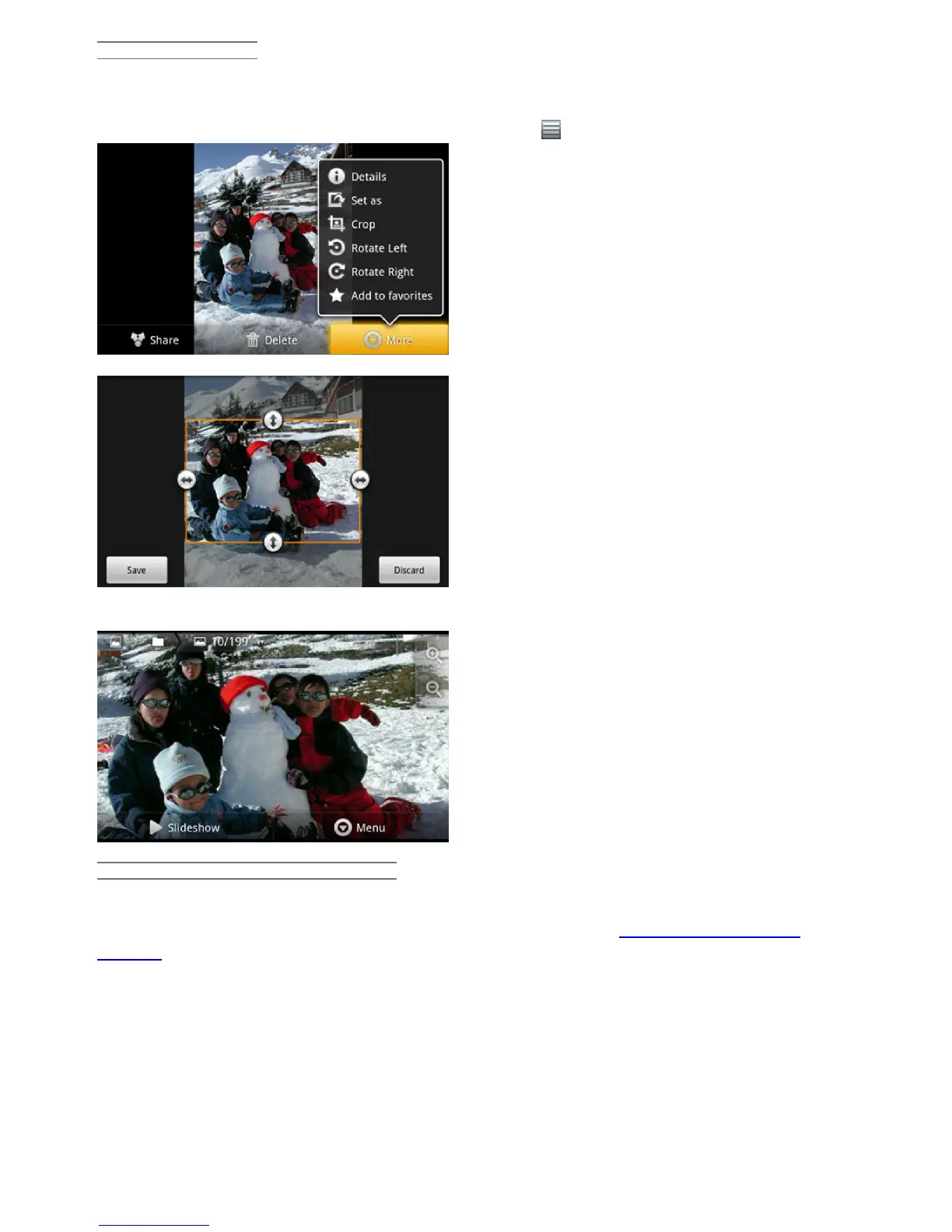
You can crop an image to fit the format of the screen or just show the more interesting parts. Don't
forget that you can also just rotate the ARCHOS itself and a vertically oriented picture will then fill up
the whole screen. To crop an image, tap on the menu icon and then on More. Select Crop.
Push and pull the arrows until it outlines the desired area.
Tap on Save and the results will be added as a new photo to the photo album. You can delete the
original image without fear of deleting the newly created one.
PUTTING PHOTOS ONTO YOUR ARCHOS
To copy photos from your camera to your ARCHOS you can connect your ARCHOS to the camera
directly or by first transferring the photos to your computer and then transferring them to the
ARCHOS. The ARCHOS 101 has a full-sized USB port that you can connect your digital camera to
directly.
11. MAKING VIDEO CONFERENCE CALLS
(FRING™ APP)
12/5/2010 ARCHOS 101 User Guide
archos.com/manuals/A101_EN_v1.1.htm 20/25













 To Next Page