- 14 -
Visual and acoustic settings
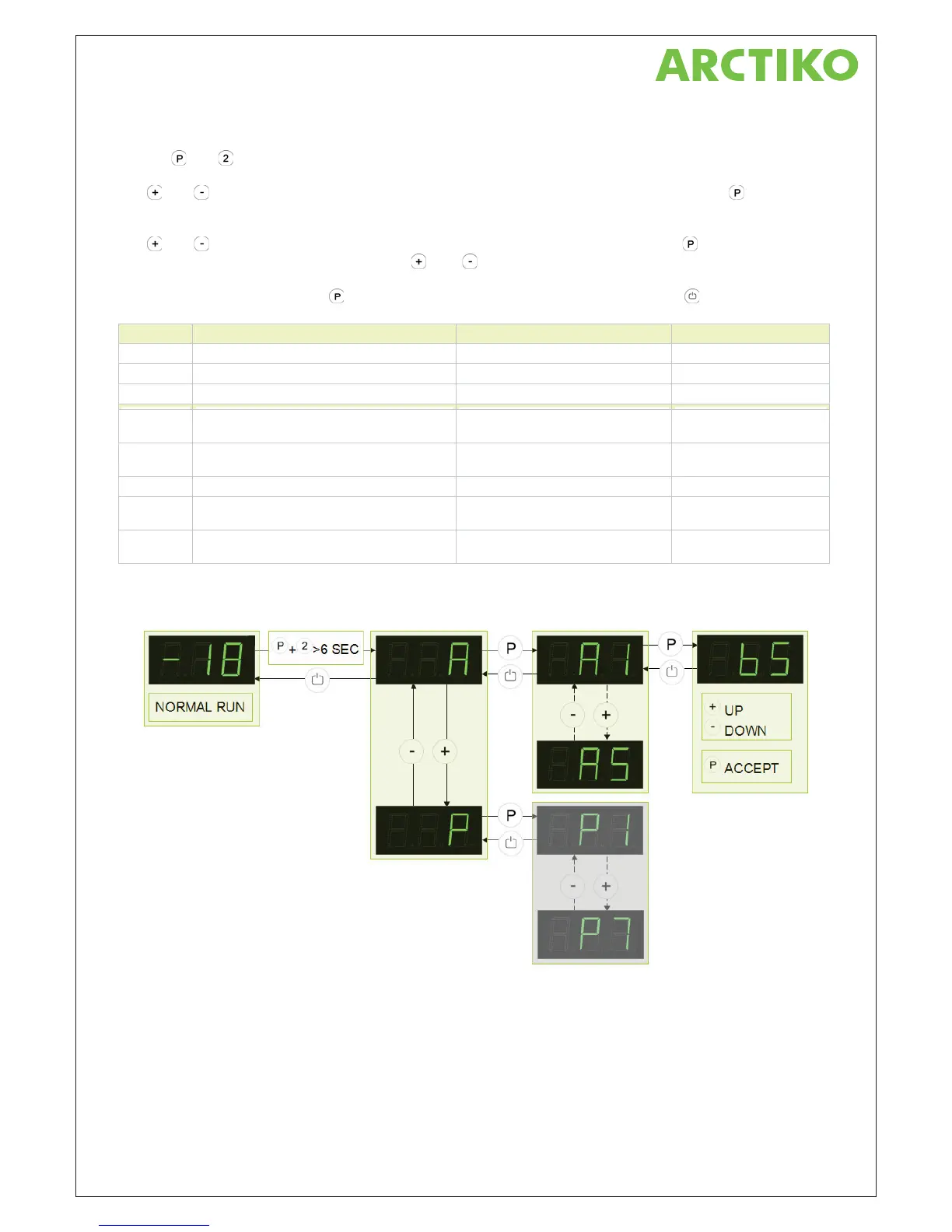
Push on and buttons at the same time in more than 6 sec. and the menu item [ A ] appears in the display.
With
and buttons it’s possible to look through the main menu item [ A ] and [ P ]. Push on button to
enter the submenu from the main menu items.
With
and buttons it’s possible to look through the submenus menu items. Push on button to enter the
desired menu item and adjust the setting with
and buttons.
To confirm the new setting, push
button. Leave the menu item and submenu with the button.
Parameter Description Setting range Default setting
.nim 5 nim 03 ot 5 emit gniraeppa-er mralA 3A
l ffo = 0 / no = l cirotsih mralA 4A
A5 Optional sensor input to surveillance system A = input A (1) / E = input E (5) A
P2 Temperature fluctuation filter * 00 = +0/-0 / 01 = +1/-1 / 02 = +2/-2
03 =
+3/-3 / 04 = +4/-4 / 05 = +5/-5
03
erutarepmet tniop-tes swohs = 0 gniyalpsiD 4P
1 = follows the room temperature
0
C F = tiehnerhaF / C = suisleC elacs erutarepmeT 5P
P6 Temperature offset on sensor input A
Forced moving of sensor measuring
-5 to +5 K / In steps of 0,5 K 0,0 K
P7 Temperature offset on sensor input E
Forced moving of sensor measuring
-5 to +5 K / In steps of 0,5 K 0,0 K
* When the temperature is within the limits, the set-point is displayed – when the temperature is outside
the limits, the current temperature is displayed.



 To Next Page