- 11 -
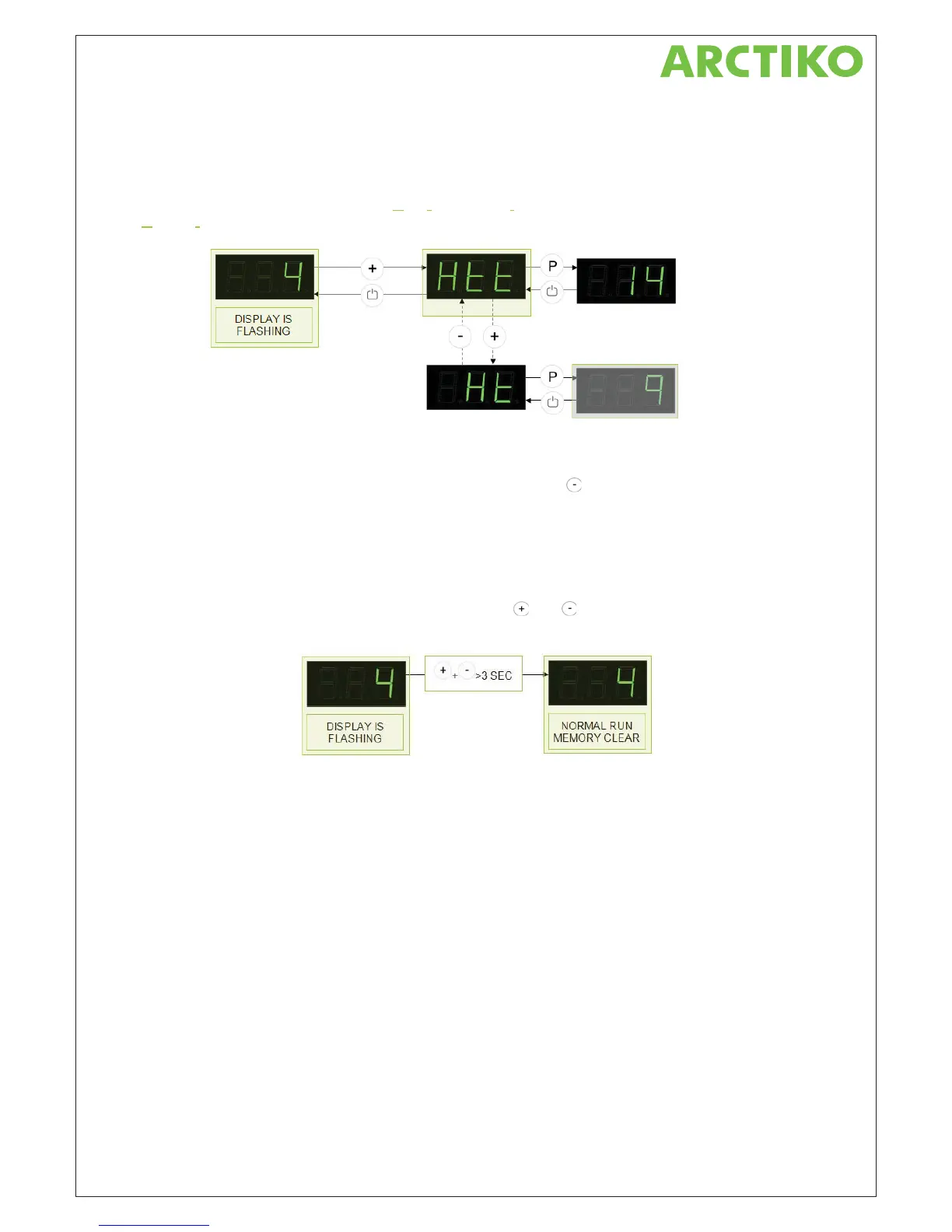
Operation of the alarm historic in example 2.
Like in example 1 situation 2, the display is flashing, which means a temperature has exceeded the alarm limit.
The operation is here the same.
But in this example the menu item Htt (Htt=H
igh temperature time) shows the total time on 14 hours and Ht
(Ht=H
ighest temperature) shows the temperature +9 °C, which were found in one of the two periods.
Log menu for low alarms
The procedure for the low alarm limit menu is exactly the same as the high alarm log. The menu for the time is
Ltt and Lt for the peak temperature. To access this menu, then press
button instead.
Resetting the log memory.
To stop the flashing display, the controller memory has to be reset.
NOTICE: When resetting the memory the high and low alarm data is vanished.
The resetting procedure is carried through when pressing the
and button at the same time in 3 seconds.
After 3 seconds a prolonged beep sounds and the memory is clear. The display stops now flashing.
Notice: It’s always possible to read the alarm historic, even when the key pad is locked. If the alarm historic has
to be reset, it’s only possible when the key pad is unlocked.
Other details in the alarm log
Displaying alarm duration
The alarm log displays the total length of time (in whole minutes) during which the temperature has exceeded
the alarm limits for one or more periods.
After 9 hours and 59 minutes, 9.59 is shown in the display, but if the number of hours rises into double figures,
the decimal point is moved to the right and the number displayed with only a single decimal place.
10 hours and 38 minutes will for example be displayed as 10.3. The number shown will not change to 10.4 until
10 hours and 40 minutes has been reached.
If the alarm persists until the number of hours reaches triple figures, the decimal point is again shifted to the
right and the time is displayed in whole hours. 100 hours and 59 minutes will thus be shown on the display as
100.



 To Next Page