- 5 -
Temperature surveillance and displaying
Introduction of the temperature surveillance and temperature displaying
The products temperature surveillance system and presentation of temperatures is especially
developed to achieve an individual and flexibility surveillance of the cabinet and storage goods.
Each single system can be used separately or they can be set in an interaction together and brings the
complete surveillance system to a higher level.
Temperature surveillance system and alarm output:
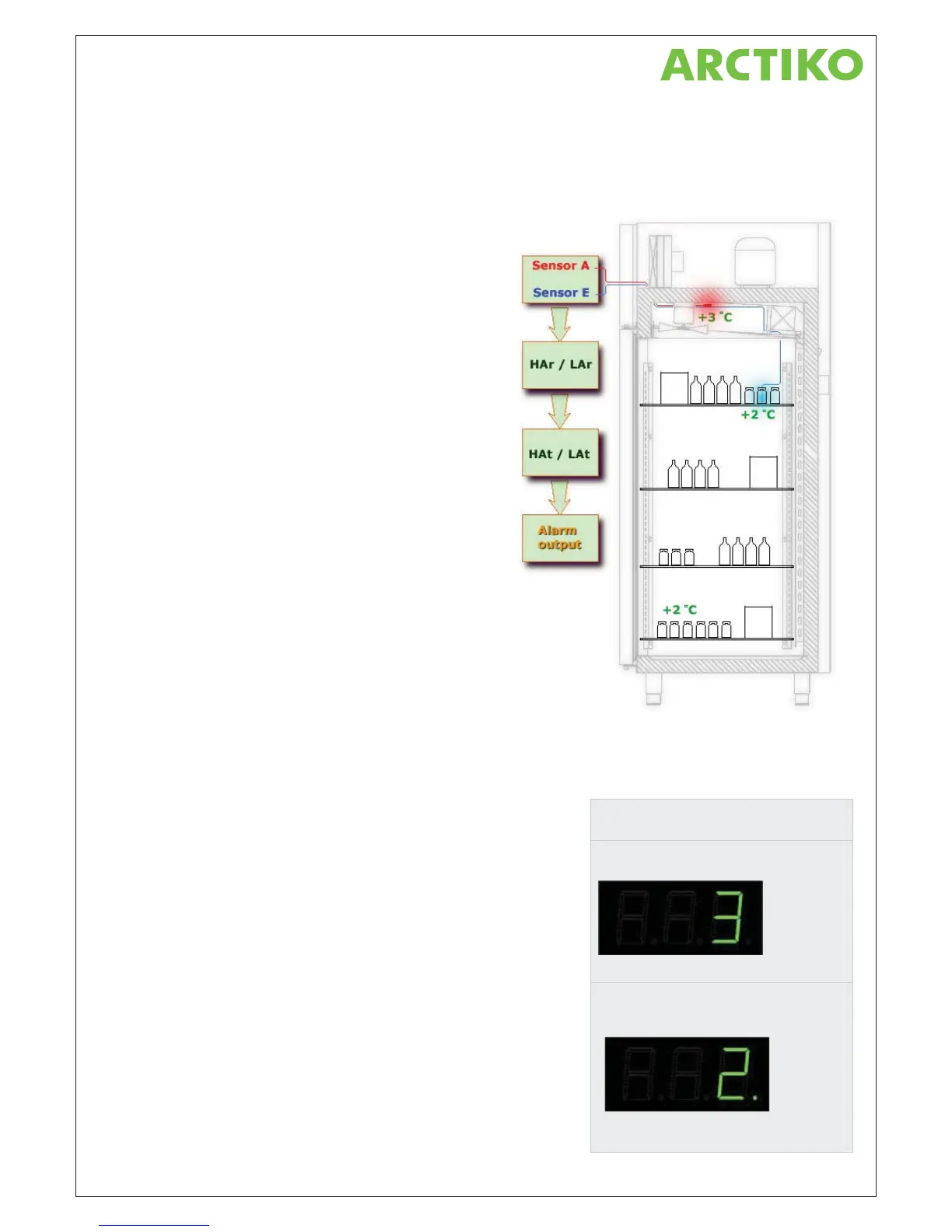
The products surveillance system is managing the
potential free alarm output. At the same time an acoustic
sound appears by alarms from the cabinet.
It’s an optional to choose between two different sensors to
activate the alarm. Each sensor has its own setting
parameters like limits and delay time.
Optional sensors for the surveillance system:
The two sensors are placed in different places inside the
cabinet and each se
nsor has there own advantages.
The first sensor controls always the cooling system and has
the name ”room sensor”.
The second sensor can be placed directly between the
stored goods or e.g. it could be placed inside a small can or
box like on the illustration to the right.
To make use of the extra sensor for the surveillance
system, it’s necessary to change the controllers setting in
the controllers setting menu.
Notice: Default setting for the surveillance system is the room sensor.
Presentation of the cabinet temperature:
The temperature in the display is presenting the cabinet temperature.
In all products the room sensor is always
placed at the warmest spot. This results in the best condition for
cooling.
If the extra sensor is installed in the product the sensor c
an
be
presented in the display instead of the original room sensor.
When the display is presenting the temperature from the extra sensor,
a little green lamp is glowing in the right corner. In that case it’s also
common to experience temperature fluctuations, which comes from the
cooling system when it’s running or not.
Notice: The change has only effect on the presentation of the
temperature in the display. The controller is still using the room sensor
for controlling the cooling system.
Here below are two examples. Both examples
are taken from the picture above…
Room sensor:
The temperature is made by the room sensor
and results in…
The +3 °C is measured at top of the cabinet.
Extra sensor:
The temperature is made by the extra sensor
and as an indication of using the extra sensor.
The little green lamp is also glowing …
The +2 °C is measured inside a can on the
shelves.



 To Next Page