18
Examples from factory default settings:
Child, Sensor, and Anterior = 0.09sec
Adult, Film, and Posterior = 0.38sec
When necessary, use the Increase or Decrease buttons to adjust the time in 0.01 second
increments. Adjusted exposure settings may be saved, replacing factory settings (see
Section 4.9 Technique Factors Settings and Adjustments
).
4.4 Ready the Device
To prevent accidental radiation exposure, properly position the patient and operator
before readying the NOMAD Pro 2.
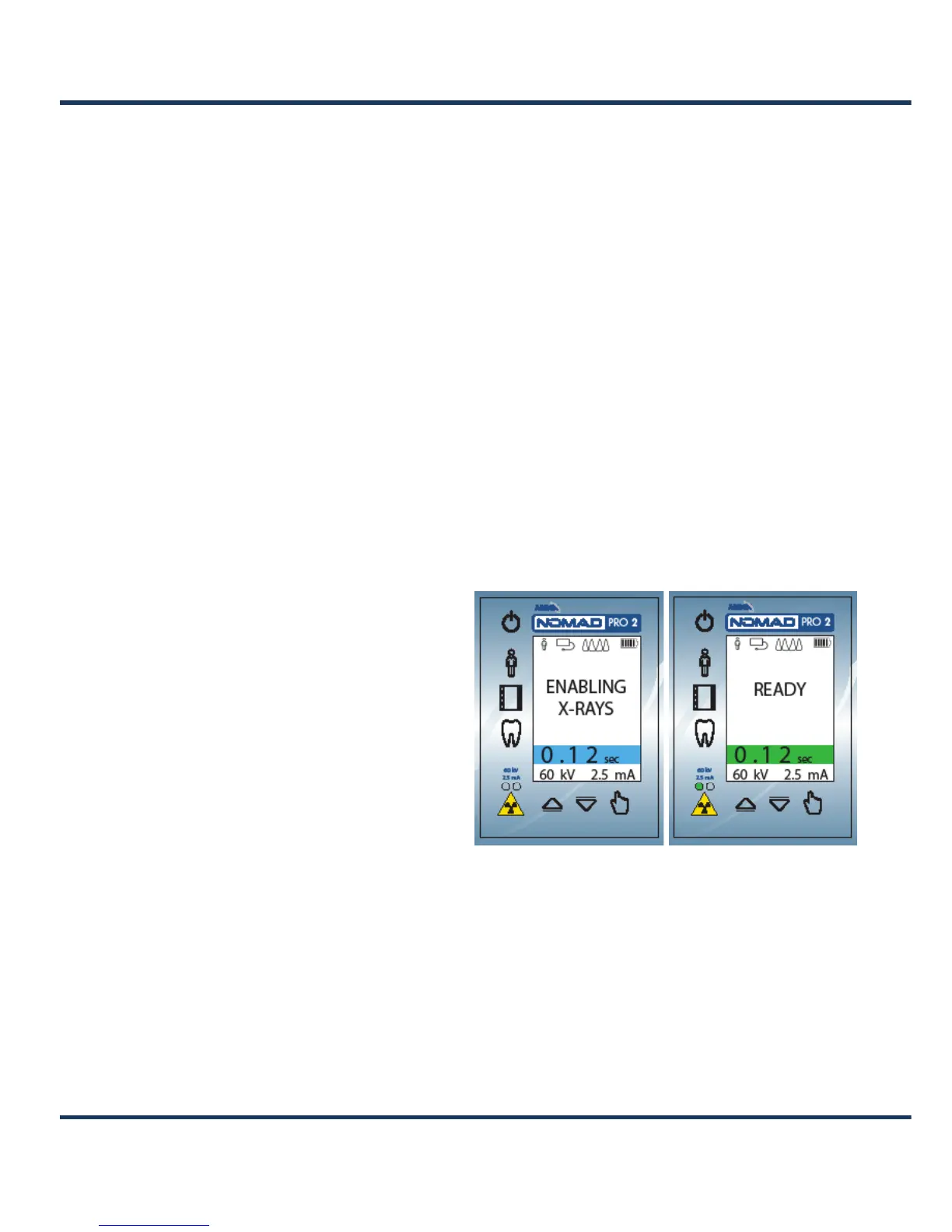
Press and release the trigger once to ready the device. The device will briefly display an
Enabling X-rays message before indicating Ready.
NOTE: As a safety precaution, if the trigger is held longer than one second or pulled
a second time while still in the Enabling X-rays state, the device will not transition to
the Ready state. (This is to prevent an accidental activation of the device by unintended
triggering.)
The illuminated green LED, the
message Ready on the display panel,
and a double tone alert confirm that
NOMAD Pro 2 is prepared to fire
X-rays. The Ready state continues
until either an exposure is initiated
or timeout occurs after 15 seconds of
inactivity (accompanied by a double
tone and the return to the at-rest
state).
While the device is in the Ready
state, any changes to the settings
(pressing any user interface panel
button) will end the state.
Enabling X-rays Alert Ready Alert


 To Next Page