PAGE 3 • 25630AB-INS-RB • 800.798.0813 • NEED ASSISTANCE? • ARIESAUTOMOTIVE.COM
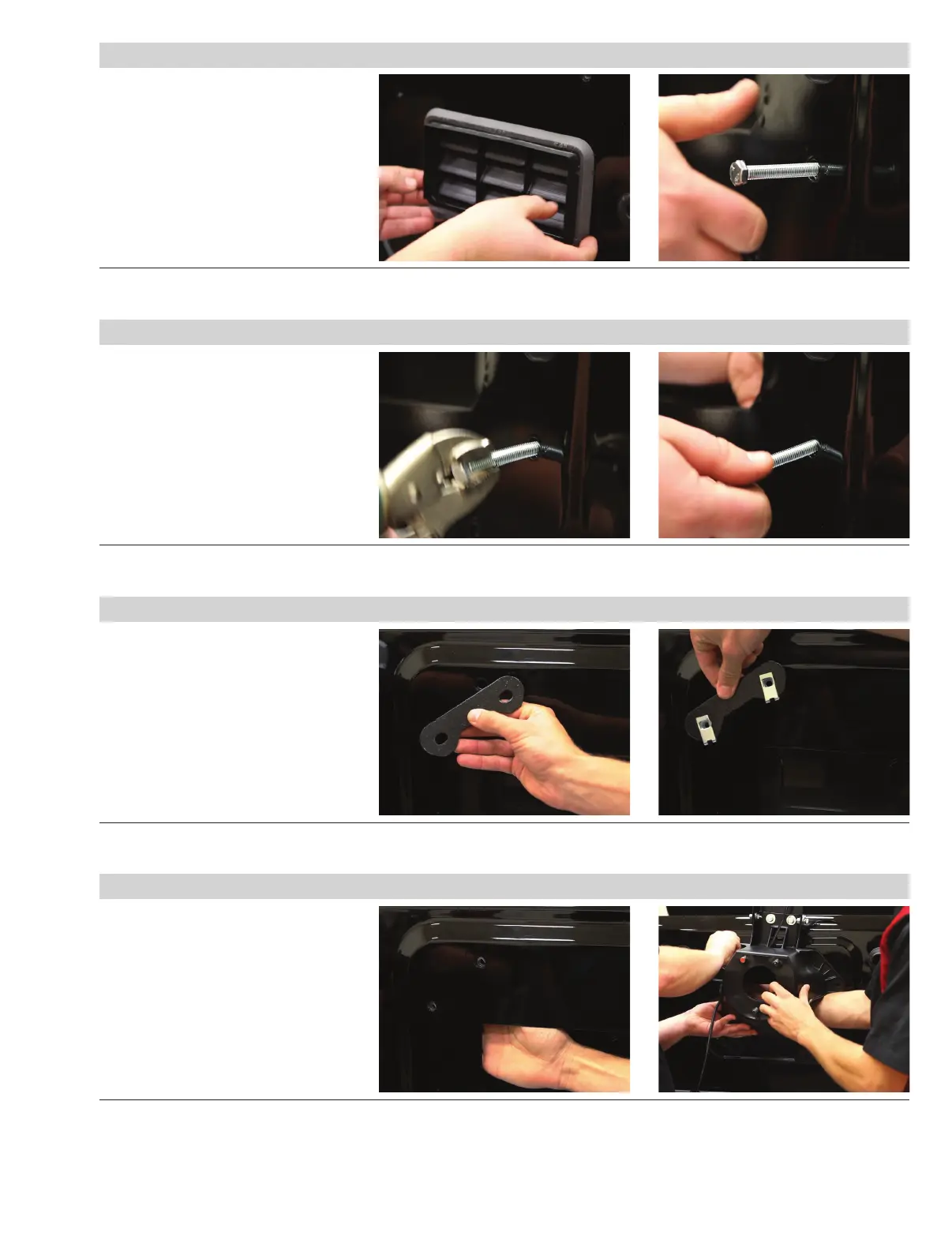
Step 5
To install the new support brackets, the
factory weld nut must be removed.
Remove the louvered plastic cover that
was exposed when the carrier was
removed.
Locate one of the M8 x 60mm bolts in
the hardware kit and partially thread it
into one of the eight factory weld nuts.
Step 6
Clamp the back of the bolt with a vise-
grip for additional leverage and pry the
bolt up and down until the weld nut
breaks free.
Reach through access panel to grab the
weld nut and unthread the M8 bolt.
Repeat this for all eight nuts.
Step 7
Locate one of the reinforcement brackets
in the hardware pack.
Install two 8mm clip nuts over the ends
of the bracket.
Repeat this on all four brackets.
Step 8
With the clip nuts installed on the
brackets, align the flat side of the clip
nuts with the holes inside the door panel.
Have an assistant lift the tire carrier back
into position over the reinforcement
bracket and loosely install the M8 flat
washer, lock washer and 40mm hex bolt.
Repeat this for all four support brackets


 To Next Page