EasyManua.ls Logo

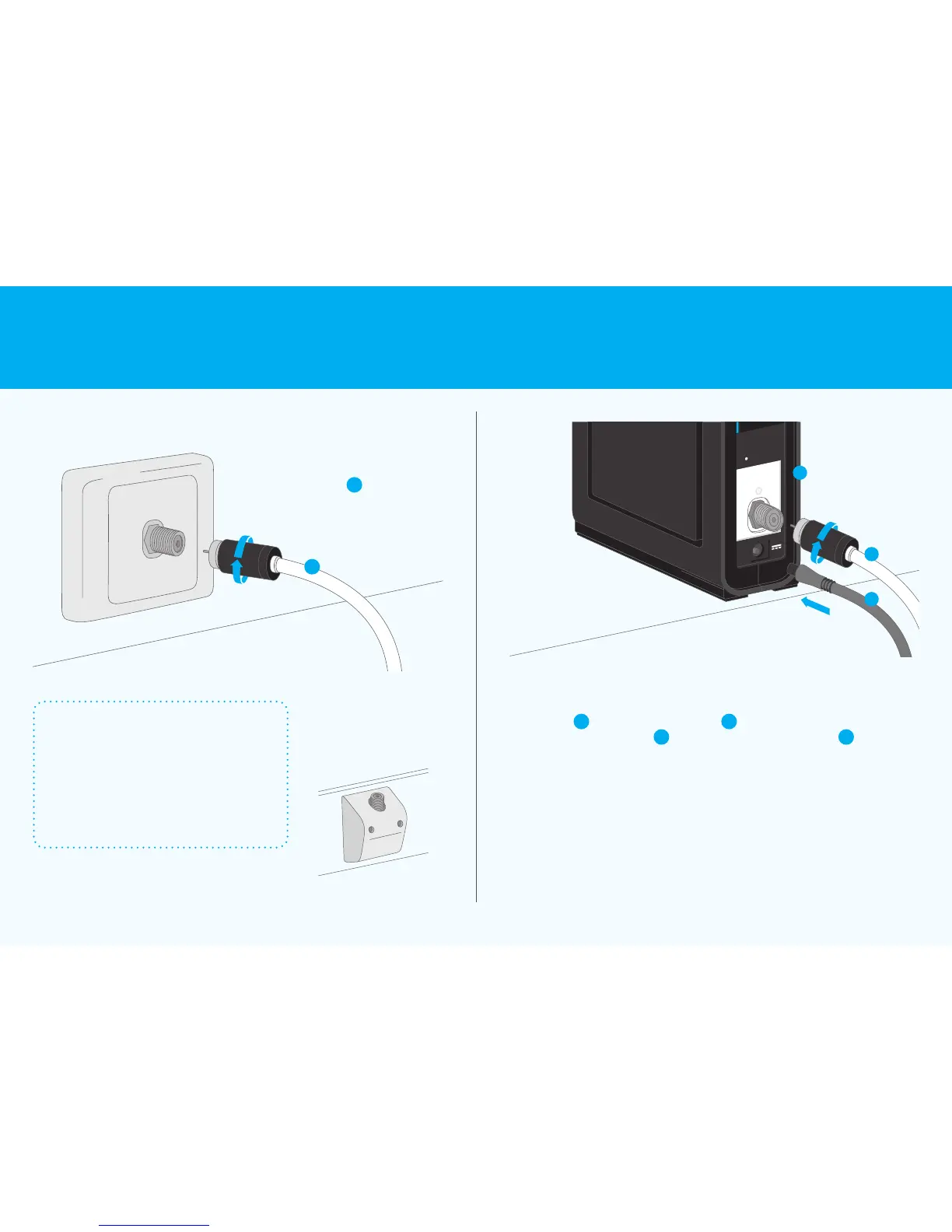
Arris CM8200 - 1 Find your cable wall outlet; Identifying the correct wall outlet; 2 Connect the nbn connection box; Connecting the white cable and power adaptor

Arris CM8200
8 pages
Print Icon
To Next Page IconTo Next Page
To Previous Page IconTo Previous Page
Loading...
B
1 2
Locate your wall outlet
inside your premises and
connect one end of the
white cable
B
Connect the other end of the
white cable
B
to the back of
your nbn
connectionbox
A
Connect the power adaptor
C
to the back of the
nbn
connection box
A
Find your cable
wall outlet
Connect the
nbn
connection box
UNI-D1
Property of nbn
Please do not remove
Reset
A
B
C
Which cable wall outlet istheright one?
If you have multiple wall outlets, you’ll
know if the correct one is connected
to the nbn
network when all four
lights on the front panel of the
nbn
connection box turn solid green
(seemore on page 7).
Your cable wall outlet
may also look like this and
be branded with logos of
other network owners

B
5 Connection without pay TV or existing cable internet Connecting to the nbn
network 6

Related product manuals