A
E
Only connect compatible equipment
Make sure only compatible equipment, such as your service provider’s
gateway (router), is connected to your nbn
™
connection box. Talk to
your service provider for more information.
See your service provider’s equipment guide for further
instructions on:
• Connecting your nbn
™
connection box to the gateway (router)
• Connecting your landline phone and/or other equipment
• Making sure all your equipment is connected and working correctly
65
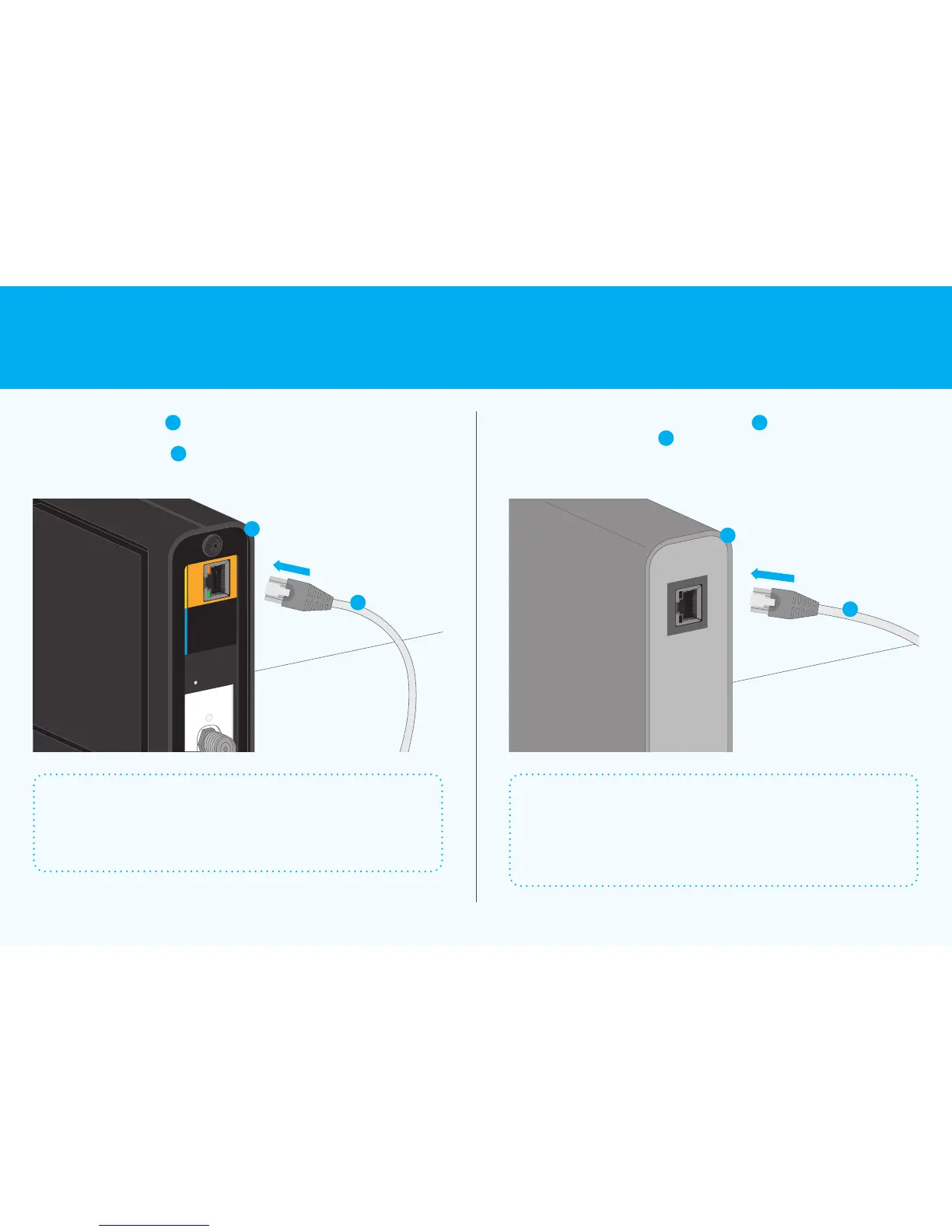
Insert an Ethernet cable
E
into
the yellow panel on the back of
thenbn
™
connection box
A
Connect the other end of the Ethernet cable
E
to the back of your service
provider’s gateway (router)
F
–youcan then connect the gateway (router)
to other equipment such as your computer or phone
Your service provider’s equipment may dier from the illustration below
Connect to your
other equipment
Connect your service
provider’s gateway (router)
9 Connection without pay TV or existing cable internet Connecting to the nbn
™
network 10











 To Next Page