14 Using your ViasatHD box
Installation
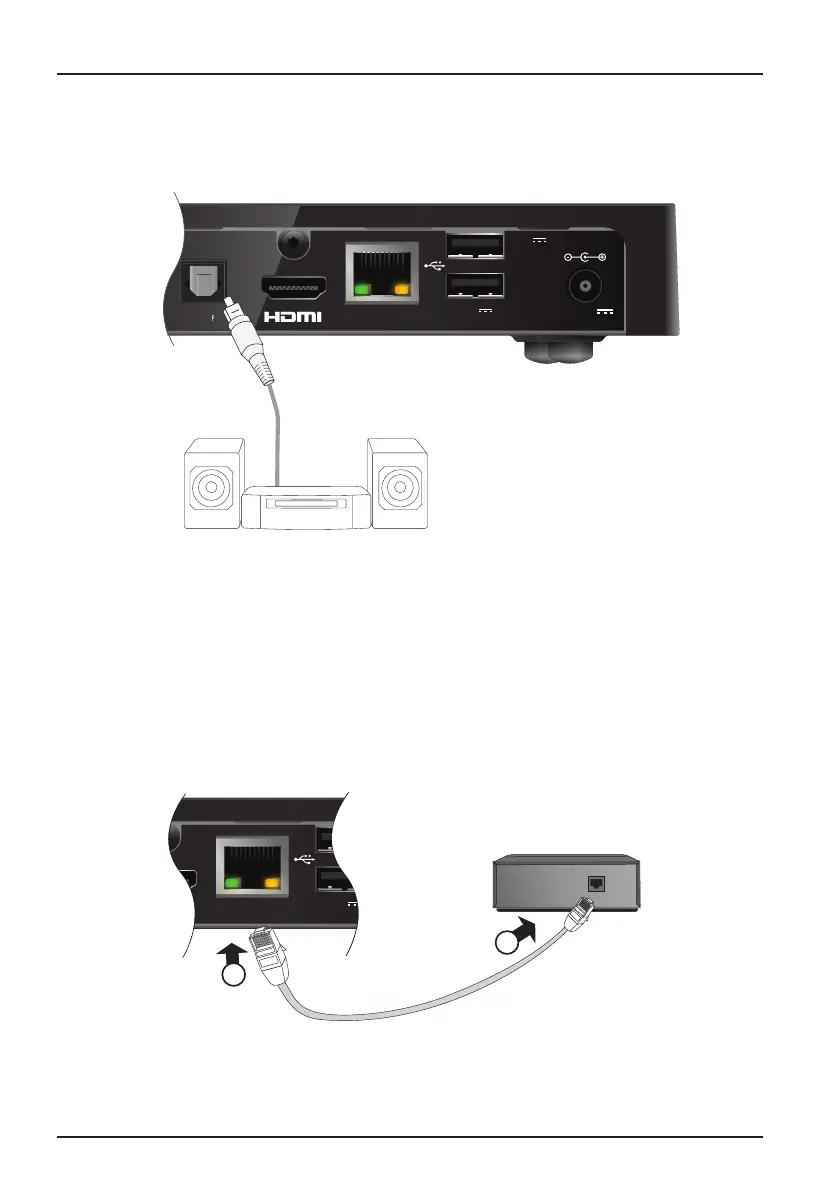
❖ Optional audio connection
This diagram shows the optional audio connection you can make to
improve the sound. You can connect to stereo audio equipment as shown.
ETHERNET
A/V SPDIF
P
+12V DC
2.5A
ETHERNET
A/V SPDIF
5V DC
500mA MAX
5V DC
1A MAX
❖ Optional Ethernet connection
If you want to connect your box to use Viaplay service over internet, use the supplied
Ethernet cable as shown below. Connect the cable between your box and an Ethernet
port on your local network router.
ETHERNET
+12V DC
2.5A
ETHERNET
5V DC
500mA MAX
5V DC
1A MAX
2
1
Optical digital-audio lead
(not supplied)
Supplied Ethernet cable
Local network router


 To Next Page
 Loading...