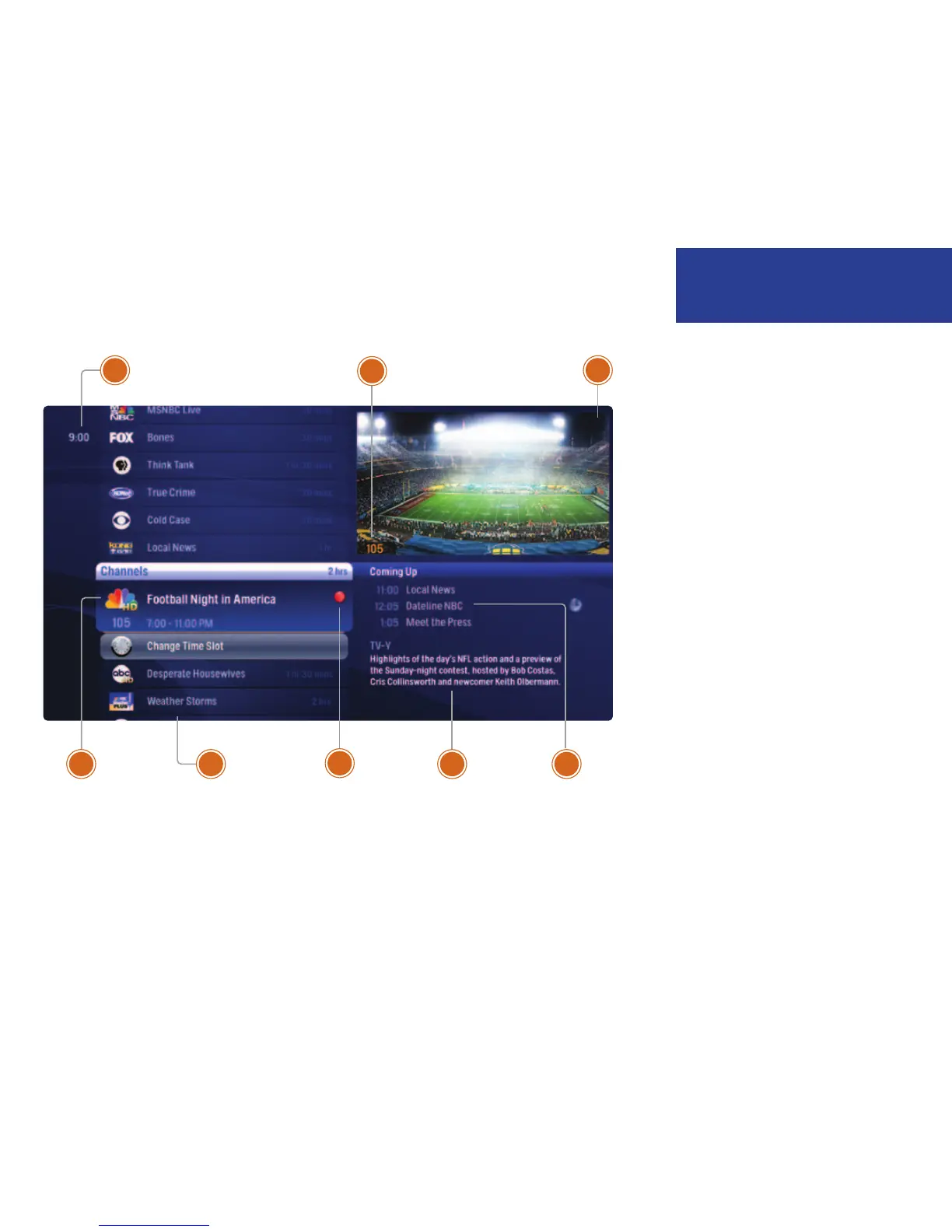
1 TIME
With the current time, you’ll know when
your show begins.
2 CURRENT CHANNEL
Displays the channel that is playing in
Mini TV. If the program is recorded, an
icon will display the current status - i.e.:
play or pause.
3 MINI TV
Even when channel surfing, Mini TV
always keeps you in the action.
4 CENTER FOCUS
The current selection is in the center
of the menu. Pressing OK on this item
brings up an action menu.
5 VERTICAL LIST
When you’re in channels, the vertical list
displays all available shows.
6 PROGRAM STATUS
These small icons let you know the
status of a recorded show or scheduled
recording.
7 PROGRAM INFORMATION
The program information about the item
in center focus.
8 PREVIEW PANEL
Displays the shows coming up on the
channel in center focus.
1
3
2
54 87
6
The Moxi Menu
5
Welcome to Moxi



 To Next Page