Front Panel
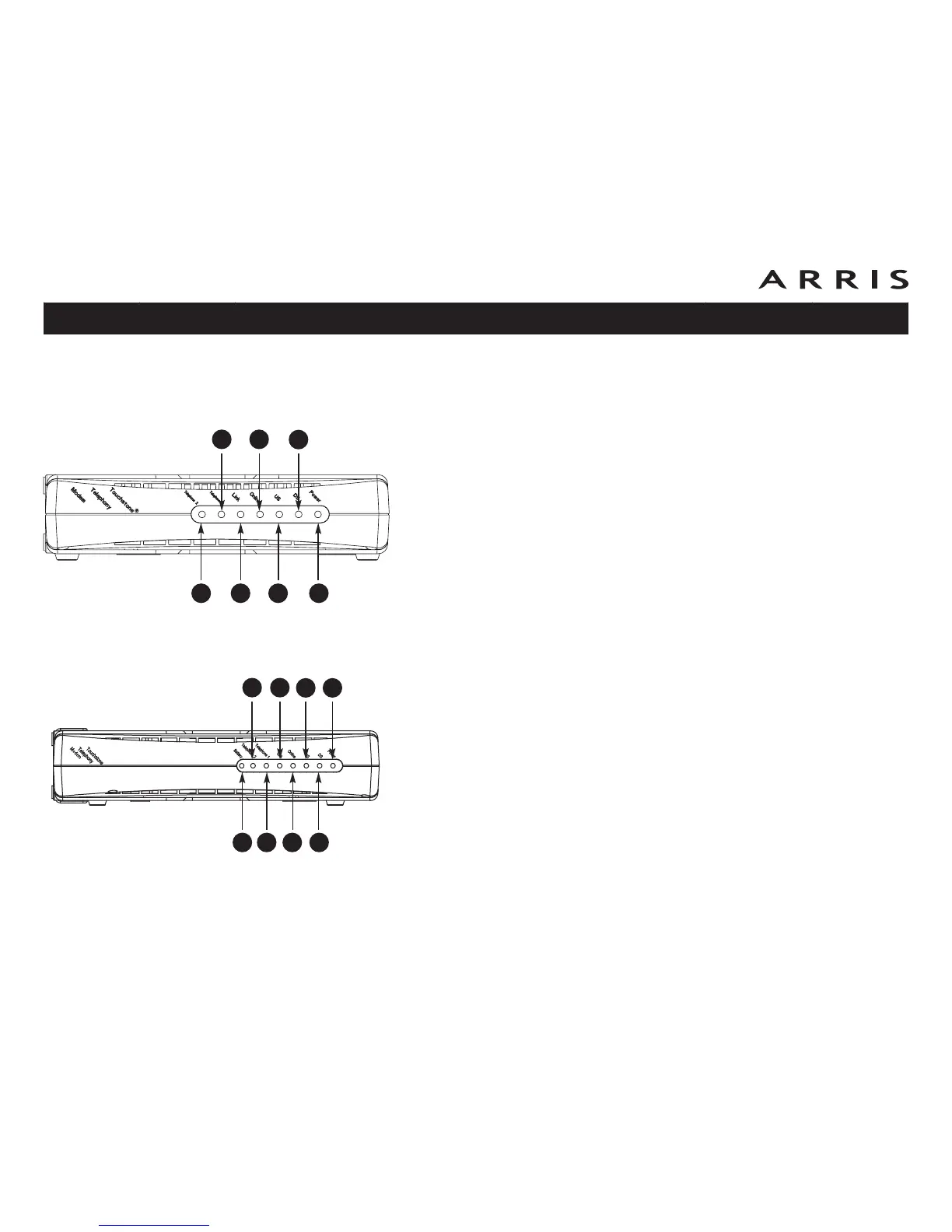
The front of the Telephony Modem provides the following indicators.
TM602A/B/S Front Panel
The front of the Telephony Modem has the following indicators:
A Telephone 2: indicates the status of line 2
B Telephone 1: indicates the status of line 1
C Link: indicates Ethernet (all models) or USB (if equipped) connectivity
between the Telephony Modem and computer
D Online: indicates internet data transmission status
E US: indicates upstream connectivity
F DS: indicates downstream connectivity
G Power: indicates whether AC power is available to the unit
TM602G Front Panel
The front of the Telephony Modem has the following indicators:
A Battery: indicates status of the battery in the Telephony Modem
B Telephone 2: indicates status of line 2
C Telephone 1: indicates status of line 1
D Link: indicates Ethernet or USB (if equipped) connectivity between the Tele-
phony Modem and computer
E Online: indicates internet data transmission status
F US: indicates upstream connectivity
G DS: indicates downstream connectivity
H Power: indicates whether AC power is available to the unit
Touchstone TM602 Telephony Modem User’s Guide
Safety
Getting
Started
Battery
Installation Installation
USB
Drivers
Ethernet
Configuration Usage Troubleshooting Glossary
23
A
B
C
D
E
F
G
A
B
C
D
E
F
G
H
TM602A/B/S
TM602G














 To Next Page