Chapter 6: Operate the Telephony Modem
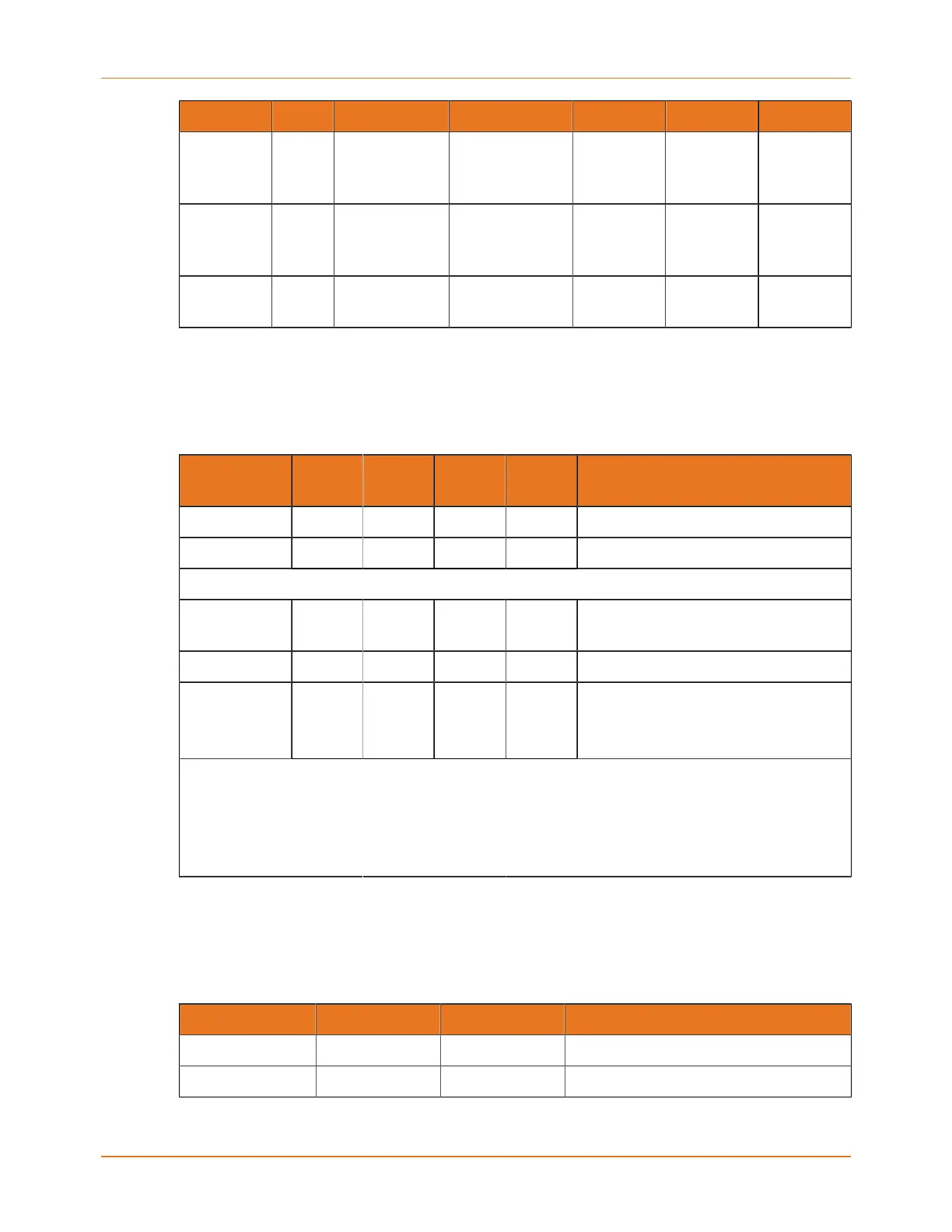
Mode Power US/DS Online Link Tel 1/2/3/4 Battery
power
mode
Off =
disabled
Flash =
battery
bad or low
No AC
power / no
battery
Off Off Off Off Off Off
Firmware
upgrade
On Flash On (normal
operation)
(normal
operation)
(normal
operation)
Telephony startup sequence
Table 2: Light patterns that occur during telephony startup
Power, DS,
US, Online
Tel 1 Tel 2 Tel 3 Tel 4 Description
Off Off Off Off Off No power to modem
Flash Flash Flash Flash Flash Power-on self test
Cable modem startup sequence (page 34) begins
On Flash Off Off Off Retrieving telephone
network information
On Off Flash Off Off Retrieving telephone line information
On Flash Flash Flash Flash Activating telephone service
Note: Only phone lines
being provisioned will flash.
Normal operation begins
Note: The DS and US indicators flash yellow during startup and turn green if the
Telephony Modem establishes an ultra-high speed connection. For some service
providers, these colors may be reversed. The Link indicator may be yellow or
green, as determined by the table in Patterns: normal operation (page 33).
Cable modem startup sequence
Table 3: Light patterns that occur during cable modem startup
DS US Online Description
Flash Off Off Downstream search
On Flash Off Downstream found; upstream search
Touchstone TM804 Telephony Modem User Guide STANDARD Revision 1.2 34















 To Next Page