Product Overview
VMS1100 Hybrid QAM/IP Video Media Server • Installation and Operation Manual
-095-25654 x.1 This document is uncontrolled pending incorporation in an ARRIS CMS
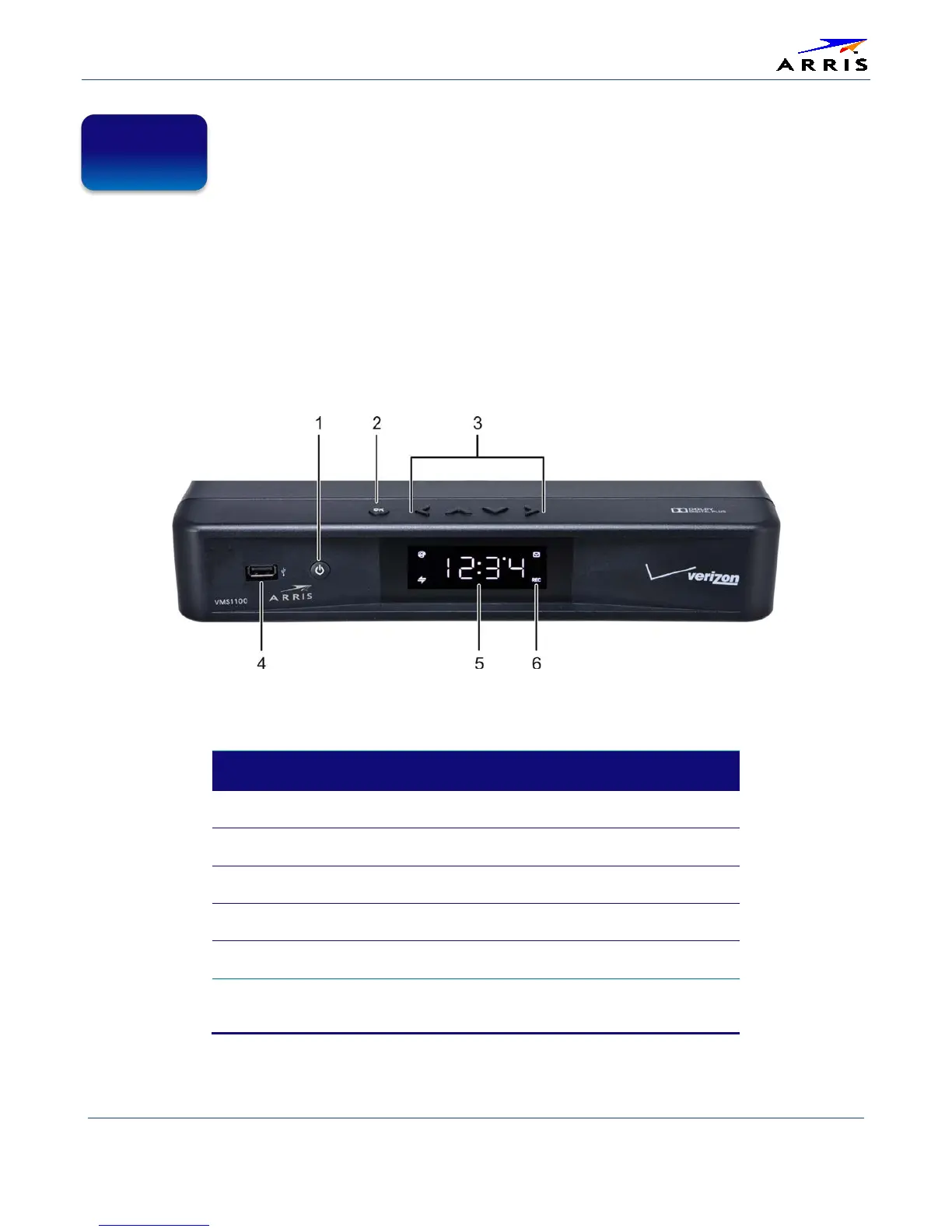
Top & Front Panels
The VMS1100 top panel controls provide functional navigation if the remote control is not available or
temporarily out of service.
The VMS1100 front panel provides the mechanical Power/Standby button and the LED Clock/Channel
number display. A USB 2.0 port is provided, though some USB connectors are not enabled and require the
support of application software.
Figure 2 – VMS1100 Front View
Table 3 – Top & Front Panel Controls
*This option may not be enabled.
BUTTON/PORT DESCRIPTION
1 Power button
Turns ON/OFF power to the media server
2 OK button
Selects or confirms the current onscreen option
3 Cursor buttons
Navigates the onscreen menus
4 USB 2.0 Port*
Connects to a high-speed peripheral device
5 Display Panel
Shows the time or channel number
6 Display Icons
Message, Recording, Home Network, Software
Update


 To Next Page