Step 17
SR30hw
30
● Parts Needed For ●
Ridge Cap & Panels
●●
●●
● 6869 Ridge Cap (1)
●●
●●
● 7743 Roof Panel (2)
● ●
● ●
● 9087 Left Roof Panel (1)
● ●
● ●
● 9086 Right Roof Panel (1)
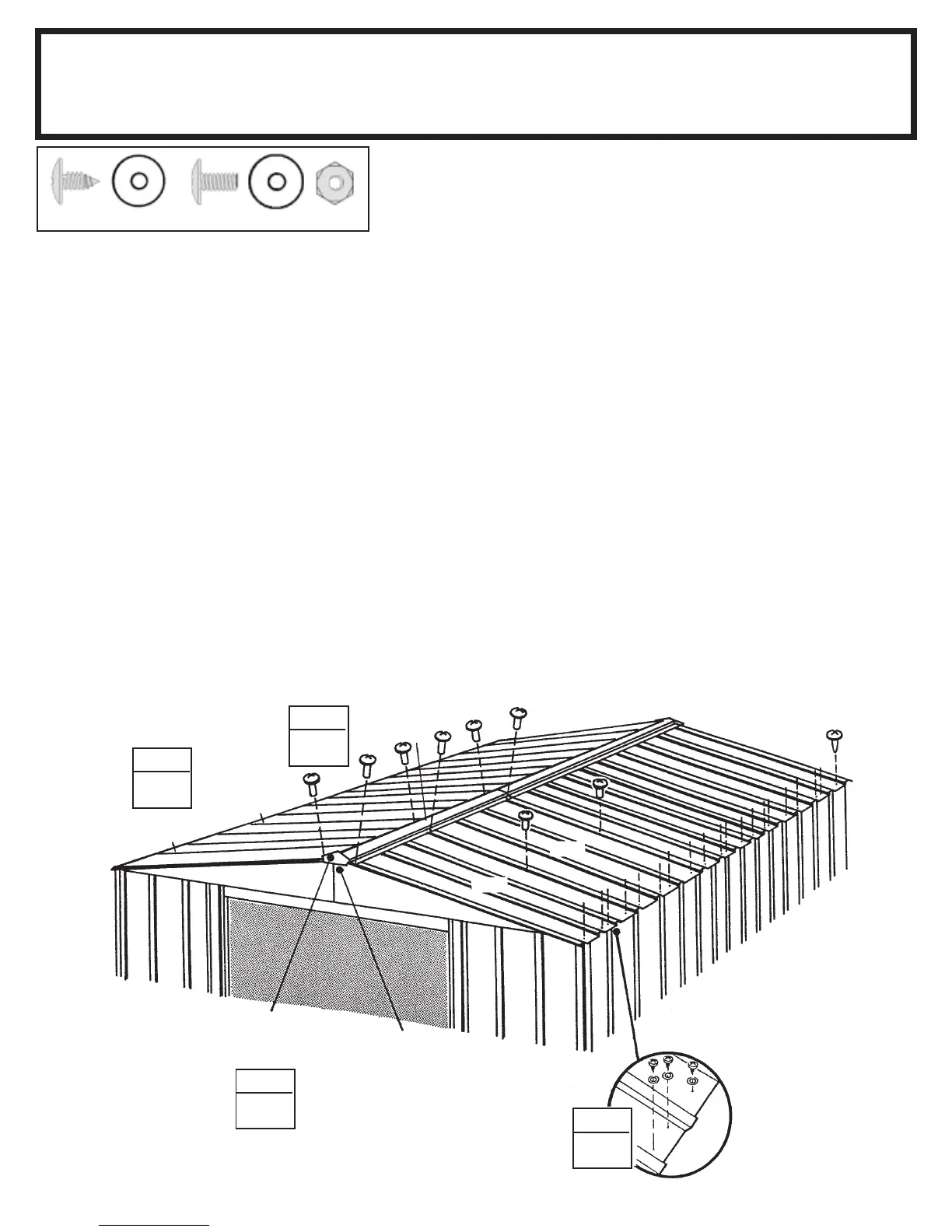
1 Install the third ridge cap 6869
overlapping the second ridge cap
while installing the remaining two
roof panels 7743.
Hint: The bolts on
the ridge cap need to be left loose to
move the ridge cap to the side and
overlap the ribs of the next roof panel.
Continue weather stripping the ridge.
2 Install the left 9087 and right roof
panel 9086 as you unroll the weather
stripping tape, and press it down.
Fasten the lower end of the panels to
the side wall angles using screws
and washers.
3 Fasten the roof panel ribs, peak
cap and ridge cap together using
bolts and nuts.
Peak Cap
STEP
2
STEP
2
7743
STEP
3
STEP
1
Cut
Weather Stripping
and Fold Under
9087
7743
9086
6869
(72)
(22)


 To Next Page