Page 12 · 5400 Series TECSource User’s Manual
Connecting to the TECSource
Arroyo Instruments carries two cable assemblies specifically designed for
connecting the TECSource to temperature controlled fixtures or devices. The
1264 is a two meter cable, capable of up to 30A of TEC current, designed for
use with Arroyo Instruments mounts, and has 17W2 connectors on both ends,
one male and one female. The 1265 is identical to the 1264, except that it has
bare wires on the device end, allowing you to terminate the cable with your own
connector or mount.
See the manual for your fixture for additional safety and operational information.
Front Panel Operation
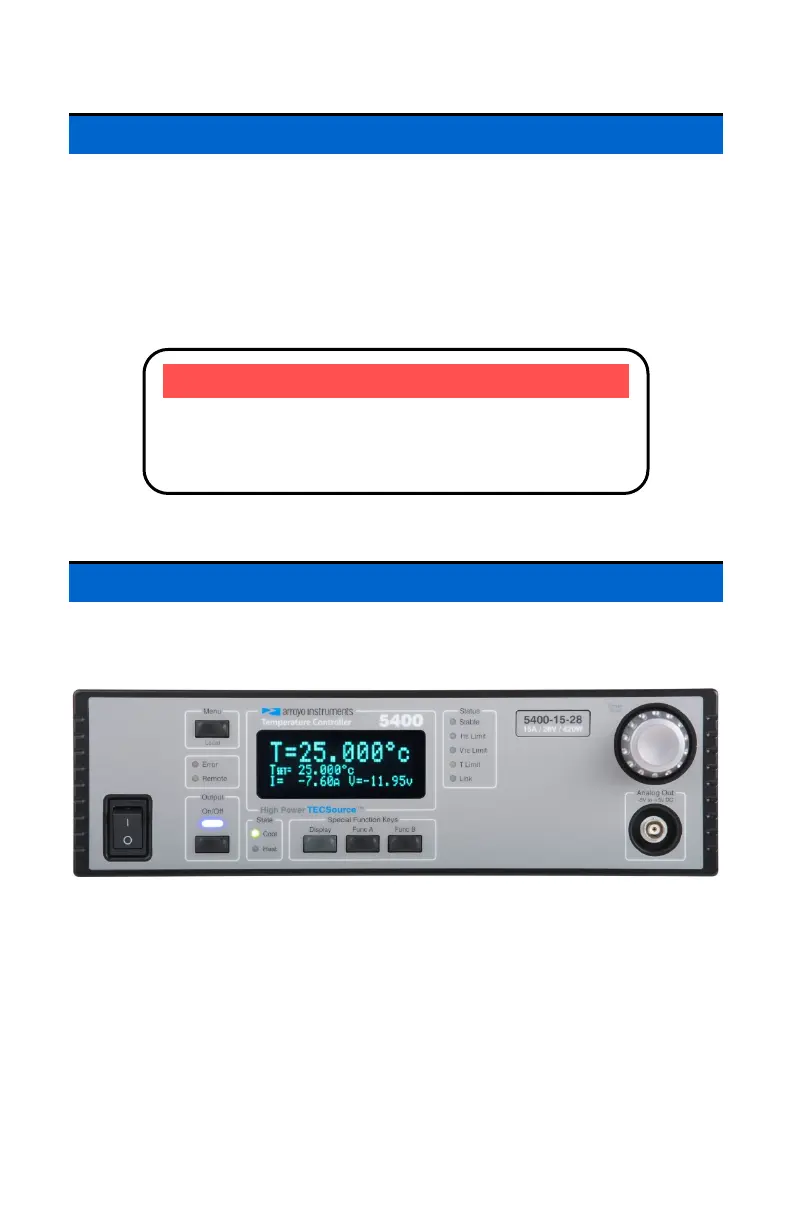
Operation of the TECSource is very straightforward. The sections below will
help familiarize you with the front panel, the display, and the menu structure.
The front panel is designed for simplicity in operation. There are six buttons on
the front panel: Output, Menu, Display, Func A, Func B, and the adjustment
knob button.
The Output button is used to turn the output on and off. Whenever the output is
on, the blue Output On LED will be lit.
The Menu button is used to enter the TECSource menu. When in remote mode,
it acts as a Local button, returning the instrument to local mode.
NOTE
Connections to the TECSource and the fixture must be
secure. Tighten any screws on the connectors, and
make sure all connections are in good condition.



 To Next Page