5400 Series TECSource User’s Manual · Page 53
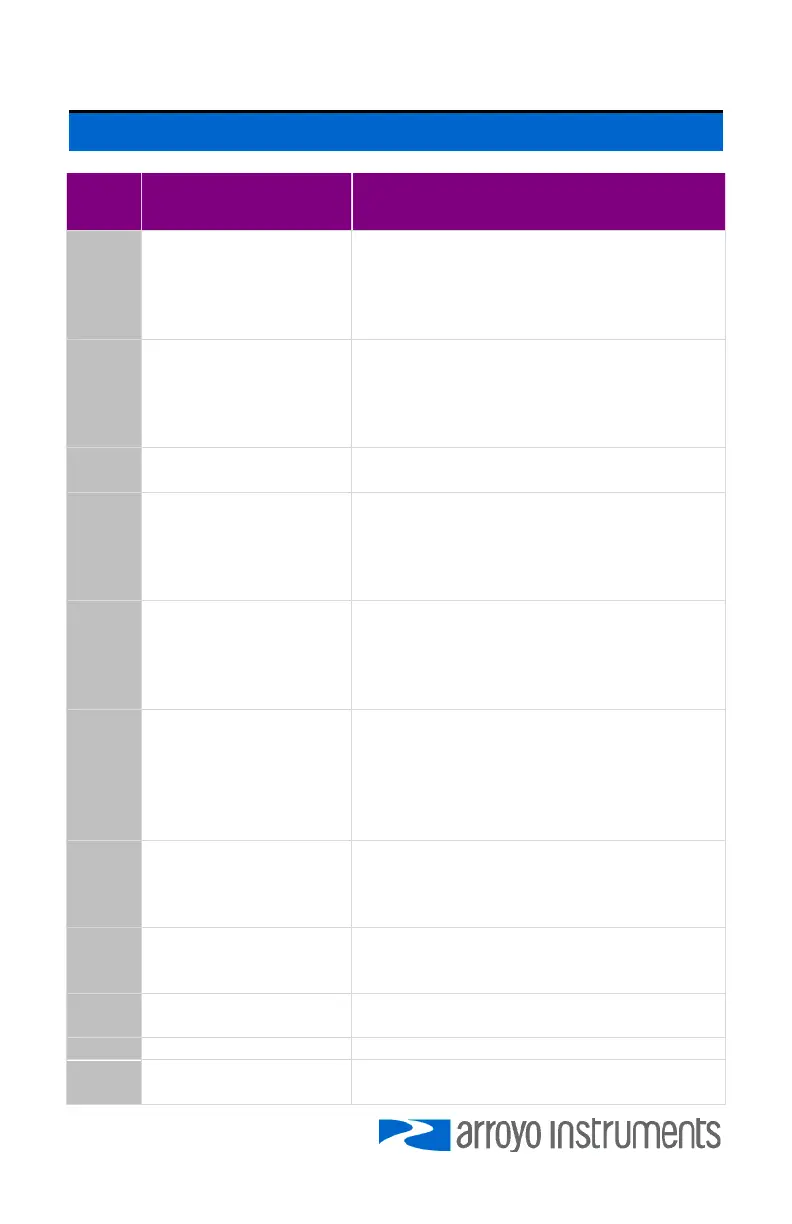
Error Messages
Error
Code
Description Cause
E-003 Factory EEPROM Error
The factory section of the EEPROM, which
contains the calibration data and system
configuration systems, is corrupted. The
unit must be returned to the factory for
repair.
E-004 User EEPROM Error
The user settings section of the EEPROM,
which contains user editable set points,
modes, etc., is corrupted. To repair the
corruption, the unit was reset to factory
defaults.
E-005 User Reset EEPROM
The user reset the unit to factory defaults.
This is a notification message only.
E-006 User EEPROM Failed
The user settings section of the EEPROM,
which contains user editable set points,
modes, etc., is corrupted. The corruption
cannot be repaired automatically, please
contact the factory for assistance.
E-007 Preset EEPROM Failed
The preset settings section of the EEPROM,
which contains user section defaults, is
corrupted. The corruption cannot be
repaired automatically, please contact the
factory for assistance.
E-008 User EEPROM Failed
The user settings section of the EEPROM,
which contains user editable set points,
modes, etc., is corrupted, and the preset
section cannot restore it. The corruption
cannot be repaired automatically, please
contact the factory for assistance.
E-009 Output Disabled
Added to every ERR? or ERRSTR? query
when the EEPROM is corrupted. The output
cannot be turned on until the corruption
has been repaired.
E-100 General Error
The error code is non-specific, and is
generally used when no other error code is
suitable.
E-102 Message too long
The message is too long to process
(USB/Serial only).
E-104 Type not allowed The RADix type was invalid
E-123 Path not found
The message used an invalid path
command (USB/Serial only).



 To Next Page