AMU Installation
9
2.4. Getting Started
Before installation,
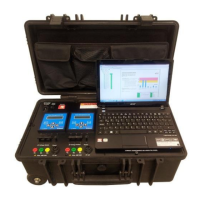
1. Ensure that AMT Toolkit includes all cables (Voltage measurement cables: Fluke AC285
SureGrip™ Alligator Clips, current measurement cables, power cable, cross cable for
ethernet connection), computer and its charging adapter.
2. Ensure that battery power of the computer is not low or charging cable is connected to
the computer.
3. Check the Motor Control Cabinet (MCC) for installation of split-core current
transformers (CTs) which are included within AMT Toolkit.
a. If it is suitable then check the motor nameplate for rated current in order to use
appropriate transformation ratio.
b. If not, check usability of existing CTs.
4. Check whether the software license is valid to be able to generate a report.
2.5. Installation
The process of connecting the AMT Toolkit system to the motor requires caution to avoid
personal injury and damage to the AMT Toolkit. Follow the steps below to collect all three
phases of the current and voltages:
AMT Toolkit Connections
1. Before setting up the AMT Toolkit, ensure that motor is not running and all switches are
off.
2. Plug the power cable.
3. Connect cross cable to the computer.


 To Next Page