Aruba 7030 Mobility Controller | Installation Guide Installation | 21
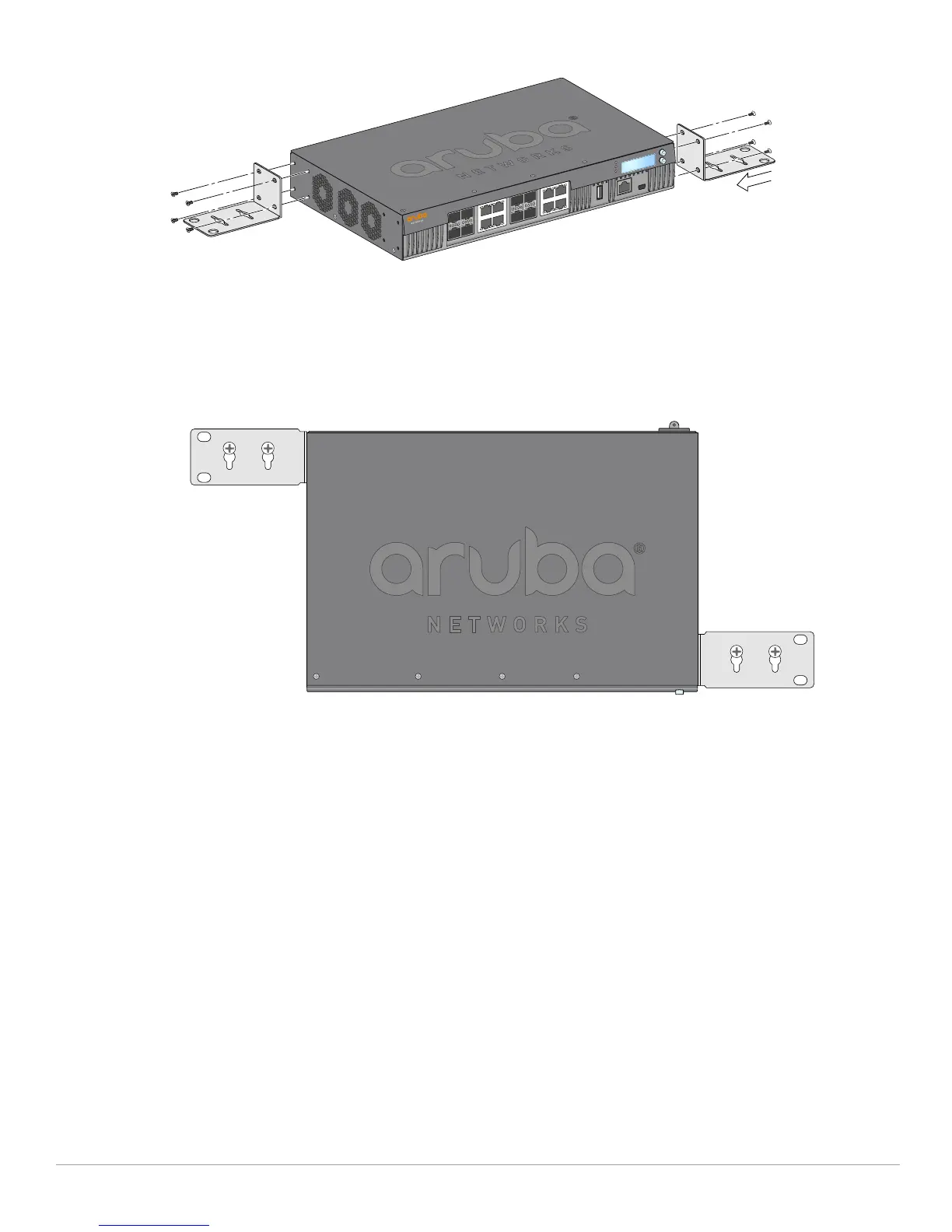
Figure 4 Attaching the Wall Mount Brackets
2. After you have chosen a mounting location, mark the locations on the wall where you intend to make
mounting holes.
3. Create the holes and insert wall anchors if your installation requires them.
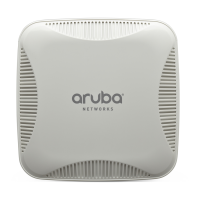
4. Align the mounting bracket holes with the holes you created in the wall (see Figure 11).
Figure 5 Wall Mounting
5. Use appropriate screws to secure the 7030 controller.
Connecting and Disconnecting the AC Power Cord
Once you have installed the 7030 controller, you are ready to power On the device. The 7030 controller is
not equipped with an On/Off switch. The device will power On when the AC power cord is connected to the
AC inlet and an AC power outlet.
Connecting the AC Power Cord
To connect the AC power cord to the 7030 controller:
1. Lift the power cord retaining clip so that it is not blocking the AC power connector.
2. Insert the coupler end of the AC power cord into the AC power connector on the AC inlet.
3. Lower the power cord retaining clip over the AC power cord.
The 7030 controller should now be receiving power.


 To Next Page