EN 13
Switching on and power setting
The power can be set to 9 different levels. The hob also has a ‘boost’ setting which is indicated
by a ‘P’ on the display (see ‘Boost’).
1. Place the pan in the middle of a cooking zone.
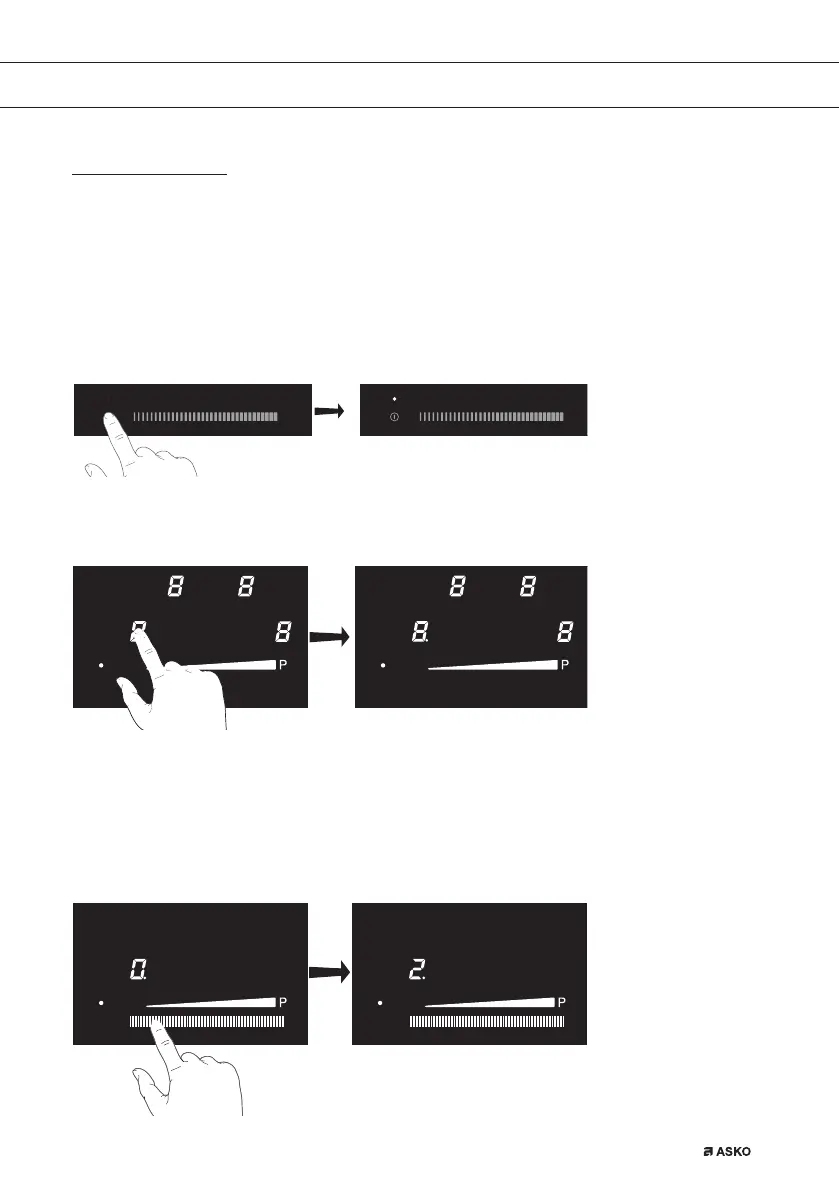
2. Press the On/Off key for at least 1 second.
▷ A single beep sounds. The hob is on and cooking zone displays are illuminated.
• If no further action or setting is taken within the following 20 seconds, the hob is
automatically switched off.
3. Press the cooking zone key of the desired cooking zone.
▷ A single beep sounds. The dot directly below the corresponding display will
light up and is assigned to the visual slide control.
4. Slide your finger over the slide control to set the desired setting.
▷ The cooking zone starts automatically at the level that has been set.
• Set a higher or lower power by sliding with your finger over the slide control.
• The cooking zones have 9 levels and a boost level (P).
• During the following 10 seconds the slider key is switched off and the decimal dot
disappears. The selected cooking zone is active.
OPERATION


 To Next Page