EN 16
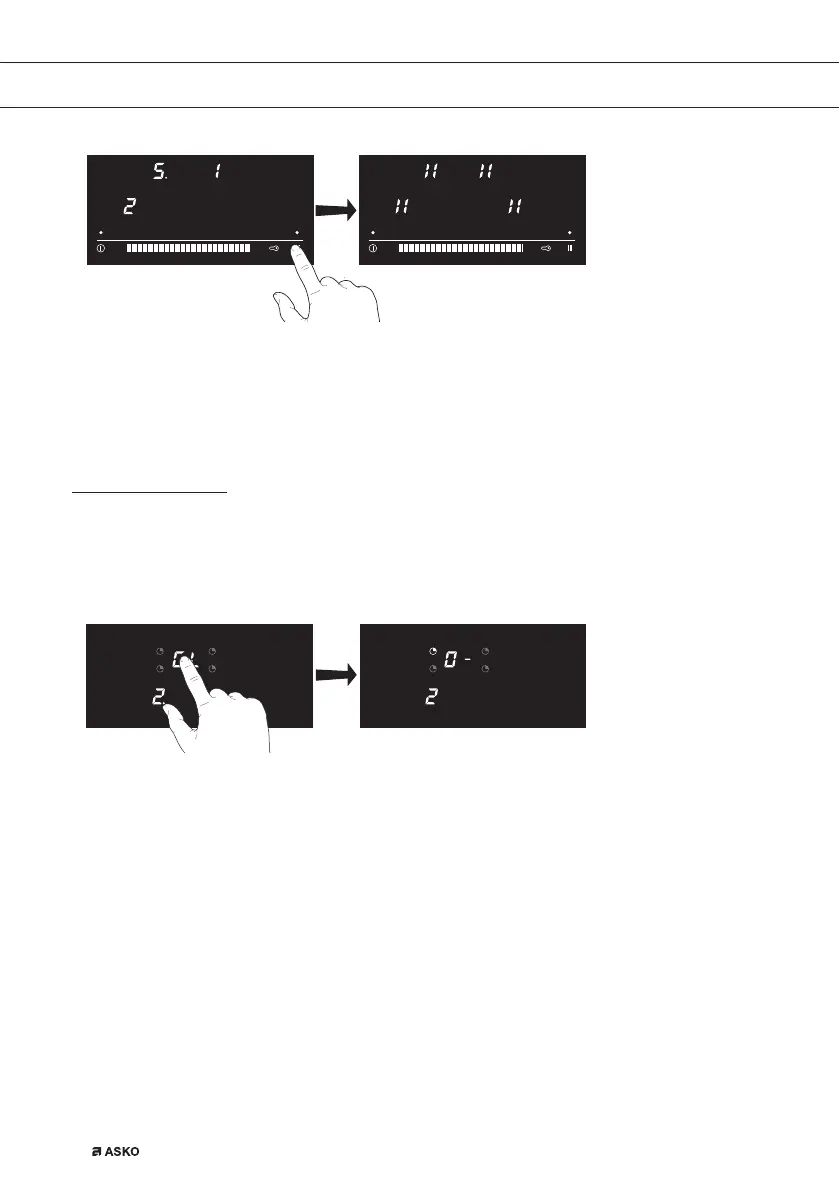
De-activate pause mode
1. Press the pause key until you hear a beep.
▷ The indicator above the pause key will flash.
2. Press somewhere on the slide control or cooking level display.
▷ The active settings can be read in the display.
Cooking-timer/alarm
Setting the cooking-timer
1. Select the desired cooking zone and set the power level.
2. Touch the timer display.
▷ The timer indicator of the relevant cooking zone flashes.
3. Use the slide control to adjust the desired time.
▷ First set a value in the right display and wait until the figure no longer flashes and a
dash appears in the left display. Then set the left display (if a preset time longer than 9
minutes is required).
▷ The selected cooking zone will switch off automatically once the set time has elapsed.
Setting the kitchen timer
1. Touch the timer display.
▷ Make sure that all the cooking zones are switched off.
2. Use the slide control to adjust the desired time.
▷ First set a value in the right display and wait until the figure no longer flashes and a
dash appears in the left display. Then set the left display (if a preset time longer than 9
minutes is required).
▷ An alarm signal will sound once the set time has elapsed.
3. Press the slide control to switch off the signal.
OPERATION


 To Next Page