EasyManua.ls Logo

Astralpool 78550 - Page 19

Astralpool 78550
31 pages
Print Icon
To Next Page IconTo Next Page
To Previous Page IconTo Previous Page
Loading...
4. USAGE AND OPERATION
18
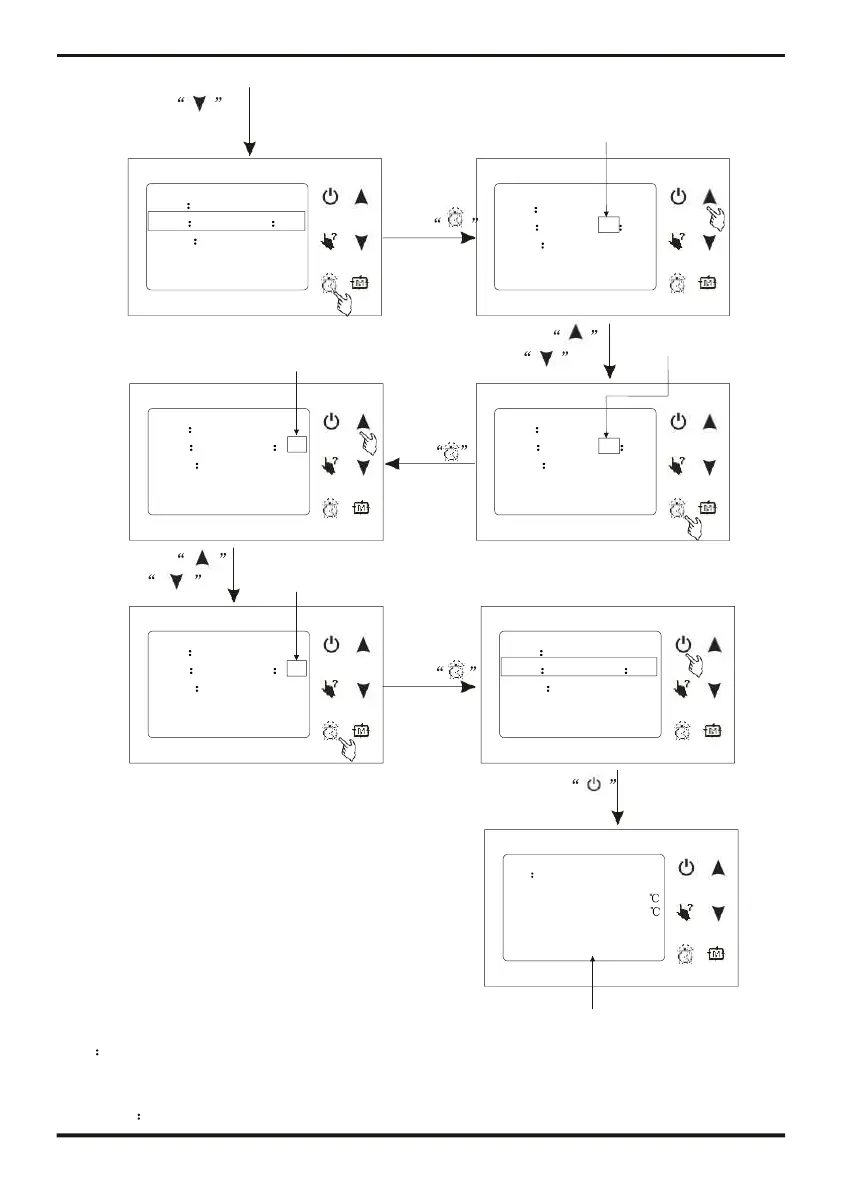
Press to
select
needing
parameter
Hour bit flashing
Date 31/01/2011
Time 05 55
Week Thursday
Timer
Date format
Press
Date
31/01/2011
Time 05 55
Week Thursday
Timer
Date format
Minute bit flashing
Press
or
Hour bit flashing
Date 31/01/2011
Time 06 55
Week Thursday
Timer
Date format
Press
to save the
hour value
Date 31/01/2011
Time 06 55
Week Thursday
Timer
Date format
Press
or
Minute bit flashing
Date 31/01/2011 Date 31/01/2011
Time 06 41
Press
Time 06 41
Week Thursday
Timer
Date format
to save the
minute value
Week
Timer
Date fo
Thursday
rmat
Press
to exit
ON Cooling
Inlet temp.: 25.0
Ou t let tem p .: 25. 0
31/01/2011 06:41 THU.
The time has been changed
Tips The setting of date and week is the same with clock;
If there is no operation in 10s, system will remember parameter setting automatic and
back to the main interface.,
As follow

Related product manuals