16
Inlet temp.:
31/03/2011 09:10 THU.
ON Eco.heating
31/03/2011 09:10 THU.
4.3
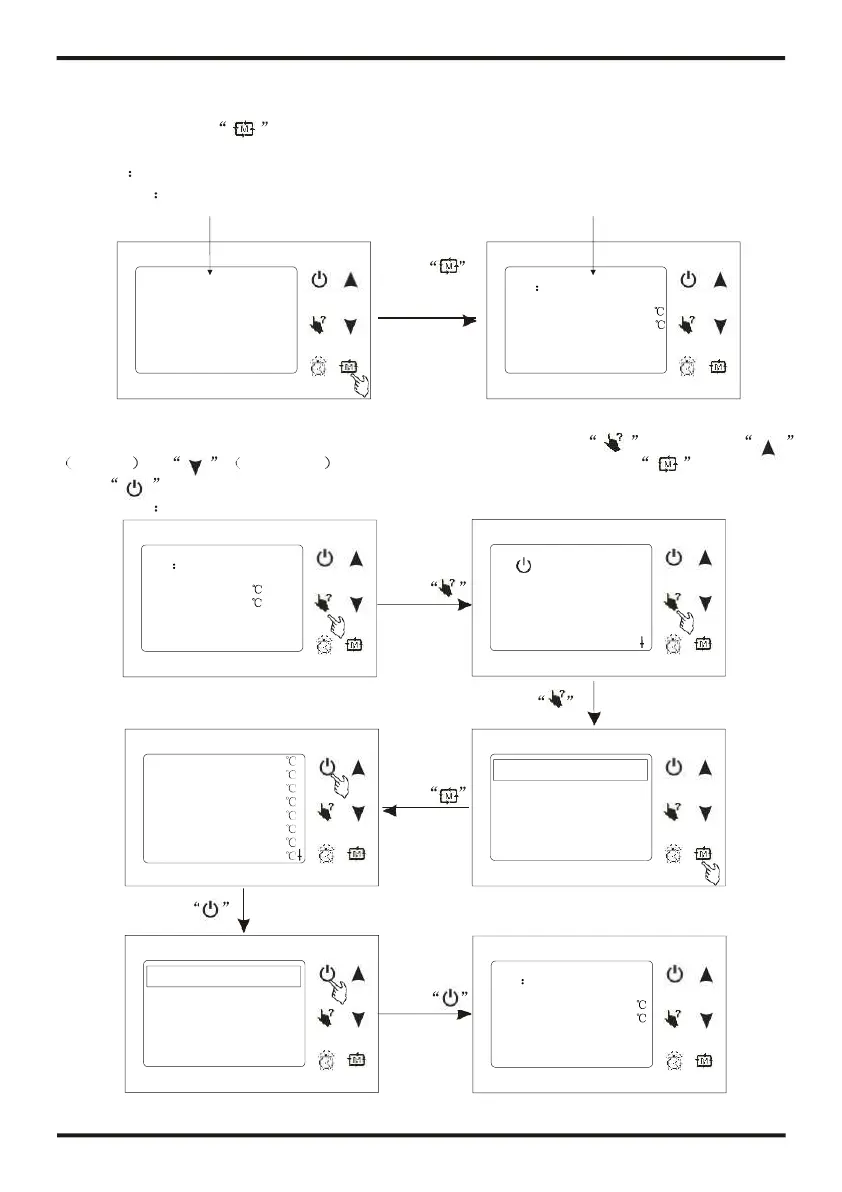
The operation of mode switching
At main interface, you can switch modes of cooling, economic heating, heating, rapid
heating by pressing . Or switch modes of cooling, economic heating and automatic.
The different unit gets different mode types.
Attention the operation of mode is invalid when the unit you buy is cooling only or heating only.
Press
to switch
modes
4.4
The operation of system state checking
At any interface, you can enter system working state by pressing twice, press
pageup or pagedown to select the needing parameter, press to enter, and
press to exit.
For example
ON Cooling
31/03/2011 09:10 THU.
Pressing this key couldturn
on/off the unit, cancel the
current operation or return to
ON Cooling
31/03/2011 09:10 THU.




 To Next Page