EasyManua.ls Logo

Astralpool 78550 - 4.2 Usage of wire controller; 4.2.1 The way to use

Astralpool 78550
31 pages
Print Icon
To Next Page IconTo Next Page
To Previous Page IconTo Previous Page
Loading...
4. USAGE AND OPERATION
14
2.
Pressing this key could select
the upward optionor increase
the value ofa certain
parameter.
3.
Pressing this key could select
the downward option or
decrease the value of a
certain parameter.
Press
ON Eco.heating
Inlet temp.: 25.0
Outlet temp.: 25.0
31/03/2011 09:10 THU.
4.2
Usage of wire controller
4.2.1
The way to use
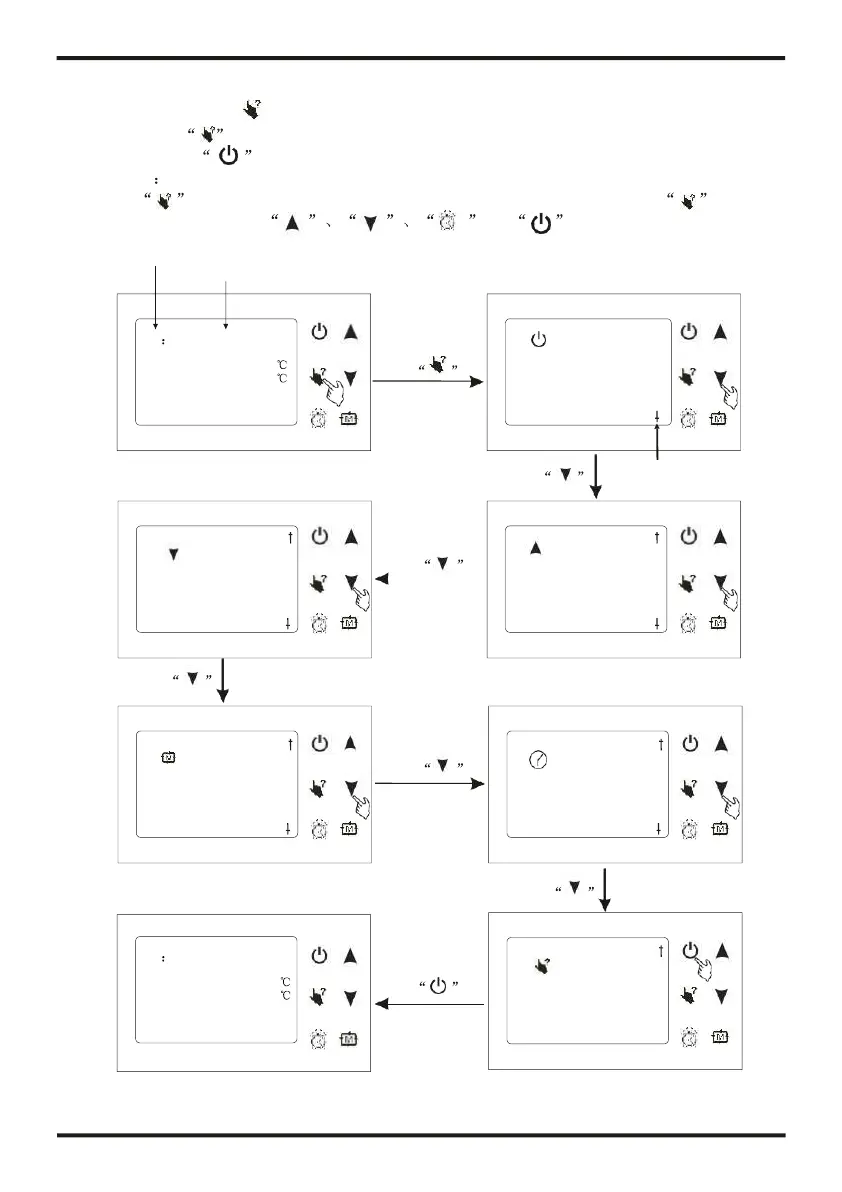
You can use at any interface, it will show relevant button function of current interface.
You can press to exit the "help" interface.
For example
Press at main interface, system will show all button function; Press at clock
interface, system will show and button function.
Both are OK when system show ON or OFF
Mode
ON Eco.heating
Inlet temp.: 25.0
Outlet temp.: 25.0
31/03/2011 09:10 THU.
Press
1.
Pressing this key couldturn
on/off the unit, cancel the
current operation or return to
the former interface.
In the boot state
Press
This symbol means
you can page up
Press
Press
4.
Pressing this key could
switch unit mode, enter
into the next interface or
save settings.
5.
Pressing this key could set
the system time, or time for
regular shutdown or
restart.
Press
In the boot state
Press
6.
Pressing this key could
check the unit state or
show you the key
functions.

Related product manuals