17
4.5
The operation of parameter setting
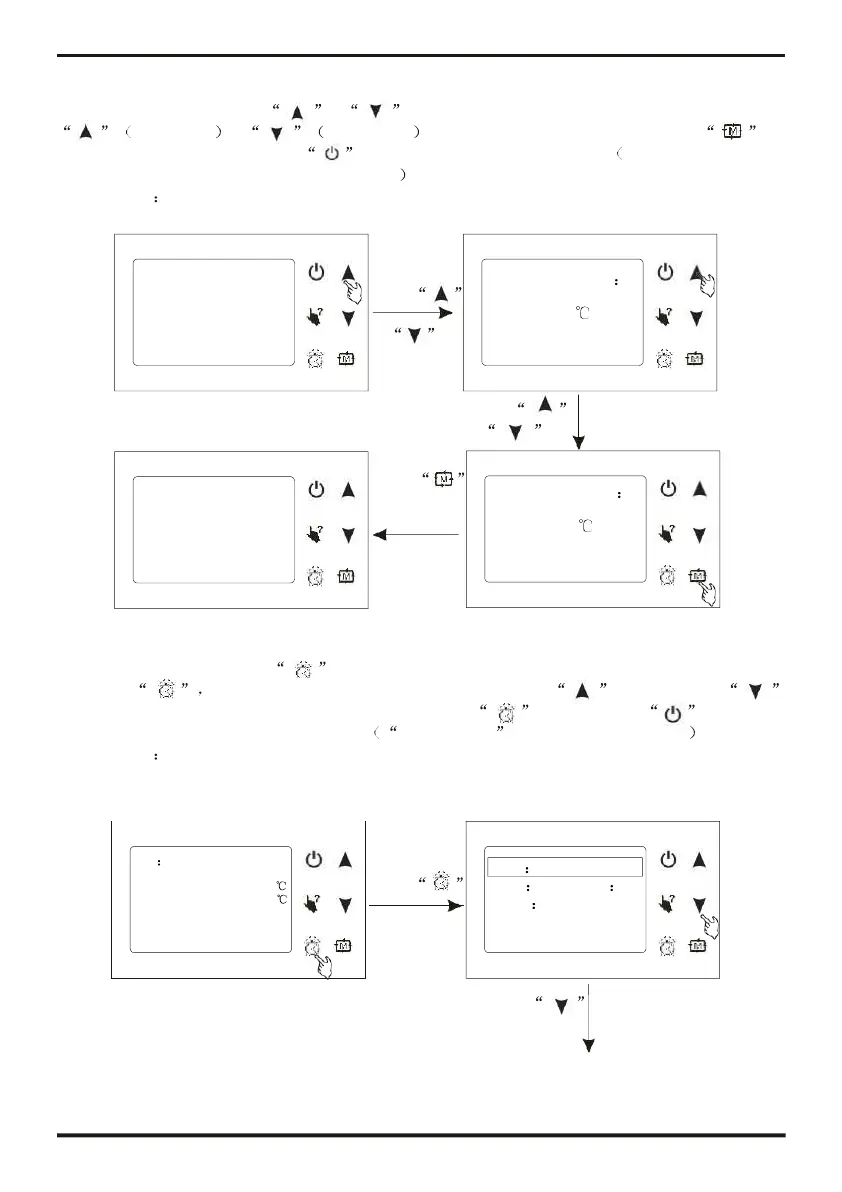
At main interface, press or to enter parameter setting interface, press
increasing or decreasing can change parameter value, press to
save the setting and exit . Press can not save the setting but exit. You can refer to
parameter table to set relevant temperature.
For example
4.6
The operation of clock setting
At main interface, press to enter clock setting interface, select the needing parameter
and press at this time, parameter value flashing, press (increasing)or
(Decreasing) can change parameter value, then press to save, press can cancel
the setting or back to the main interface. timer setting refer to timer operation
For example
Date 31/01/2011
Inlet temp.: 25.0
Press
Time 05 55
Outlet temp.: 25.0
Week Thursday
31/01/2011 05:55 THU.
to enter clock
Timer
interface
Date format
Inlet temp.:
31/03/2011 09:10 THU.
Cooling set point
12.0
Cooling set point
13.0
Inlet temp.:
31/03/2011 09:10 THU.
or
or
to save the
setting




 To Next Page